Introduction
A multiviewer can show you that something is wrong. The bigger question is whether your team can prove what happened, when it happened, who reviewed it, and how quickly it was resolved.
That is why many broadcast teams searching for TAG Multiviewer alternatives are not only comparing screen layouts or low-latency mosaics. They are comparing monitoring depth, compliance logging, historical recording, alerting, captions, loudness, SCTE markers, proof of performance, and incident review.
TAG Video Systems is well known in software-based IP probing, monitoring, visualization, and analytics. Its monitoring page highlights integrated multiviewing, support for major workflows and standards, 500+ unique events, API customization, and COTS, cloud, or hybrid deployment.
For some teams, that type of real-time visibility is the priority. For others, the bigger need is compliance evidence, searchable recordings, loudness reports, closed-caption verification, ad verification, and easy clip export for legal, traffic, engineering, and station management teams.
This guide explains what to compare when evaluating TAG Multiviewer alternatives, especially if your team needs multiviewer monitoring plus compliance logging.
Table Of Contents
- Why Teams Look For TAG Multiviewer Alternatives
- What TAG Multiviewer Is Commonly Used For
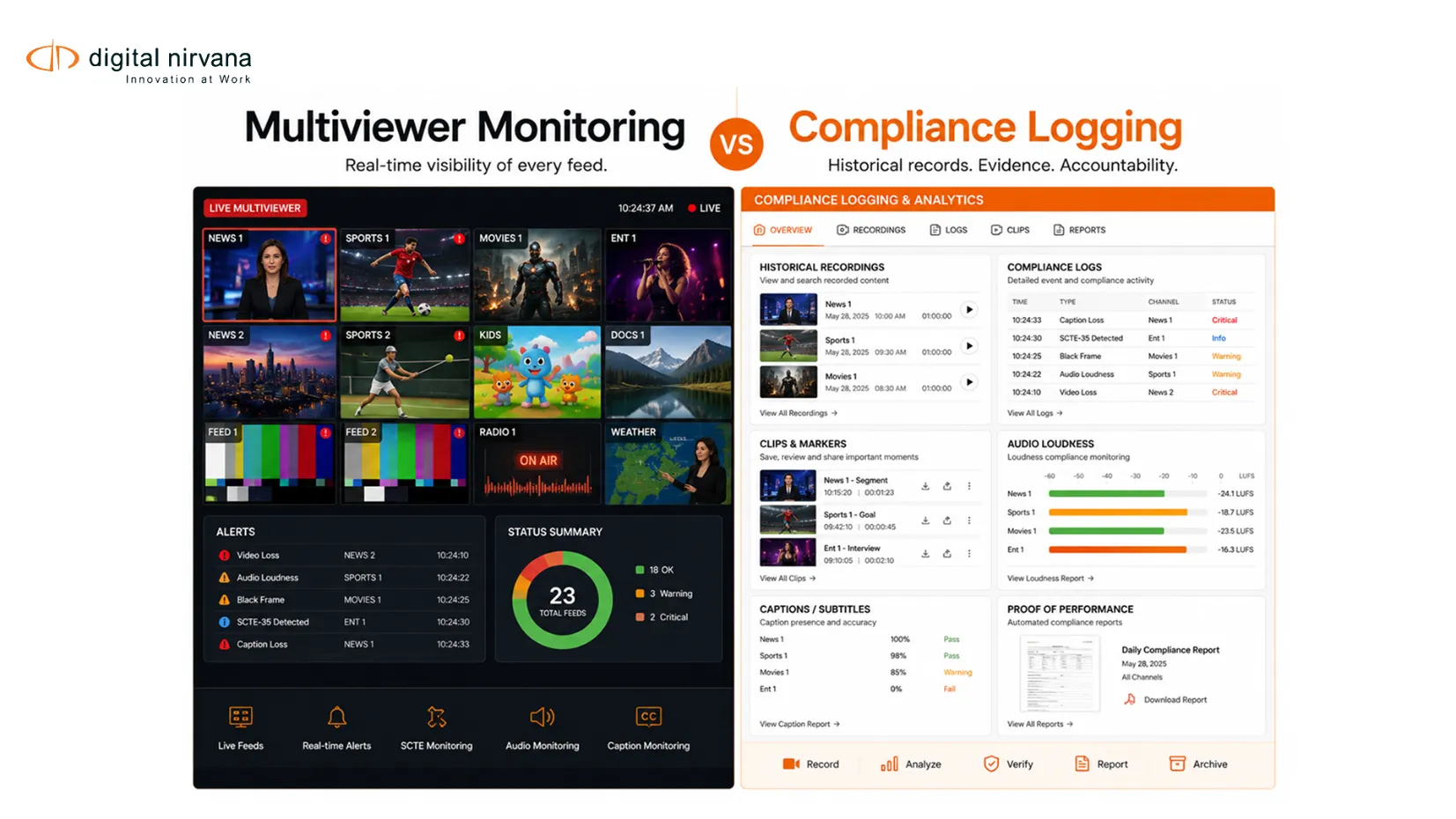
- Multiviewer Monitoring Vs Compliance Logging
- Features To Compare In TAG Multiviewer Alternatives
- TAG Multiviewer Alternatives To Consider
- When MonitorIQ Is A Strong Fit
- Feature Comparison Checklist
- FAQs
- Conclusion And Key Takeaway
Why Teams Look For TAG Multiviewer Alternatives?
Broadcast teams usually look for TAG Multiviewer alternatives for one of three reasons.
The first reason is workflow fit. A team may already have a live production multiviewer but still need a stronger logging, monitoring, and compliance system for master control, OTT distribution, legal review, ad verification, or proof of performance.
The second reason is operational coverage. Modern operations often need to monitor SDI, IP, transport streams, OTT outputs, set-top box returns, audio, captions, subtitles, SCTE markers, loudness, and metadata. Digital Nirvana’s MonitorIQ lists input coverage across transport stream, TS/IP/OTT, baseband, terrestrial, satellite, cable, and radio sources.
The third reason is evidence. A live mosaic helps operators react in the moment, but compliance teams often need historical recordings, searchable metadata, timestamped logs, reports, clips, and proof that a signal, ad, caption, or program aired correctly. Digital Nirvana’s content monitoring article explains that modern content monitoring provides teams with a single source of truth about what left the facility or OTT stack, with timecoded evidence for regulators, advertisers, and executives.
What TAG Multiviewer Is Commonly Used For
TAG Multiviewer is commonly associated with live visibility across broadcast and IP media workflows.
TAG describes its platform as software-based integrated IP probing, monitoring, visualization, and analytics. Its monitoring page emphasizes signal quality monitoring across stream layers, integrated multiviewing, actionable alarms, API customization, support for COTS, cloud, and hybrid deployment, and scale across major workflows and formats.
That makes TAG especially relevant for teams that want real-time situational awareness across complex IP, cloud, and hybrid infrastructures.
However, “multiviewer” and “compliance logger” are not always the same buying requirement. A live production team may care most about low latency and real-time screen confidence. A compliance team may care more about recording retention, audit trails, proof-of-air clips, loudness reports, closed-caption logs, and incident evidence.
That distinction should shape how teams compare alternatives.
Multiviewer Monitoring Vs Compliance Logging
Multiviewer Monitoring
Multiviewer monitoring provides operators with a visual, alert-driven view of multiple channels, feeds, or streams simultaneously.
In traditional workflows, this meant a screen wall in master control or production. In modern workflows, it can include browser-based views, IP streams, OTT feeds, telemetry, alarms, and quality indicators.
Digital Nirvana’s guide to multiviewer monitoring explains that multiviewer monitoring adds intelligence and alarms to the visual mosaic, including checks for black screen, freeze, audio issues, caption presence, service integrity, and QoE indicators.
Compliance Logging
Compliance logging records and stores what aired so teams can prove what happened later.
This matters when a regulator, advertiser, legal team, rights holder, viewer, or internal stakeholder asks for evidence. Compliance logging should help teams retrieve a channel, time range, program, ad break, caption event, loudness issue, or SCTE marker without having to search manually.
MonitorIQ is positioned as a content monitoring, compliance logging, and verification solution. Its product page specifically mentions loudness compliance, closed-caption standards including CC608 and CC708, international caption standards, real-time alerting, ad verification, SCTE-35, SCTE-104, SCTE-224, QoE, TS analysis, and proof of performance.
Proof-Of-Performance
Proof-of-performance confirms that content, ads, sponsorships, or programming aired as expected.
This is important for ad sales, traffic, legal, compliance, and station management. A proof-of-performance workflow should make it easy to retrieve the relevant recording, export a clip, attach metadata, and share evidence with non-engineering teams.
MonitorIQ provides access to 1 to hundreds of channel recordings through a web browser and delivers critical content and metadata with a single click.
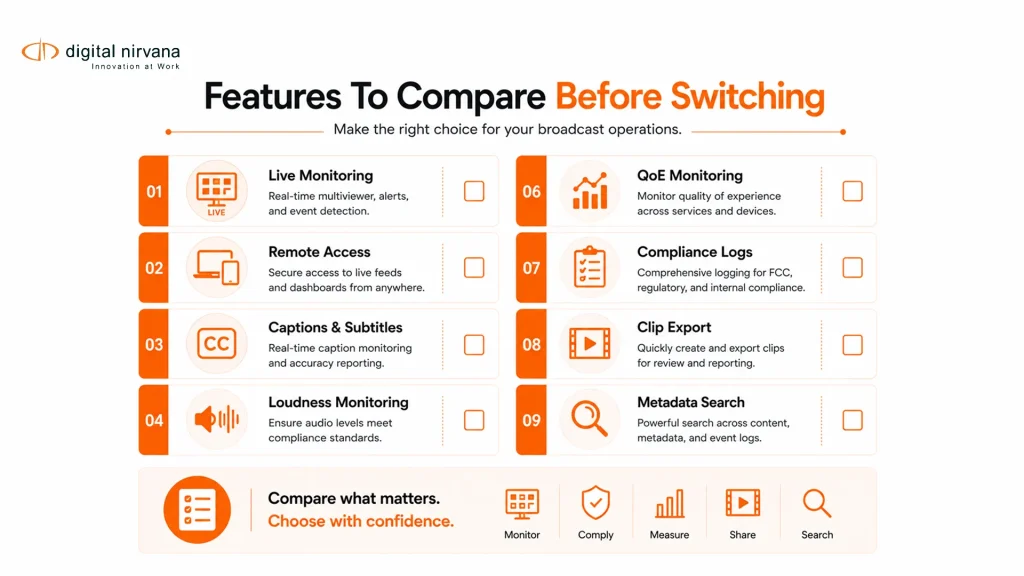
Features To Compare In TAG Multiviewer Alternatives
Multi-Format And Multi-Point Monitoring
A strong alternative should monitor more than one point in the chain.
For broadcast and OTT teams, that may include production feeds, master control output, encoder output, transport streams, OTT streams, set-top box returns, and regional distribution paths.
MonitorIQ supports TS/IP/OTT, SDI, HDMI, component, terrestrial, satellite, cable, and radio inputs, making it relevant for facilities managing mixed linear, IP, OTT, and audio workflows.
External alternatives also compete here. Actus Digital states that its compliance logging software records channels from sources such as DVB, ATSC 3.0, ASI, SDI, TSoIP, SMPTE 2022-6, SMPTE 2110, HLS, MPEG-DASH, RTMP, and others.
Real-Time Alerts And QoE Monitoring
A multiviewer alternative should not only display feeds. It should alert teams when something needs attention.
Compare whether the platform can detect black screens, frozen video, silence, audio overload, loudness issues, missing captions, transport errors, service disruptions, or viewer experience issues.
MonitorIQ is positioned around proactive alarms for visual impairments that affect service quality, return path monitoring, and QoE monitoring.
Compliance Recording And Historical Review
Live monitoring helps during the broadcast. Historical recording helps after the broadcast.
This is where many buyers need to compare carefully. A system may look strong as a multiviewer, but still lack the compliance logging depth needed for legal, regulatory, and advertiser review.
MonitorIQ allows users to view live or historical recordings in any combination and access one to hundreds of channel recordings through a web browser.
Caption, Subtitle, And Teletext Monitoring
Caption issues can lead to viewer complaints, compliance risks, and accessibility gaps.
When comparing TAG Multiviewer alternatives, check whether the system can monitor caption presence, caption standards, subtitles, Teletext, CC608, CC708, and international caption requirements.
MonitorIQ’s product page states that it supports closed-caption monitoring for 608/708, subtitles, and Teletext, along with real-time alerting for caption standards compliance.
For teams that also need captioning, transcription, or localization workflows, Digital Nirvana’s TranceIQ is a relevant internal link, as it focuses on smart transcription, captioning, and localization within the broader Digital Nirvana product ecosystem.
Loudness Monitoring
Loudness monitoring is a core point of comparison for compliance-heavy teams.
A good monitoring platform should help teams identify loudness issues, generate evidence, and support applicable regional standards.
MonitorIQ lists loudness monitoring for CALM Act/A/85 and EBU R128, and its product page says teams can track and report on loudness compliance while monitoring internal standards and practices.
SCTE And Ad Verification
For broadcasters, MVPDs, OTT teams, and FAST channel operators, SCTE markers are not just technical signals. They affect ad insertion, revenue, proof of performance, and the viewer experience.
MonitorIQ lists ad verification across SCTE-35, SCTE-104, and SCTE-224 as monitoring and compliance capabilities.
This is an important comparison point for buyers who need more than visual monitoring. A platform should help teams confirm that the right markers fired, the right ad break occurred, and the evidence can be retrieved later.
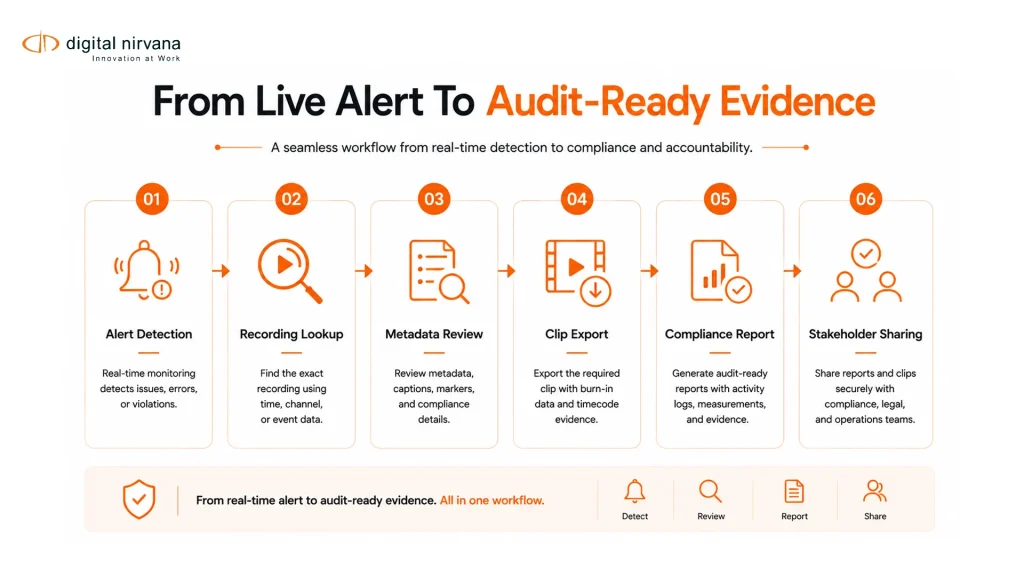
Incident Investigation And Clip Export
When something goes wrong on air, teams need to investigate quickly.
A strong alternative should let operators jump from an alert to the recording, review the relevant time window, compare channels, inspect metadata, and export clips for engineering, legal, traffic, or management.
Digital Nirvana’s multiviewer monitoring article explains that MonitorIQ’s thumbnail storyboard UI supports frame-accurate clip creation and export from recorded content and associated metadata.
Industry coverage shows that incident review is becoming more important across the category. TV Tech reported that Mediaproxy introduced Instant Replay for live incident review and HTML content monitoring inside its Monwall multiviewer platform.
Remote Access And Browser-Based Review
Broadcast teams are more distributed than they used to be. Master control, compliance, engineering, ad sales, legal, and regional teams may not all sit in the same facility.
A useful TAG Multiviewer alternative should support secure remote access, browser-based review, and cross-team visibility.
MonitorIQ gives users access to 1 to 100 channels of recordings from any web browser and supports remote monitoring across geographic areas.
Metadata, Search, And Reporting
Monitoring becomes more valuable when it is searchable.
A strong platform should connect video, audio, loudness, captions, SCTE markers, alerts, ratings data, watermarks, and metadata to timecoded recordings. This makes it easier to answer questions like “What aired at 8:32 PM?” or “Which channel had a caption issue during this program?”
Digital Nirvana’s MonitorIQ 7.0 article explains that metadata can be available on a single page, timestamped and indexed to video, including closed captions, subtitles, loudness measurements, rating data, watermarks, and audio metadata.
Deployment Flexibility
Deployment matters because not every team is fully cloud, fully on-prem, or fully IP.
TV Tech reports that modern multiviewers are expected to handle compressed and uncompressed signals, IP and SDI, and both on-prem and cloud infrastructure.
When comparing alternatives, ask whether the platform supports your current infrastructure, cloud migration plan, storage policy, security model, and remote access requirements.
TAG Multiviewer Alternatives To Consider
MonitorIQ
MonitorIQ is a strong alternative when the buyer needs broadcast monitoring, compliance logging, and verification on a single platform.
It is especially relevant for teams that need live and historical channel monitoring, caption monitoring, loudness compliance, SCTE and ad verification, QoE alerts, TS analysis, proof of performance, remote access, metadata, and clip export.
Digital Nirvana’s internal resource on multiviewer monitoring also positions MonitorIQ as a software-based broadcast monitoring and compliance layer that behaves like a multiviewer-style monitoring screen while adding searchable metadata, compliance logs, and clip tools.
Actus Digital
Actus Digital is another relevant vendor in the compliance logging and monitoring category. Its broadcast compliance page states that it records channels from broadcast and internet sources including DVB, ATSC 3.0, ASI, SDI, TSoIP, SMPTE 2022-6, SMPTE 2110, HLS, MPEG-DASH, and RTMP.
This makes Actus relevant in comparison sections where buyers are evaluating logging and monitoring tools, not only live production multiviewers.
Mediaproxy
Mediaproxy is relevant for teams comparing IP compliance monitoring and multiviewing. TV Tech reported that Mediaproxy added Instant Replay for live incident review and HTML content monitoring within Monwall, which shows the category’s shift toward faster incident investigation and hybrid monitoring.
Other Multiviewer And Monitoring Vendors
Other vendors that may appear in buyer research include Evertz, Imagine Communications, Lawo, Cobalt Digital, and other multiviewer or monitoring providers. TV Tech’s multiviewer market coverage examines how vendors across the category are responding to IP, cloud, low-latency, API integration, and flexible deployment needs.
The best choice depends on whether the team is solving for live production visibility, IP stream probing, compliance logging, OTT monitoring, proof of performance, or cross-team incident review.
When MonitorIQ Is A Strong Fit
MonitorIQ is a strong fit when the team’s buying question is broader than “Which multiviewer should we use?”
- It is especially useful when the team needs to:
- Monitor live and historical channels from a browser.
- Record content from multiple video and audio sources.
- Track loudness compliance.
- Monitor closed captions, subtitles, and Teletext.
- Verify SCTE markers and ad performance.
- Review QoE issues and signal alarms.
- Support compliance logging and proof-of-performance.
- Give engineering, traffic, legal, sales, and station management access to the same evidence.
- Retrieve recordings and metadata quickly during investigations.
- Support remote monitoring across different locations.
Digital Nirvana’s MonitorIQ is a content monitoring, compliance logging, and verification solution built to address ad performance issues, service quality gaps, compliance gaps, and content monitoring challenges in one platform.
For buyers who need a pure low-latency production multiviewer, TAG or another production-focused multiviewer may still be part of the architecture. For buyers who need monitoring plus logging, compliance, proof, and searchable historical review, MonitorIQ becomes a stronger commercial fit.
Feature Comparison Checklist
| Feature To Compare | Why It Matters | What To Ask Vendors |
| Live Multiviewer Monitoring | Helps operators see multiple feeds in real time. | Does the platform support the number of feeds, formats, and layouts our team needs? |
| Multi-Format Input Support | Broadcast workflows are often SDI, IP, OTT, terrestrial, satellite, cable, and radio. | Which source types are supported natively? |
| QoE And Signal Alerts | Teams need fast awareness of service-impacting issues. | Can the platform detect black, freeze, silence, loudness, caption, and signal issues? |
| Historical Recording | Compliance teams need evidence after the broadcast. | How long can recordings be retained, searched, and retrieved? |
| Compliance Logging | Regulatory and internal reviews require defensible records. | What logs, reports, clips, and metadata can be exported? |
| Caption Monitoring | Accessibility and compliance depend on captions being present and correct. | Does it support CC608, CC708, subtitles, and Teletext? |
| Loudness Monitoring | Loudness issues create regulatory and viewer experience risk. | Does it support CALM Act/A/85 and EBU R128 requirements? |
| SCTE And Ad Verification | Ad markers affect revenue and proof-of-performance. | Can it verify SCTE-35, SCTE-104, and SCTE-224 events? |
| Clip Export | Teams need shareable evidence for incidents and audits. | Can users export frame-accurate clips with associated metadata? |
| Browser-Based Access | Modern teams need remote and cross-department access. | Can non-engineering teams securely review content from a browser? |
| Metadata Search | Searchable evidence reduces manual review time. | Can users search by time, channel, metadata, caption, loudness, SCTE, or alert event? |
| Deployment Model | Infrastructure requirements vary across facilities. | Is deployment on-prem, cloud, hybrid, or COTS-based? |
FAQs
What Is TAG Multiviewer?
TAG Multiviewer is commonly associated with TAG Video Systems’ software-based media monitoring and visualization platform. TAG positions its platform around IP probing, monitoring, multiviewing, visualization, analytics, alarms, APIs, and flexible cloud, COTS, or hybrid deployment.
What Are The Best TAG Multiviewer Alternatives?
The best alternative depends on the workflow. For compliance logging, proof-of-performance, caption monitoring, loudness monitoring, SCTE verification, and browser-based historical review, MonitorIQ is a strong option. Actus Digital and Mediaproxy are also relevant vendors in the broader compliance monitoring and multiviewer monitoring category.
Is MonitorIQ A Multiviewer?
MonitorIQ is primarily a broadcast monitoring and compliance logging platform. Digital Nirvana’s multiviewer monitoring article explains that it provides multiviewer-style live and historical views, while adding searchable metadata, compliance logs, and clip tools.
What Is Multiviewer Monitoring?
Multiviewer monitoring combines visual feed monitoring with alerts, signal checks, QoE indicators, metadata, and operational intelligence. It helps teams spot issues across multiple live or recorded feeds without relying only on manual viewing.
What Should I Compare Beyond The Multiviewer Screen?
Compare recording, compliance logging, caption monitoring, loudness monitoring, SCTE verification, ad proof-of-performance, alerting, clip export, metadata search, browser access, input support, retention, and deployment options.
Why Is Compliance Logging Important In A Multiviewer Alternative?
Compliance logging gives teams proof of what aired and when it aired. It supports audits, advertiser disputes, legal review, viewer complaints, and internal investigations. MonitorIQ is positioned around content monitoring, compliance logging, verification, proof-of-performance, caption monitoring, loudness, and SCTE verification.
Can MonitorIQ Support OTT Monitoring?
MonitorIQ lists TS/IP/OTT as an input source and supports monitoring from multiple points in the delivery chain. Digital Nirvana’s multiviewer monitoring article also explains that MonitorIQ can record and monitor content from SDI in production to OTT and STB outputs.
Do Teams Still Need A Low-Latency Production Multiviewer If They Use MonitorIQ?
Some teams may still use a dedicated low-latency multiviewer for live production decisions. MonitorIQ is better positioned as the monitoring, logging, compliance, evidence, and historical review layer. Digital Nirvana’s multiviewer monitoring article makes this distinction clear by positioning MonitorIQ as a software-based broadcast monitoring and compliance layer rather than only a production switcher multiviewer.
Conclusion
Choosing a TAG Multiviewer alternative is not just about replacing a screen layout. It is about understanding what your team needs to monitor, prove, search, export, and report.
If your biggest need is live IP visualization, low-latency monitoring, and real-time stream awareness, a production-focused multiviewer may be the right fit. If your team also needs compliance logging, historical recordings, caption and loudness checks, SCTE verification, proof of performance, and browser-based review, the comparison should include monitoring and logging platforms such as MonitorIQ.
Key Takeaway
- TAG is strongly associated with software-based IP probing, monitoring, visualization, analytics, and integrated multiviewing.
- A TAG Multiviewer alternative should be evaluated by workflow need, not only by mosaic quality.
- Multiviewer monitoring helps teams see and react to issues in real time.
- Compliance logging helps teams prove what aired after the fact.
- Important comparison points include captions, loudness, SCTE, ad verification, QoE alerts, historical recording, metadata search, clip export, and remote access.
- MonitorIQ is a strong fit for teams that need broadcast monitoring, compliance logging, proof-of-performance, and multiviewer-style review in one platform.
- The best buying decision depends on whether the team needs live production visibility, compliance evidence, or both.