Introduction
A video file without the right metadata can look finished, pass through review, and still create problems after publishing.
Editors may struggle to find the right clip. Compliance teams may miss a sensitive moment. Archive teams may not know which version can be reused. Distribution teams may publish content without the right captions, rights, or regional tags.
That is why metadata for video files should not be treated as a final admin task. For broadcast teams, metadata is part of the publishing workflow. It helps people and systems understand what the video is, where it came from, what it contains, who can use it, where it can be distributed, and how quickly it can be found again.
In broadcast, OTT, sports, news, and archive environments, the best time to capture metadata is before publishing, not after the asset has already moved downstream.
Table Of Contents
- What Metadata For Video Files Means In Broadcast Workflows
- Why Metadata Should Be Captured Before Publishing
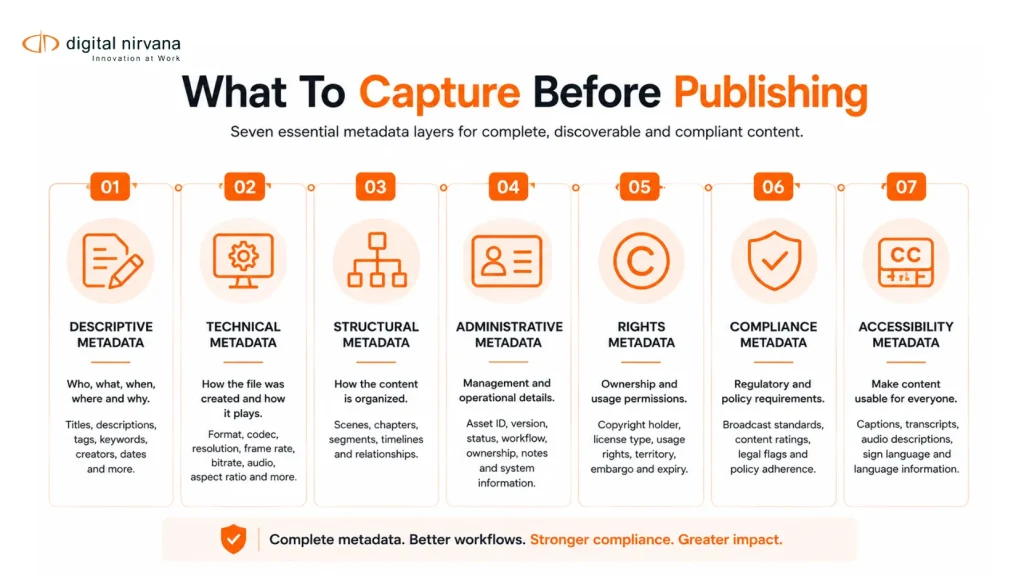
- The Core Types Of Video Metadata Broadcast Teams Need
- Broadcast Metadata Checklist Before Publishing
- Where Metadata Breaks Down In Broadcast Workflows
- How AI Can Help Broadcast Teams Capture Better Metadata
- Best Practices For Metadata Governance
- FAQs
- Conclusion And Key Takeaway
What Metadata For Video Files Means In Broadcast Workflows?
Metadata for video files is the structured information attached to a video asset. It describes the file, its contents, and the rules for handling that asset.
For a simple web video, metadata may include a title, description, thumbnail, tags, and schema markup. For a broadcast team, the metadata layer is deeper. It may include show ID, episode number, timecode, speakers, topics, rights, regions, captions, language tracks, ad markers, content warnings, source system, edit version, embargo date, and archive status.
This matters because broadcast teams do not manage one video at a time. They manage live feeds, edited packages, promos, sports highlights, syndicated content, multilingual versions, and large archives. Without consistent metadata, content becomes harder to search, verify, repurpose, monetize, and govern.
Most general video metadata guidance focuses on SEO and discoverability. That is useful, but broadcast teams also need metadata that supports PAM, MAM, DAM, newsroom, compliance, playout, archive, and distribution workflows. Google’s video guidance, for example, focuses on helping search engines understand video pages through elements such as watch pages, thumbnails, titles, descriptions, structured data, and video sitemaps.
Why Should Metadata Be Captured Before Publishing?
Metadata becomes more valuable when captured before content leaves the production workflow.
Once a video has already been published, missing metadata becomes harder to fix. Teams may need to reopen the project, check rights documents, search through transcripts, review footage manually, or ask another department for clarification. That slows down publishing and creates risk.
For broadcast teams, pre-publishing metadata supports six important outcomes.
- First, it improves search. Editors, producers, and archive teams can find footage by topic, speaker, location, scene, date, team, sponsor, or timecode.
- Second, it supports compliance. Teams can tag profanity, violence, nudity, political ads, product placement, disclaimers, sensitive material, and other review points before distribution.
- Third, it protects rights and usage. Rights metadata tells teams whether the asset can be used globally, regionally, on social platforms, in OTT libraries, for paid syndication, or only for a limited time.
- Fourth, it improves accessibility. Captions, subtitles, transcripts, language tracks, and audio description fields should be confirmed before publishing.
- Fifth, it helps monetization. Better metadata can support contextual ad placement, sponsorship tracking, content packaging, and archive licensing.
- Sixth, it improves reuse. A well-tagged clip can be found, clipped, localized, and republished faster than a file with only a generic name, like final_master_v3.mp4.
The Core Types Of Video Metadata Broadcast Teams Need
Broadcast metadata should be organized into practical categories. The goal is not to capture every possible field. The goal is to capture the fields that help teams publish, search, verify, and reuse content without creating extra manual work.
Descriptive Metadata
Descriptive metadata explains what the video is about. This includes the title, summary, keywords, speakers, guests, teams, locations, topics, event names, and story themes.
For a news package, descriptive metadata might include the anchor, reporter, location, interviewee, topic, and related event. For a sports clip, it might include the league, teams, players, match date, play type, score moment, and highlight category.
Descriptive metadata is the foundation for search inside a MAM or DAM system. ResourceSpace notes that descriptive metadata helps users identify what a video is about and makes it easier to find relevant content inside a DAM.
Technical Metadata
Technical metadata describes the file itself. This includes format, codec, resolution, frame rate, aspect ratio, bitrate, duration, audio channels, language tracks, file size, and creation date.
This metadata helps engineering, operations, and distribution teams confirm whether the file is ready for the destination platform. A broadcast master, OTT encode, social clip, and archive mezzanine file may all need different technical requirements.
Technical metadata also reduces avoidable back-and-forth. If a platform requires a specific format, bitrate, or caption file, the publishing team should know before the asset leaves production.
Structural Metadata
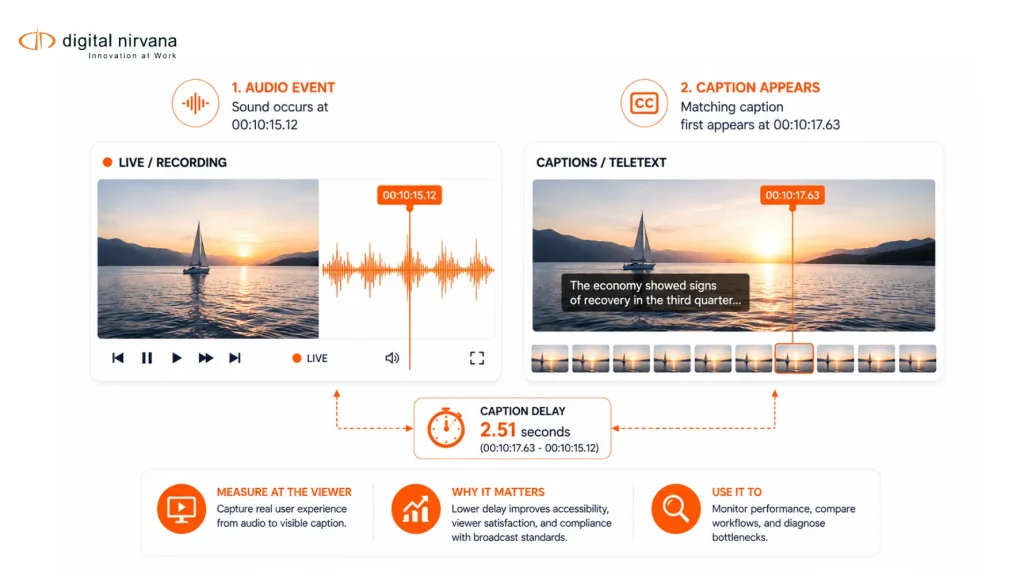
Structural metadata explains how the video is organized. This includes timecodes, chapters, segments, scene changes, markers, transcript alignment, ad breaks, intro and outro points, lower-third timing, and clip boundaries.
For broadcast teams, structural metadata is especially important because teams often need to retrieve moments inside a video, not just the video itself. A producer may need the exact point where a public figure made a statement. A sports editor may need the exact moment of a goal, foul, replay, or celebration. A compliance team may need the exact timecode of a sensitive segment.
Time-coded metadata makes the asset searchable at the scene- or moment-level.
Administrative Metadata
Administrative metadata helps teams manage the asset. This includes owner, producer, editor, department, project ID, content ID, approval status, review notes, publishing date, expiry date, source system, and archive location.
This metadata is often overlooked because it does not describe the story itself. But it is essential for governance. It tells teams who is responsible for the asset, which version is approved, where it lives, and how it should be handled after publishing.
Rights And Licensing Metadata
Rights metadata defines what can and cannot be done with the video. This includes copyright owner, license type, usage window, allowed regions, restricted platforms, music rights, talent releases, third-party footage, sports rights, syndication rights, and embargo details.
This is critical for broadcast teams because content is often reused across channels, clips, promos, social media, OTT, and partner distribution. Missing rights metadata can lead to takedowns, legal review, delayed publishing, or missed monetization opportunities.
IPTC, a standards body for news media, includes standards areas such as Video Metadata Hub, RightsML, Media Topics, and NewsML-G2, which shows how important structured metadata is for media exchange, rights, and news workflows.
Compliance Metadata
Compliance metadata flags content that may require review before publishing. This can include profanity, nudity, violence, political advertising, brand mentions, health claims, legal disclaimers, regional restrictions, sensitive topics, and age-rating concerns.
In many broadcast workflows, compliance metadata is not only about public regulation. It also supports internal policy, advertiser guidelines, client contracts, platform requirements, and regional publishing rules.
Digital Nirvana’s MetadataIQ includes compliance tagging and rules that can detect and tag content such as political ads, profanity, product placement, and legal disclaimers before issues move further downstream.
Accessibility Metadata
Accessibility metadata includes captions, subtitles, transcripts, language versions, audio description status, caption format, subtitle language, speaker labels, and caption approval status.
Accessibility metadata helps teams confirm that the right text assets are attached to the right video version. This is especially important when one video has multiple language versions, regional edits, or distribution formats.
SMPTE ST 2110 also reflects the importance of handling media components separately in modern broadcast environments, including video, audio, captions, subtitles, timecodes, and metadata as synchronized but independent streams.
Broadcast Metadata Checklist Before Publishing
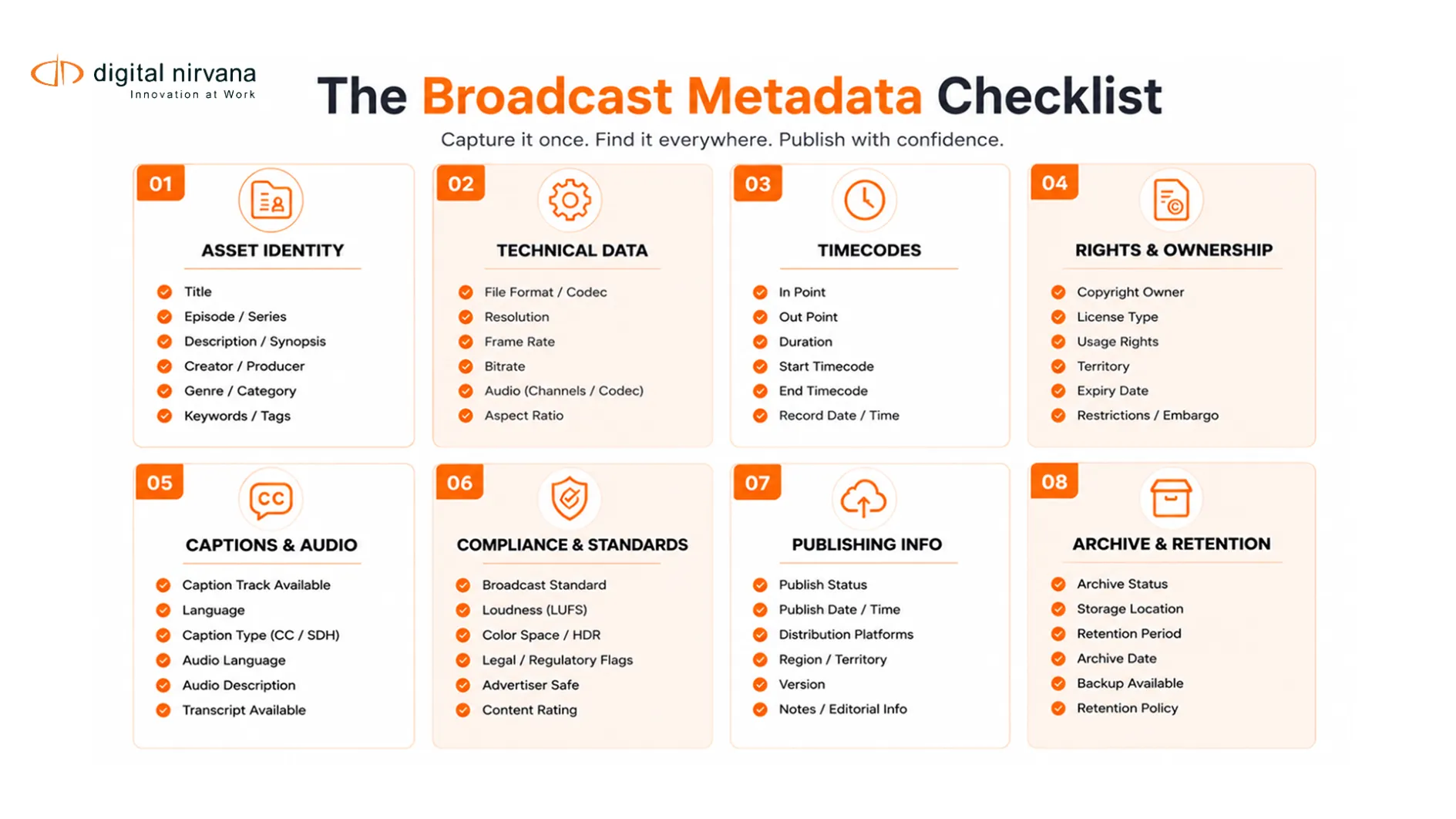
Before publishing a video, broadcast teams should confirm the following metadata fields.
1. Asset Identity
Capture the asset title, content ID, episode ID, project ID, series name, version number, production date, publishing date, and source system.
The goal is simple. Every team should know exactly which asset they are looking at and whether it is the correct version.
2. Content Description
Add a clear title, short summary, long description, topics, keywords, people, organizations, locations, event names, and related story tags.
This makes the asset easier to search inside internal systems and easier to package for external platforms.
3. Time-Coded Moments
Capture timecodes for scenes, chapters, ad breaks, key moments, speakers, visual segments, topic changes, lower-thirds, and compliance-sensitive moments.
This is one of the biggest differences between generic video metadata and broadcast metadata. Broadcast teams often need to retrieve moments, not full files.
4. Technical Readiness
Confirm duration, format, codec, frame rate, resolution, aspect ratio, audio channels, loudness status, caption file status, language tracks, and delivery format.
This helps teams avoid publishing delays caused by rejected files or platform mismatches.
5. Rights And Usage
Confirm rights owner, copyright status, license window, allowed regions, blocked regions, usage platforms, third-party footage, music clearance, talent releases, sports rights, and syndication rules.
Rights metadata should travel with the video, not sit in a separate document that only one team can access.
6. Compliance And Review Flags
Tag profanity, violence, nudity, sensitive topics, political ads, brand mentions, product placement, disclaimers, sponsored segments, legal review needs, and regional policy notes.
This gives compliance and operations teams a clearer review path before publishing.
7. Captions, Subtitles, And Transcripts
Confirm caption status, subtitle language, transcript availability, speaker labels, text track format, caption approval status, and translation status.
For multilingual distribution, each language version should have its own metadata trail.
8. Publishing And Distribution Details
Capture platform destination, publish date, expiry date, embargo date, region, channel, playlist, OTT category, content rating, thumbnail, promotional copy, and social version.
This helps downstream teams understand where the asset belongs and how it should appear to viewers.
9. Archive And Reuse Metadata
Add archive category, retention rule, reuse permission, evergreen status, monetization potential, clip eligibility, licensing value, and related assets.
This helps teams turn finished content into reusable media intelligence, rather than storing it as a hard-to-find file.
Where Metadata Breaks Down In Broadcast Workflows
Metadata problems usually do not begin at the time of publishing. They begin earlier in the workflow.
One team may use one naming convention while another team uses a different one. Editors may add useful notes in the NLE, but those notes may not move cleanly into the MAM. Compliance teams may record sensitive moments in a spreadsheet, but those flags may not remain attached to the asset. Archive teams may receive final files without rights metadata or transcripts.
Common breakdowns include:
- Inconsistent file naming across teams.
- Missing timecodes for key scenes or compliance moments.
- Captions and transcripts stored separately from the media file.
- Rights information kept outside the MAM.
- Manual tagging that varies by person or department.
- Generic tags that do not match the team’s taxonomy.
- No quality score for metadata completeness.
- No audit trail for who approved the metadata.
- No automated way to process high-volume live or archive content.
These issues become more painful as content volume grows. A small team may manage metadata manually for a limited number of videos. A broadcast or OTT operation publishing thousands of assets needs a more structured workflow.
How AI Can Help Broadcast Teams Capture Better Metadata
AI can help broadcast teams capture metadata faster, but it should not remove editorial control. The strongest workflow is AI-assisted and human-reviewed.
AI can generate transcripts, identify speakers, detect logos, recognize objects, summarize scenes, classify topics, find sensitive content, segment video by timecode, and suggest tags. Human reviewers can then approve, correct, or refine the metadata before publishing.
This is where broadcast-specific automation is different from generic AI tagging. Broadcast teams need metadata that fits existing systems, taxonomies, and approval workflows.
MetadataIQ is built for this use case. Digital Nirvana positions it as an intelligence layer for Avid, Grass Valley, and custom MAM systems. It supports automated metadata tagging, content discoverability, time-coded tagging, compliance rules, governance dashboards, quality scoring, batch scheduling, and real-time live stream processing.
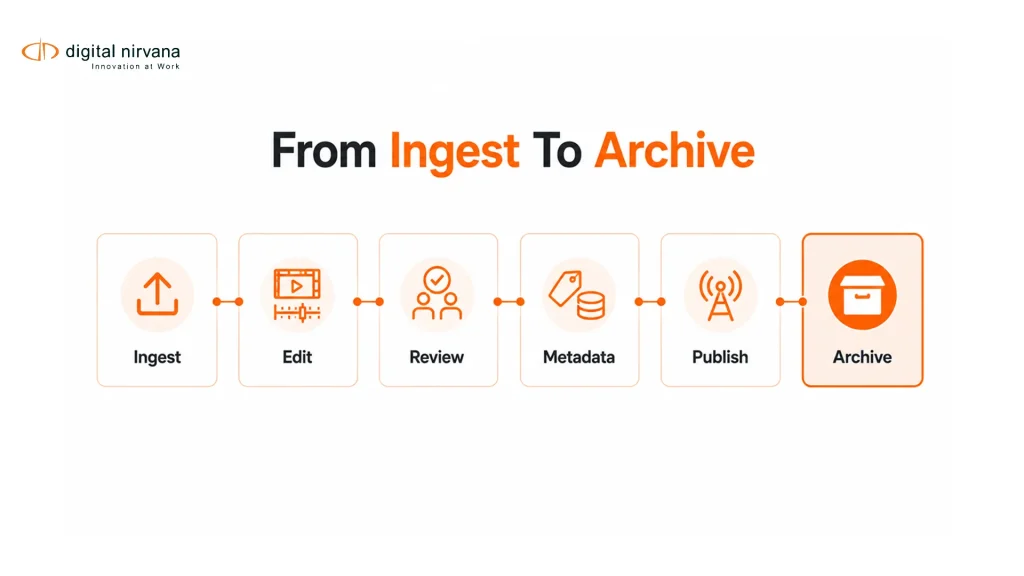
For a broadcast team, that means metadata can be captured closer to the workflow itself. Instead of manually tagging every asset after publishing, teams can use AI to enrich content during ingest, production, review, live processing, or archive migration.
Best Practices For Metadata Governance
Good metadata needs governance. Without governance, even the best fields become inconsistent over time.
Start with a controlled taxonomy. Define approved terms for shows, topics, people, locations, teams, leagues, content types, sponsors, and compliance categories. This prevents teams from using multiple names for the same thing.
Create required fields for publishing. Some fields should be mandatory before a video can go live, such as title, content ID, rights status, approval status, captions, language, and distribution platform.
Use time-coded tagging where possible. For broadcast teams, metadata should describe what happens inside the video, not only the file as a whole.
Score metadata quality. A metadata completeness score helps teams identify missing fields before publishing.
Keep metadata attached to the asset. Important information should not live only in emails, spreadsheets, or review notes.
Review AI-generated metadata before publishing. AI can speed up tagging, but humans should approve sensitive fields related to compliance, rights, captions, and editorial context.
Audit metadata regularly. Archive, compliance, and operations teams should be able to see what was tagged, who approved it, and when changes were made.
FAQs
What Is Metadata For Video Files?
Metadata for video files is structured information that describes a video asset. It can include the title, description, technical details, timecodes, speakers, topics, rights, captions, compliance flags, and publishing rules.
Why Is Video Metadata Important For Broadcast Teams?
Video metadata helps broadcast teams search, publish, review, archive, monetize, and reuse content. It also helps reduce manual work across PAM, MAM, DAM, newsroom, compliance, and distribution workflows.
What Metadata Should Be Captured Before Publishing?
Broadcast teams should capture asset identity, descriptive metadata, technical metadata, time-coded scenes, rights, compliance flags, captions, subtitles, publishing details, and archive rules before publishing.
How Does Metadata Help With Compliance?
Metadata can flag sensitive content such as profanity, violence, nudity, political ads, product placement, brand mentions, and legal disclaimers. This helps teams review and approve content before it reaches viewers.
Can AI Generate Metadata For Video Files?
Yes. AI can generate transcripts, topics, summaries, scene descriptions, speaker labels, object tags, logo recognition, and compliance flags. For broadcast use, AI-generated metadata should be reviewed and governed prior to publication.
How Does MetadataIQ Support Broadcast Metadata Workflows?
MetadataIQ helps broadcast teams automate metadata tagging, improve content discoverability, apply compliance rules, track metadata quality, process batches, support live streams, and integrate with systems such as Avid and Grass Valley, as well as MAM or DAM platforms.
Conclusion
Metadata for video files is not just a publishing detail. It is the operational layer that helps broadcast teams move faster, reduce risk, improve search, protect rights, support accessibility, and reuse valuable content.
For teams managing high-volume video workflows, the best approach is to capture metadata before publishing, link it to timecodes, govern it with clear rules, and automate as much of the process as possible without sacrificing human review.
Key Takeaway:
- Capture metadata before publishing, not after the asset has already moved downstream.
- Prioritize descriptive, technical, structural, administrative, rights, compliance, and accessibility metadata.
- Use time-coded metadata so teams can find exact moments inside long-form video.
- Keep rights, captions, transcripts, and compliance flags attached to the asset.
- Use AI-assisted metadata workflows to reduce manual tagging and improve consistency.
- Review and govern metadata quality before content goes live.
- For broadcast teams using PAM, MAM, DAM, or live workflows, MetadataIQ can help turn video into searchable, compliant, reusable media intelligence.