Introduction
Closed captions are timed text that represents speech and meaningful audio information, and that viewers can turn on or off. They support people who are deaf or hard of hearing and also help viewers in noisy, quiet or language-learning situations. For media teams, captioning is both an editorial workflow and a technical delivery process.
A good file must carry the right words, timing, speaker context and sound information without obscuring necessary visuals. It must also meet the format and policy requirements of its broadcast, streaming or device destination.
Key Takeaways
- Closed captions include dialogue and meaningful non-speech audio.
- Captions and subtitles can overlap, but they are not automatically the same deliverable.
- Offline and live workflows have different review and latency constraints.
- Quality includes accuracy, synchronicity, completeness and placement.
- Technical validation must be paired with review against the actual program.
Table Of Contents
- Closed-caption definition
- Captions versus subtitles
- Caption types and presentation
- Production workflow
- Quality and delivery checklist
- FAQs
What Are Closed Captions?
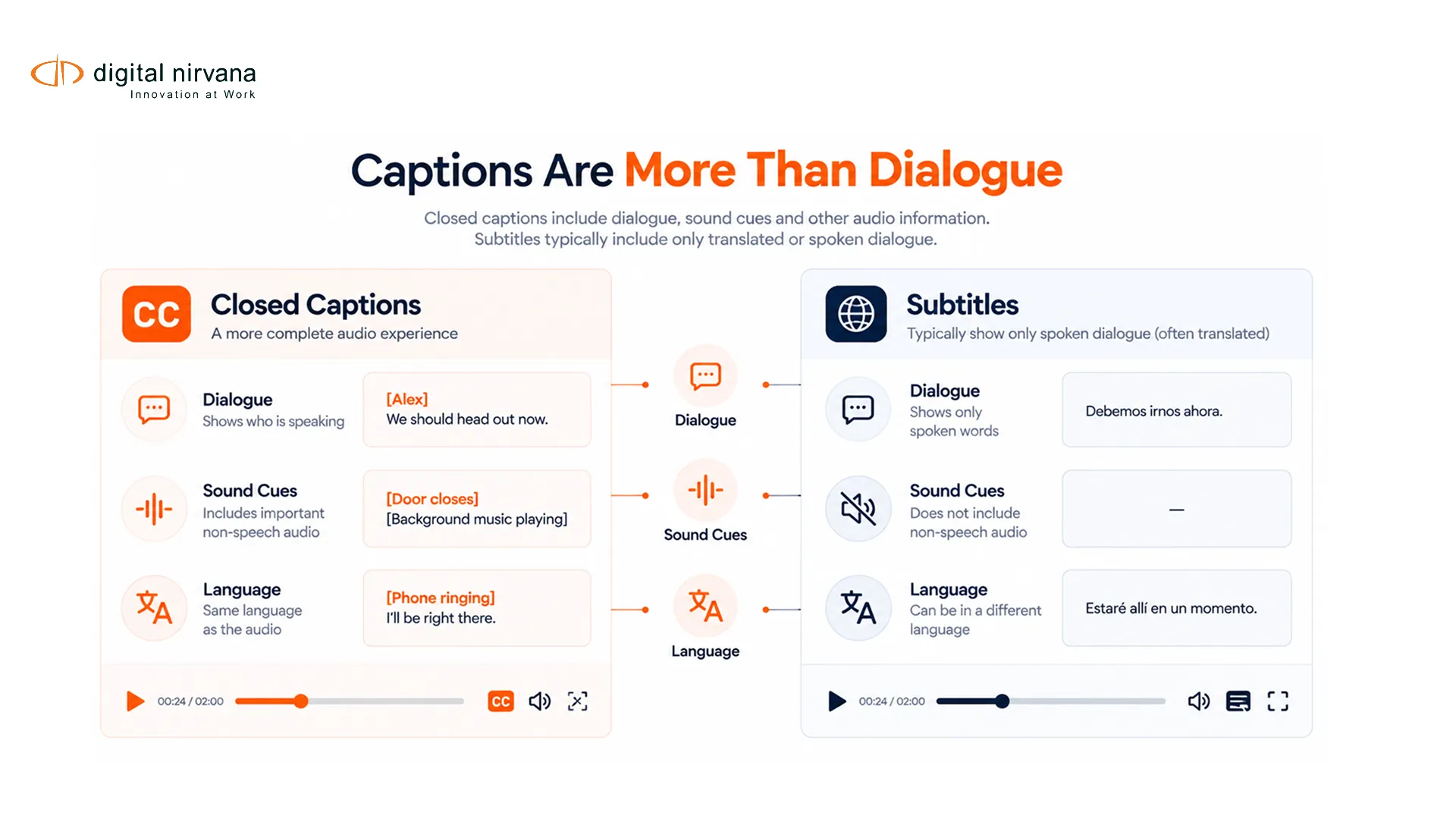
Closed captions provide a text alternative for spoken dialogue and meaningful sound. Speaker identification, music, laughter, alarms and other audio cues may be included when they are needed to understand the program. The viewer controls whether closed captions are displayed. Open captions are burned into the picture and cannot be switched off.
The W3C guidance on prerecorded captions explains captions as synchronized alternatives for prerecorded audio content. Its live-caption guidance applies a related accessibility principle to live synchronized media.
Closed Captions Versus Subtitles
| Dimension | Closed Captions | Subtitles |
| Primary goal | Access to dialogue and meaningful audio | Commonly translation or language support |
| Sound cues | Usually included when relevant | May be omitted unless the brief requires them |
| Speaker identification | Included when the speaker is not visually clear | Varies by style and destination |
| Viewer control | Can be switched on or off | Can be optional or forced, depending on delivery |
| Language | Often same as audio | Often different from audio |
The boundary is not absolute. Subtitles for the deaf and hard of hearing combine translation with accessibility information. Platform terminology also varies. The safest brief names the intended viewer, language relationship, sound treatment and technical destination.
See Digital Nirvana’s closed captions versus subtitles article for a focused comparison.
Caption Types And Presentation
Offline captions are created for prerecorded content. They allow a fuller review of wording, speaker identity, synchronization and visual placement. Live captions are produced as a program unfolds, so latency and correction behavior join the quality criteria.
Presentation can include pop-on captions that appear as complete blocks, roll-up captions that add lines progressively and paint-on captions that render characters in sequence. The available mode and styling depend on the delivery system and caption format.
Captions should not cover names, scores, weather warnings or other necessary graphics. Placement decisions need review against the final picture, including aspect-ratio conversions and platform overlays.
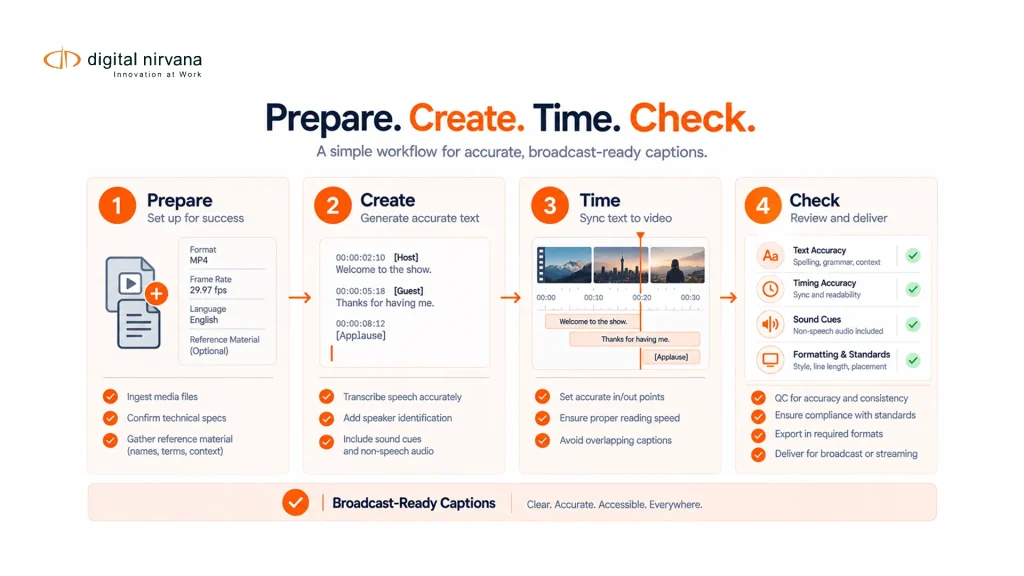
A Four-Stage Captioning Workflow
The first stage is preparation: register the correct media, language, frame rate, start time and destination specification. The second stage is text creation through transcription, speech recognition or a supplied script, followed by speaker and sound treatment.
The third stage is timing and presentation. Cues are aligned to speech, divided for readable presentation and positioned when the format supports it. The fourth stage is QC and delivery: review against the media, validate syntax, confirm language and file identity, and package the correct version for each destination.
Automation can accelerate draft creation, alignment and consistency checks. Human review remains useful for names, accents, crosstalk, humor, meaningful sounds and display choices. A workflow should record which stage a person reviewed and what exceptions remain.
TranceIQ supports caption and subtitle workflow orchestration and review. Digital Nirvana’s Media Enrichment services are relevant when an organization needs managed caption production and quality review.
Caption Quality And Delivery Checklist
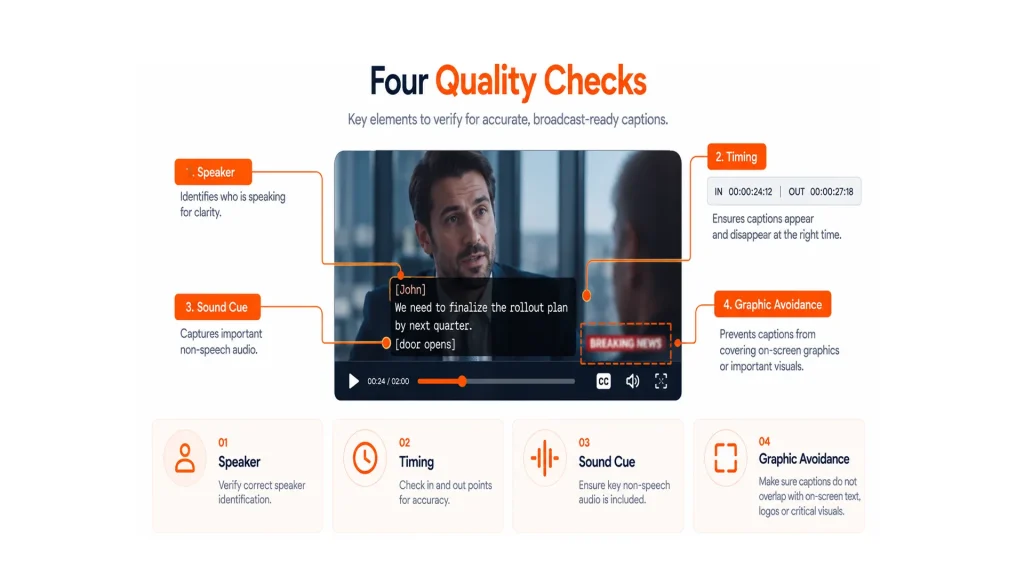
The FCC describes four television caption-quality dimensions: accuracy, synchronicity, completeness and placement. The FCC closed-captioning consumer guide provides definitions and scope for United States television audiences.
Use those dimensions alongside destination-specific technical checks:
- Accuracy: verify words, names, numbers, speakers and meaningful sounds.
- Synchronicity: confirm captions align with speech and remain readable.
- Completeness: check that required program audio is represented from start to finish.
- Placement: avoid blocking faces, names and essential graphics.
- Format: validate file structure, language, frame rate and destination profile.
- Version: match the captions to the exact program edit and audio track.
- Live workflow: monitor latency, dropouts, corrections and handoff failures.
- Evidence: retain QC status, exceptions and delivery identifiers.
Technical validation catches malformed files and unsupported values. It cannot decide whether a joke was translated correctly or a speaker was mislabeled. Always review a representative program playback in the target environment when possible.
FAQs
Closed captioning is viewer-selectable timed text that represents dialogue and meaningful non-speech audio in synchronized media.
Closed captions can be turned on or off. Open captions are part of the video picture and are always visible.
Not automatically. Captions are designed for access to speech and meaningful audio, while subtitles commonly support translation. Some subtitle types include accessibility information.
For United States television, the FCC frames quality around accuracy, synchronicity, completeness and placement. Other destinations can add their own language, format and presentation requirements.
Live production has limited review time and must manage latency and on-air corrections. Prerecorded work allows detailed editing and QC before distribution.
It can create a draft or support a live workflow, but names, timing, speakers, meaningful sounds and destination rules may require review.
Conclusion
Closed captioning joins language, accessibility, timing and technical delivery. Teams need a clear brief, a visible review process and destination-specific acceptance checks. A valid file is only complete when it matches the program and serves the viewer.
To plan an operated captioning service or review workflow, contact Digital Nirvana.