Introduction
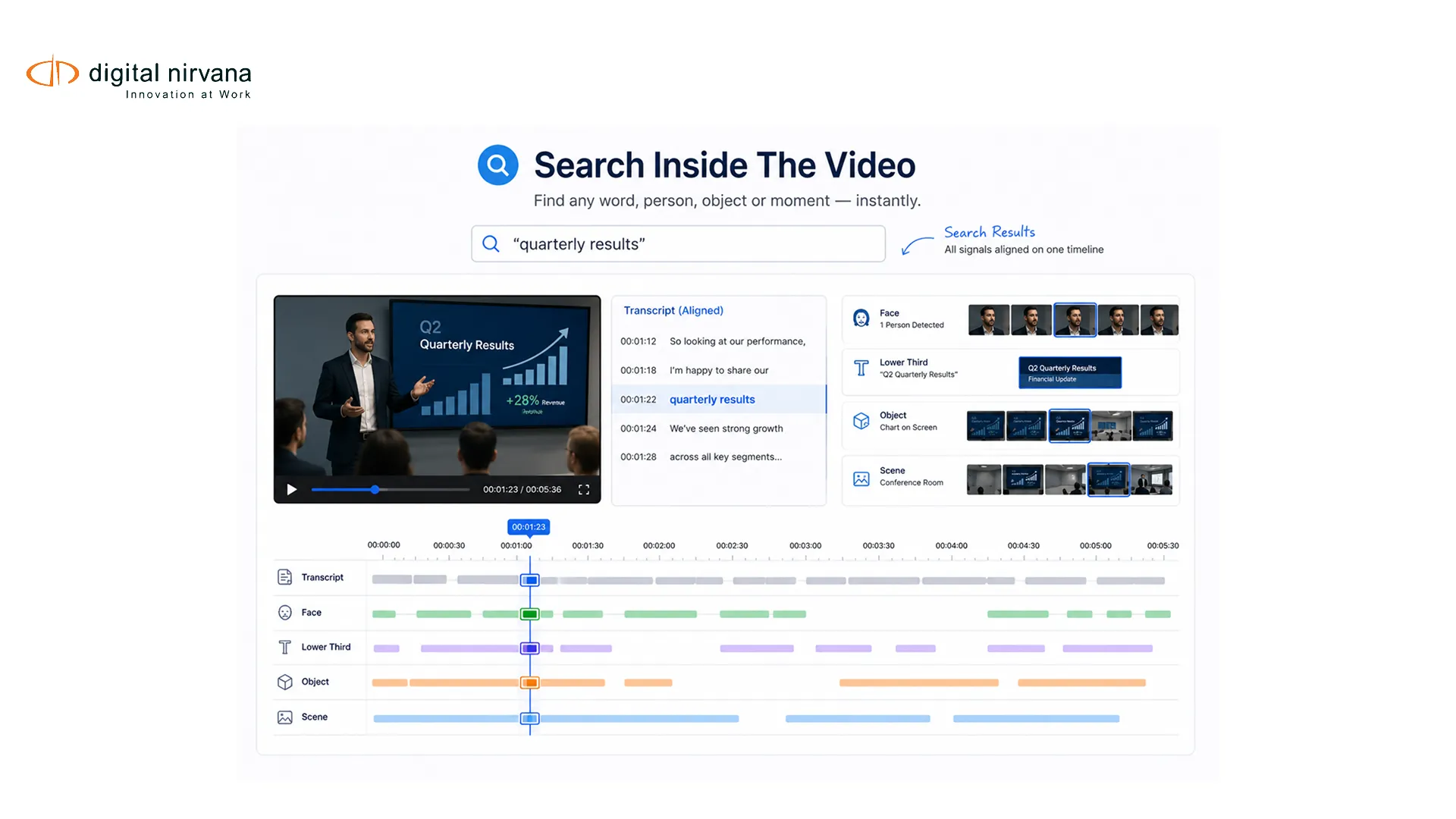
AI video search lets a media team search what happens inside a recording, not only the filename and manually entered description attached to it. A producer can look for a spoken phrase, a person, visible text, an object or a scene type, then jump to the relevant time range. That changes an archive from a file inventory into a source of usable moments.
The technology works best when multiple signals are indexed together and tied to timecodes. It still needs a metadata model, confidence rules, human review and a clear connection to the MAM, PAM or DAM that owns the asset.
Key Takeaways
- Multimodal search combines speech, faces, text, objects, labels and scene boundaries.
- Timecoded indexing makes a result actionable at the moment level.
- Search quality should be measured with real editorial queries and reviewed samples.
- Confidence thresholds and human review help manage names and high-impact metadata.
- An intelligence layer enriches the asset system rather than replacing it.
Table Of Contents
- Why filename search breaks down
- Signals behind AI video search
- How the indexing pipeline works
- How to evaluate search quality
- Archive rollout plan
- FAQs
Why Filename Search Breaks Down
Traditional archive search depends on the fields someone had time to enter. A one-hour news program might have a program title, date and broad synopsis even though it contains dozens of people, locations, quotes and graphics. A sports recording may be labeled with teams and date but not the exact point where a player, sponsor logo or scoreboard appears.
That gap creates three kinds of work. Editors scrub long recordings. Archivists answer repeated research requests. Teams fail to reuse material because they cannot prove what is inside it quickly enough. Video indexing reduces that gap by creating time-based evidence from the content itself.
The existing Digital Nirvana article on shot change detection explains how scene boundaries create useful structural anchors for segmentation and search.
Which Signals Power AI Video Search?
| Signal | Example Query | Main Quality Risk |
| Speech transcript | A quoted statement or topic | Noise, overlap, names, accents |
| Face or person identity | A known presenter or guest | Reference quality, identity governance |
| On-screen text | Lower third, scoreboard or location | Motion, stylized fonts, low contrast |
| Object or label | Microphone, vehicle or landmark | Broad labels, false positives, context loss |
| Scene boundary | Interview, studio, field report | Over-segmentation or missed cuts |
| Named entity | Organization, person or place | Transcript errors and ambiguous names |
These signals are more useful together than alone. A text search for a surname may find a lower third. A transcript may confirm that the person is speaking. A face match may add another clue. The system can present these signals with confidence and time ranges instead of collapsing them into one unqualified assertion.
Google Cloud’s label-detection documentation shows how labels can be associated with shots, frames and segments. The Azure Video Indexer transparency note also describes limitations and the need to assess system performance in context.
How A Multimodal Indexing Pipeline Works
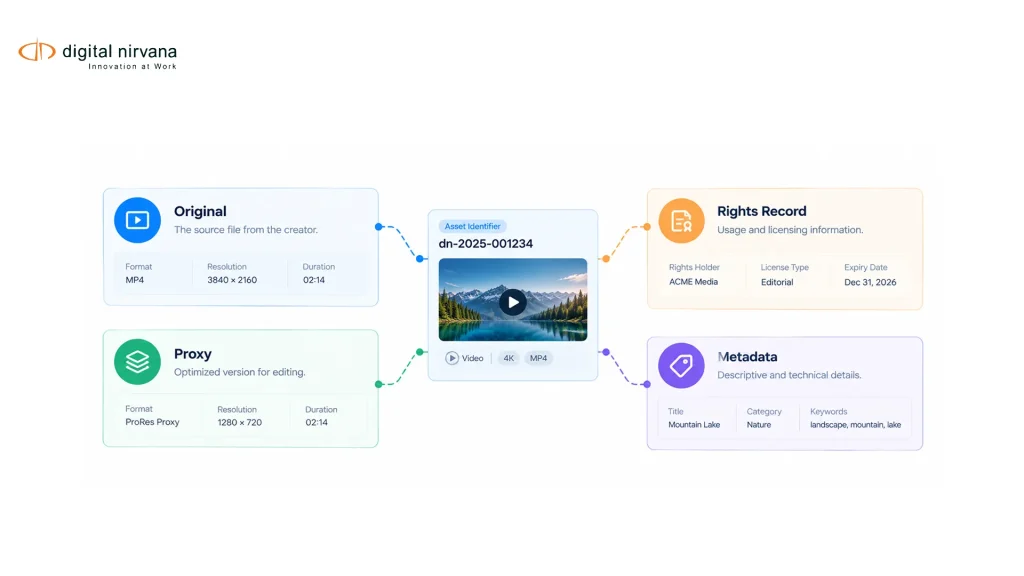
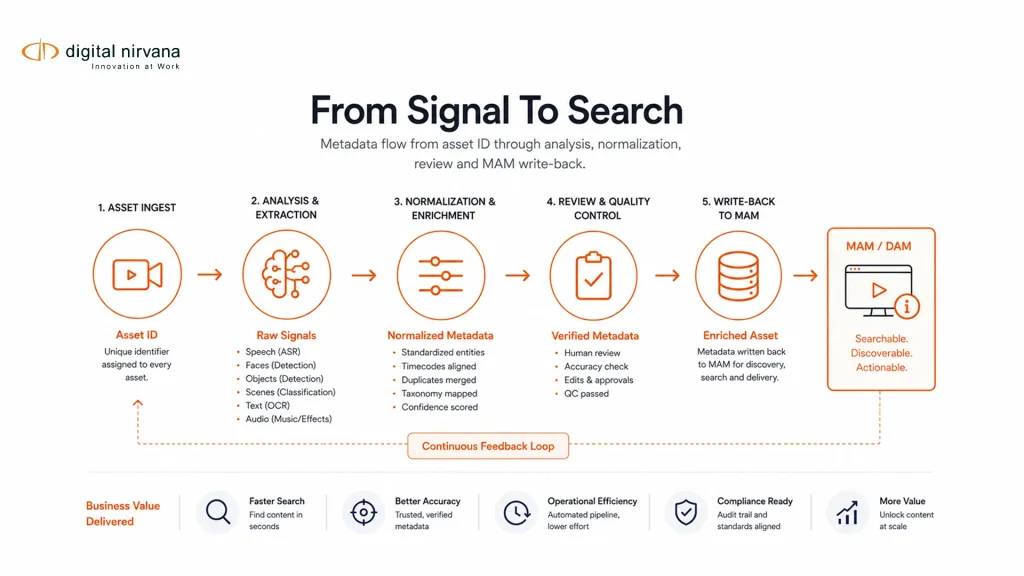
The first stage registers the asset and its stable identifier. The pipeline then creates or accesses a processing copy, runs selected analysis services and receives timecoded outputs. A normalization layer maps names, labels, language codes and confidence values into a consistent schema.
Next, rules decide what can be published automatically and what needs review. A common pattern is to route uncertain people, restricted terms or high-impact records to an operator while allowing lower-risk descriptive labels to enter a searchable index. Approved metadata is then linked back to the source asset and exposed through the system where users already work.
MetadataIQ is Digital Nirvana’s metadata and indexing layer for this part of the workflow. It complements a MAM, PAM or DAM by enriching the asset record. Teams that need individual analysis capabilities through APIs should distinguish that packaged workflow from MediaServicesIQ, which provides composable media analysis services.
How To Evaluate Search Quality
Begin with a query set taken from real archive requests. Include exact names, paraphrased topics, visible text, scenes and combinations such as a person plus location. Mark the relevant moments in a representative sample so results can be assessed against known answers.
Measure whether the first results are useful, whether relevant moments are missed and how much irrelevant material a user must inspect. Precision and recall are useful, but operational measures matter too: time to a usable clip, number of query reformulations and reviewer corrections per asset.
Test errors by signal. A failed name search may originate in transcription, entity extraction, identity matching, spelling normalization or index configuration. That diagnosis matters because each cause requires a different fix.
Do not use one global confidence threshold. A low-risk object label and a person’s identity should not automatically share the same publication rule. Set thresholds around the consequence of an error and the available review capacity.
A Phased Rollout For Media Archives
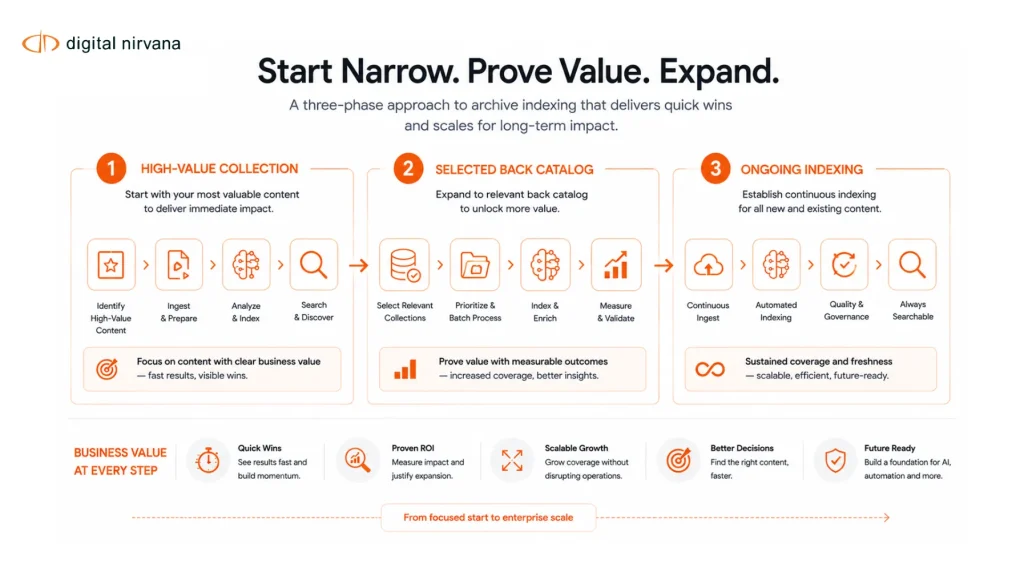
Start with a high-value collection and a narrow set of searches. News organizations might begin with named people, speech and lower thirds. Sports teams might begin with players, scoreboards, logos and shot boundaries. Prove that users can find and reuse moments before expanding the model set.
The second phase can address a selected back catalog. Prioritize assets with known demand, clear rights and sufficient technical quality. Track failed and low-confidence jobs so archive enrichment does not silently create uneven coverage.
The third phase can add ongoing or near-live indexing. At that point, teams need operational monitoring, retry rules, version control for models and a process for correcting published metadata. Digital Nirvana’s original video indexing guide can retain its practical focus while this refresh adds the evaluation and governance needed for a production deployment.
FAQs
AI video search uses machine-generated, timecoded insights to find moments inside audiovisual content by speech, text, people, objects, labels or scenes.
File metadata describes the asset as a whole. Video indexing can describe events and signals at specific frames, shots or time ranges inside it.
Yes. Visual labels, object detections, on-screen text, faces and scene boundaries can support search. A transcript adds another strong signal when speech is present.
No. The MAM, PAM or DAM can remain the system of record. The search layer enriches its assets and provides moment-level discovery.
Use representative content and real queries with known relevant moments. Review precision, missed results, ranking, time alignment and the effort required to correct metadata.
Review is most useful for uncertain identities, sensitive topics, rights-related fields and other metadata where a wrong result has a high operational consequence.
Conclusion
AI video search succeeds when it connects multimodal signals to an editorial task. Timecoded indexing, a governed schema and selective human review turn detections into evidence that archive users can trust. A phased rollout keeps the work tied to measurable use rather than adding metadata without a clear consumer.
To discuss a search and enrichment plan for an existing archive, contact Digital Nirvana.