Introduction
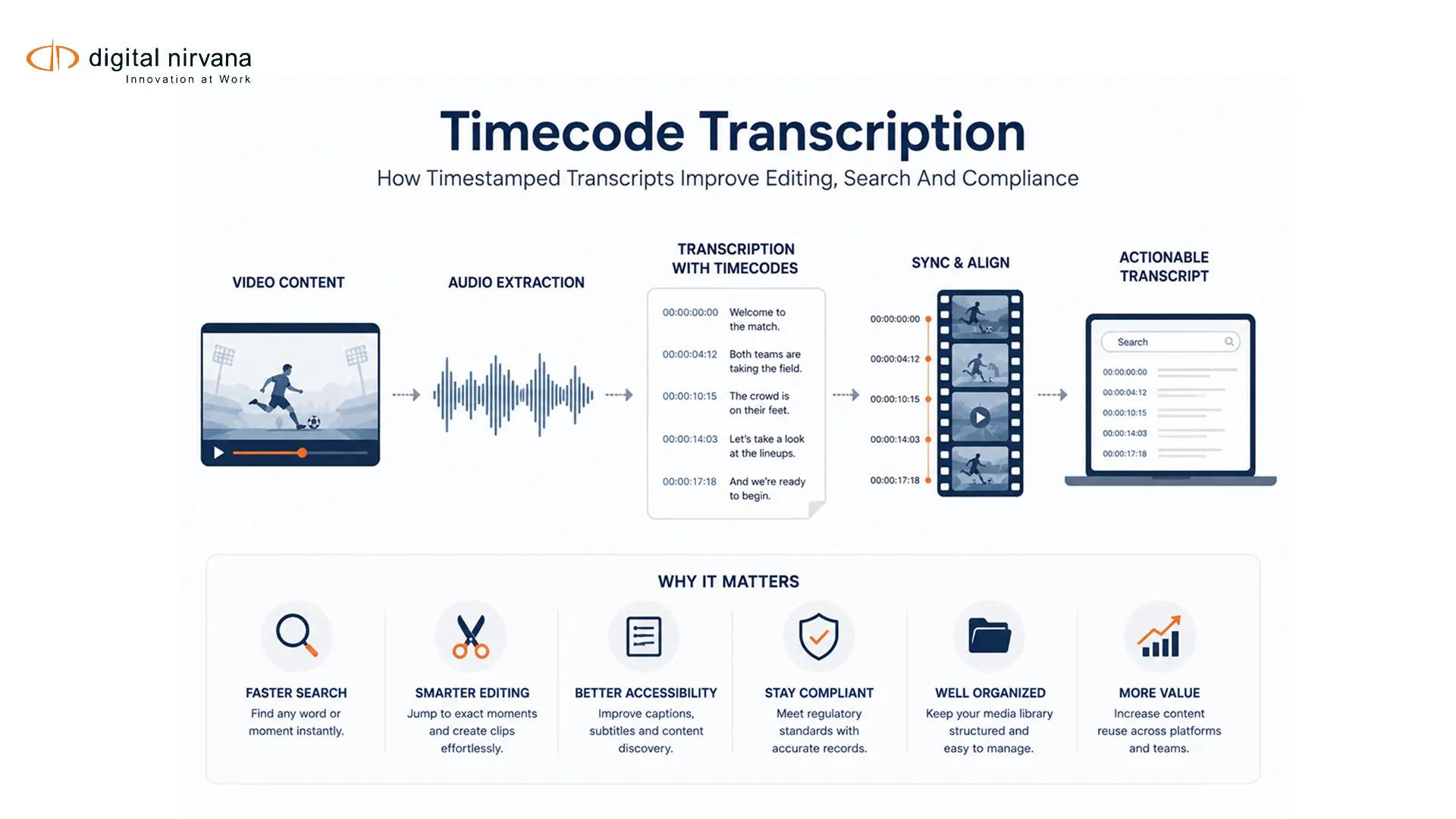
Timecode transcription connects written dialogue to exact positions in a media file. Instead of forcing an editor, producer or reviewer to search an entire recording, a timestamped transcript provides reference points that can open the relevant passage. The same alignment can support archive search, review records and navigation in a transcription platform.
The phrase “with timecodes” is not a complete specification. Teams must define the timing source, frame rate, timestamp granularity, speaker treatment, export format and quality checks.
Key Takeaways
- Plain text records words; timecode transcription records words plus where they occur.
- Source timecode and media-relative elapsed time are not interchangeable.
- Choose interval, speaker-turn, phrase or word timing according to the task.
- Validate alignment against the exact delivery media and frame-rate convention.
- Treat compliance use as destination- and jurisdiction-specific.
Table Of Contents
- Plain versus timestamped transcripts
- Timecode basis and frame rate
- Timing granularity
- Editing, search and compliance uses
- Workflow and QC
- FAQs
Plain Text Versus Timecoded Transcription
| Dimension | Plain Transcript | Timecoded Transcript |
| Navigation | Search text, then locate media manually | Jump from text to an approximate or exact media position |
| Editing | Useful for review and scripting | Supports source selection and edit decisions |
| Archive search | Finds documents or assets | Can find moments inside assets |
| Speaker review | Depends on labels | Labels can be tied to speaker-turn start times |
| Data volume | Lower | Higher, especially at word level |
| QC | Text accuracy | Text accuracy plus timing alignment |
A plain transcript remains appropriate for meeting notes, broad research or a readable record where media navigation is not needed. Adding timestamps creates more operational value only if they align with the media users actually open.
Digital Nirvana’s article on broadcast transcripts explains how purpose should shape the chosen transcript format.
Define The Timecode Basis
Source timecode identifies frames according to the production or broadcast media. Media-relative time begins at zero for the delivered file. Program time may begin after slate or pre-roll. These values can point to different moments even when each is internally correct.
The job brief should record the source identifier, start time, frame rate and whether drop-frame numbering is used. SMPTE’s time-code overview explains the relationship between time code and frame identification. Drop-frame timecode adjusts numbering to stay aligned with clock time at certain fractional frame rates; it does not delete video frames.
If a transcript is generated from a proxy, compare known cues against the master. A shifted proxy start, trimmed pre-roll or frame-rate conversion can create a constant offset that makes every timestamp wrong for the editor.
Choose The Right Timestamp Granularity
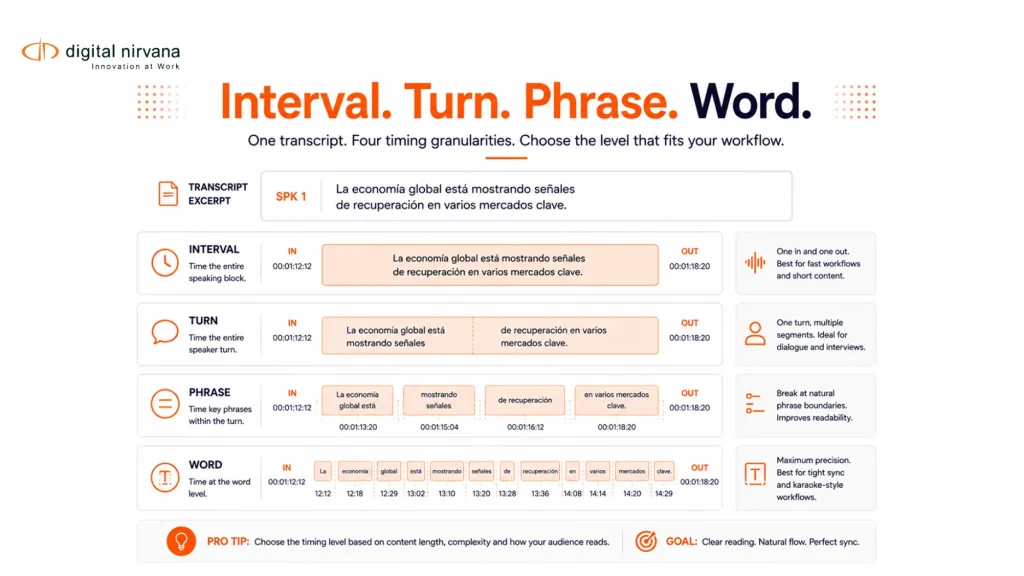
Interval timestamps mark a regular cadence such as every 30 or 60 seconds. They are compact but force users to search within the interval. Speaker-turn timestamps create a new reference when the speaker changes. Phrase-level timing gives editors and researchers finer navigation. Word-level timing supports karaoke-style highlighting, detailed search and machine alignment, but it increases data and QC needs.
Choose the least detailed timing that supports the user. A documentary editor may need phrase-level cues. An archive transcript may work with speaker turns. A technical integration may need word timing for search results but present only phrase-level cues to the user.
The WebVTT specification provides an example of timed cues with start and end positions. A transcript export need not use WebVTT, but downstream delivery formats may impose their own timing syntax and precision.
Editing, Search And Compliance Uses
For editing, timestamps let a producer mark quotations and transfer selections to the source media. The transcript should preserve source identity and timecode basis so an edit decision can be reconciled with the correct master.
For search, transcript terms become time-based index entries. A query can return the asset and the passage where a term was spoken. Combining speech with OCR, scenes or existing metadata improves context. Digital Nirvana’s guide to video indexing and smarter content search describes that multimodal pattern.
For compliance or review records, timecoded text can help an operator locate and document a passage. It does not by itself prove that a program met a legal or contractual obligation. The workflow must preserve media evidence, reviewer action and the rule being assessed.
A Timecode Transcription Workflow
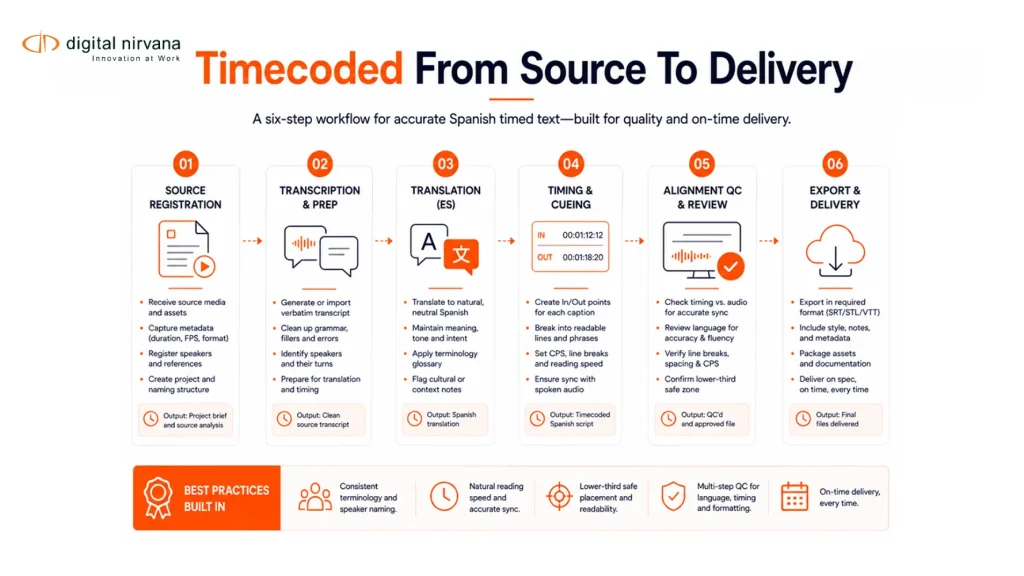
First, register the correct media and timing basis. Second, transcribe speech and assign speaker labels. Third, align the required timestamp granularity. Fourth, review names, numbers, omissions and speaker changes. Fifth, compare sampled cues against the delivery media. Sixth, export the approved text, timing and identifiers in the destination format.
TranceIQ supports transcription and timed-text workflow orchestration and review. Digital Nirvana’s Media Enrichment services are relevant when the organization needs managed transcription production and quality review.
FAQs
It is a transcript in which text or speaker segments are linked to timestamps or frame-based positions in the source media.
A timestamp may represent elapsed time, while production timecode identifies frames according to a defined rate and numbering convention. The job brief should state which is used.
Use the granularity required by the task: regular intervals, speaker turns, phrases or individual words.
It is a numbering convention that skips selected timecode numbers so the displayed count remains close to clock time at specified fractional frame rates. No content frames are removed.
Yes, if it references the correct source, version and timing basis. Editors should validate sample cues before relying on it for selections.
No. It can help locate and document evidence, but the applicable rule, media record, monitoring process and reviewer decision remain necessary.
Conclusion
Timecoded transcription is useful because it makes text actionable against media. Its quality depends on correct source identity, defined timing conventions, appropriate granularity and sampled alignment checks. Those decisions should be part of the brief, not left to the export stage.
To plan a platform or managed workflow for timestamped transcripts, contact Digital Nirvana.