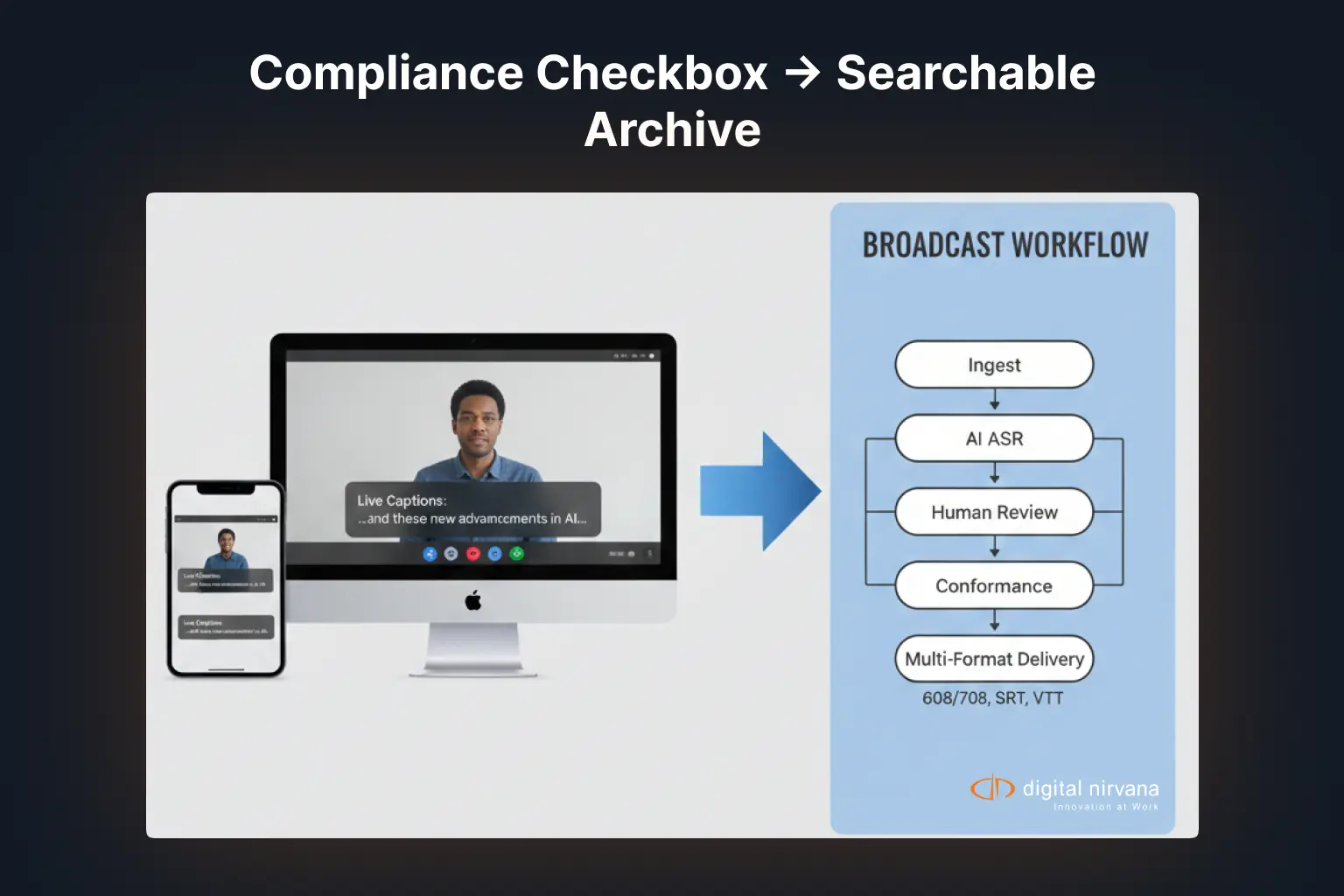
A master control operator turns on Live Captions during a Mac-based preview monitor just to double-check a live feed’s audio sync. Within seconds, accurate, real-time text appears on screen, no cloud connection required, no lag worth mentioning. It’s genuinely impressive technology.
Then someone asks the obvious follow-up question: can we use this for the actual broadcast? And that’s where the conversation gets complicated, because Apple never built Live Captions to be a compliance-grade broadcast captioning system. It built it to help someone follow a podcast on a noisy train.
That gap, between what Apple’s on-device AI captioning does brilliantly and what a regulated broadcast actually requires, is exactly what “operationalizing” it means. It’s not about whether the technology works. It’s about what has to surround it before it can carry a station’s compliance obligations.
What Apple’s AI Captioning Actually Is
Apple’s Live Captions feature, part of the broader Apple Intelligence and accessibility stack, provides real-time, on-device transcription of any audio source. It runs on iPhone 11 and later, iPad models with A12 Bionic chips or newer, and Mac computers with Apple silicon, transcribing FaceTime calls, podcasts, videos, and even in-person conversations picked up through the device’s microphone.
The underlying technology has improved quickly. Apple’s newer on-device speech frameworks, including SpeechAnalyzer, now support both live streaming and pre-recorded audio, with adjustable tradeoffs between speed and finalized accuracy. Everything processes locally, which is a genuine privacy advantage, and there’s no cloud dependency or per-minute transcription fee.
Apple is also explicit about the feature’s limits. Its own support documentation states that Live Captions accuracy may vary and should not be relied upon in high-risk or emergency situations. That single sentence is the entire reason broadcasters can’t drop this feature directly into a live newscast and call it done.
Why Consumer AI Captioning Doesn’t Translate Directly to Broadcast
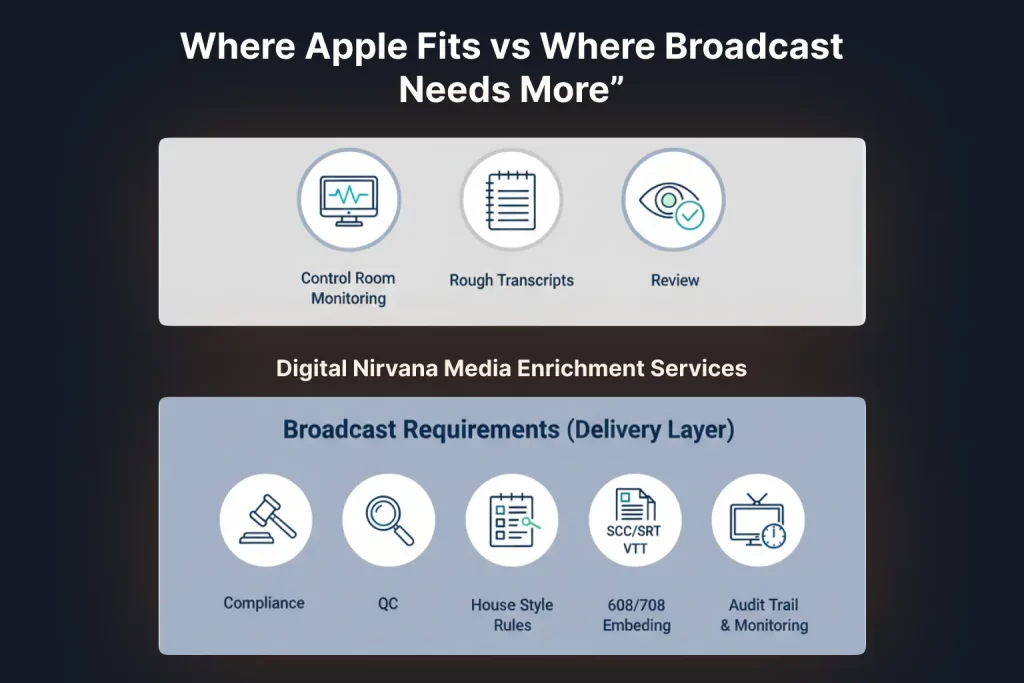
Broadcast captioning carries obligations that consumer accessibility features were never designed to meet.
Regulatory format requirements. Broadcast captions in the US need to conform to CEA-608 and CEA-708 standards, with specific timing, positioning, and encoding requirements for over-the-air and cable delivery. Apple’s Live Captions output is a floating on-screen overlay meant for personal viewing, not a broadcast-compliant caption stream.
Compliance logging. Regulators expect broadcasters to demonstrate that captions were present, accurate, and synchronized during a specific broadcast window. A personal accessibility feature running on a producer’s laptop doesn’t generate the kind of audit trail a compliance team can hand over during a review.
Accuracy under broadcast conditions. Newsrooms and live sports deal with overlapping speakers, technical jargon, proper nouns, and background noise that push any speech recognition system toward its limits. Apple’s own disclaimer about variable accuracy in demanding conditions is worth taking seriously, not dismissing as boilerplate legal language.
Workflow integration. A broadcast operation runs on MAM and PAM systems, encoders, and compliance monitoring platforms. Consumer-grade captioning tools don’t plug into that infrastructure; they run as standalone features on individual devices.
The Real Opportunity: Where Apple AI Captioning Genuinely Helps
None of this means the technology is irrelevant to broadcast teams. Used in the right place, it’s a legitimately useful tool.
Producers previewing raw footage can use on-device live captions to quickly scan for a quote without waiting on a formal transcript. Field teams capturing interviews on location can get an instant rough draft of what was said, useful for planning a script before the footage even reaches the newsroom. Accessibility teams testing internal workflows can use it as a fast, no-cost reference point when evaluating a formal captioning vendor’s output.
The pattern here is consistent: Apple’s on-device AI captioning works well as a fast, informal, first-pass tool. It was never meant to be, and shouldn’t be treated as, the system of record for what actually airs.
How to Operationalize It Into a Broadcast-Grade Workflow
Turning a useful consumer feature into part of a defensible broadcast process comes down to four steps.
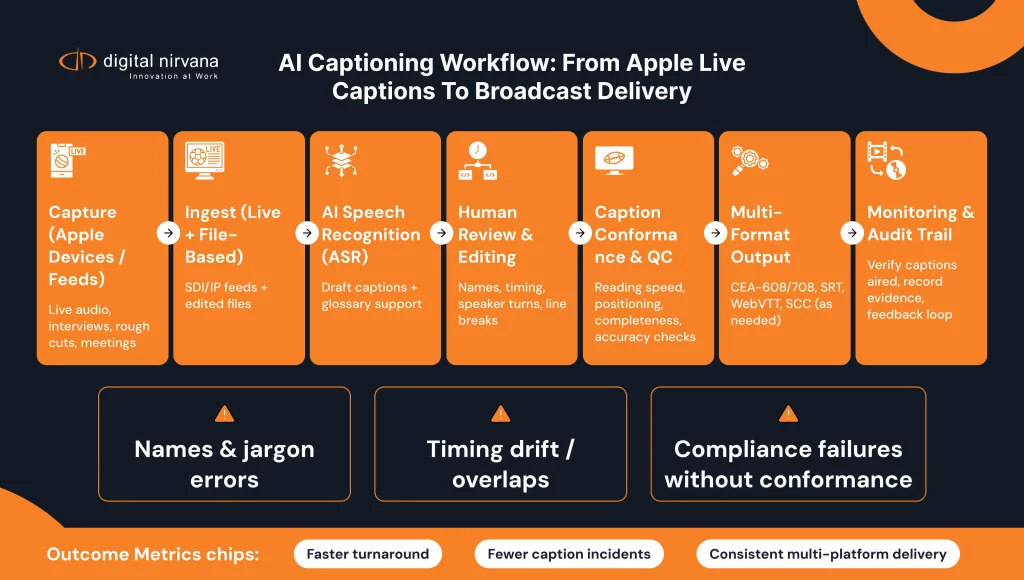
1. Define where in the pipeline it’s allowed to touch. Use it for pre-production review, rough drafts, and internal previews. Keep it out of anything that generates the final caption stream that airs.
2. Route anything broadcast-bound through a compliant captioning system. Final captions need CEA-608/708 encoding, accurate timing, and a verifiable production record, which means routing that content through a platform like TranceIQ, built specifically for cloud transcription, subtitle generation, and caption conformance across broadcast and OTT delivery.
3. Add human review at the right checkpoint. Whether captions originate from Apple’s on-device AI, a cloud ASR engine, or a hybrid workflow, a review layer needs to catch names, technical terms, and low-confidence segments before anything reaches air. This is where Media Enrichment services provide managed, human-assisted review at scale, especially for live captioning and rapid-turnaround content.
4. Log everything for compliance. Loudness, caption presence, and timing all need to be tracked and reportable. MonitorIQ handles compliance logging and closed caption monitoring, including CC608 and CC708 standards, across live and recorded content, giving compliance teams the audit trail a personal device feature simply can’t produce.
A Practical Workflow Example
Picture a local news team covering a live press conference. A field producer uses on-device live captions on an iPhone during the event purely for personal reference, jotting down a rough quote to flag for the script.
Back at the station, the actual broadcast footage runs through a proper captioning pipeline. Automated transcription generates a first pass, a human reviewer checks names, numbers, and any low-confidence segments, and the final caption file gets encoded to broadcast standards before airing. Compliance monitoring logs the caption stream alongside the aired footage, so if a viewer complaint or an FCC inquiry comes in later, the station has a verifiable record.
The consumer AI tool saved the field producer a few minutes of note-taking. It never touched what actually aired, and that separation is exactly what makes the workflow defensible.
Where Consumer AI Captioning Fits vs Where It Doesn’t
| Use Case | Appropriate for Apple AI Captioning | Requires Broadcast-Grade Workflow |
| Producer previewing raw footage | Yes | No |
| Field notes during an interview | Yes | No |
| Final caption stream for air | No | Yes |
| FCC/Ofcom compliance reporting | No | Yes |
| Live emergency broadcast captions | No | Yes |
| Internal accessibility testing | Yes | No |
| OTT platform subtitle delivery | No | Yes |
Checklist for Building an Operationalized Captioning Workflow
- Map every point in your production pipeline where AI-generated captions could enter
- Restrict consumer-grade AI tools to pre-production, preview, and internal use only
- Route all broadcast-bound content through a compliance-capable captioning platform
- Build a human review checkpoint for low-confidence or high-stakes segments
- Confirm your caption output meets CEA-608/708 or applicable regional standards
- Maintain a compliance log tying caption presence and accuracy to the exact broadcast window
- Revisit the workflow whenever a new on-device AI feature ships, since capability changes quickly
Common Objections, Answered
“Apple’s captions are already impressively accurate. Why add extra steps?” Accuracy on a quiet recording is not the same as accuracy on a live, noisy broadcast feed, and Apple’s own documentation says as much. The extra steps exist for the moments the on-device model gets wrong, not the moments it gets right.
“This sounds like unnecessary process for a free feature.” The feature is free. The compliance risk of an inaccurate or missing caption during a live broadcast is not. A lightweight review and logging layer is a small cost against that exposure.
“Our team already has a captioning vendor. Why does this matter?” Because staff are already using on-device AI captions informally in daily work, whether or not it’s officially part of the workflow. Defining where it’s appropriate prevents it from quietly becoming the source of what airs.
How Digital Nirvana Supports This Kind of Workflow
This is precisely the gap Digital Nirvana’s platforms are built to close. TranceIQ delivers cloud transcription and caption generation that meets broadcast and OTT conformance standards, while Media Enrichment adds the managed, human-assisted review that keeps accuracy high on live and high-volume content. On the compliance side, MonitorIQ tracks closed caption standards, loudness, and proof-of-performance so teams have a defensible record of what actually aired, not just what a device happened to transcribe.
For broadcasters exploring how AI-generated metadata and captions connect to searchable archives, MetadataIQ extends that same accuracy discipline into indexing and search, so caption text becomes part of a searchable production asset rather than a one-time on-screen overlay. The underlying speech and detection models behind that indexing work draw on the same AI/ML microservices that power transcription and scene analysis across Digital Nirvana’s broader product suite.
Why This Matters Beyond Captioning Alone
The Apple AI captioning question is really a preview of a broader pattern. Consumer devices are shipping increasingly capable on-device AI, and broadcast teams will keep encountering tools that are genuinely useful but were never built with regulatory compliance in mind. The discipline that applies here, defining where a tool is trusted, adding human review at the right checkpoint, and logging everything for accountability, is the same discipline behind Managed AI‘s approach to human-in-the-loop review across any AI-generated broadcast content, not just captions.
Digital Nirvana’s work across broadcast compliance and captioning, reflected in its documented customer outcomes and full product portfolio, consistently comes back to the same principle: AI tools earn their place in a broadcast workflow by proving their output holds up under scrutiny, not by being fast or convenient alone.
FAQ
Can Apple’s Live Captions replace a professional broadcast captioning vendor? No. It lacks broadcast-standard encoding (CEA-608/708), compliance logging, and the accuracy guarantees regulators expect for aired content, even though it works well for personal, informal use.
Is Apple’s on-device AI captioning accurate enough for live news? It can produce a reasonable rough transcript, but Apple’s own documentation warns against relying on it in high-risk or emergency situations, which makes it unsuitable as the sole source for live broadcast captions.
Where can broadcast teams safely use consumer AI captioning tools? Pre-production review, field note-taking, internal accessibility testing, and quick reference checks are all reasonable uses, as long as the output never becomes the final caption stream that airs without passing through a compliant workflow first.
Conclusion
Apple’s AI captioning is a legitimately impressive piece of consumer technology, and pretending otherwise does broadcast teams no favors. The mistake isn’t using it. It’s using it in the wrong place, letting a personal accessibility feature quietly become part of what airs without the compliance layer a broadcast actually requires. Operationalizing it means drawing that line clearly, keeping the convenient tool where it belongs, and routing anything broadcast-bound through a workflow built for the standards regulators and audiences actually expect.
Key Takeaways
- Apple’s on-device AI captioning is built for personal accessibility, not broadcast compliance, and Apple’s own documentation says so directly
- Broadcast captions require CEA-608/708 encoding, compliance logging, and an audit trail that consumer features don’t produce
- Consumer AI captioning tools are genuinely useful for pre-production, field notes, and internal review
- A defensible workflow keeps AI-generated captions out of the final broadcast stream unless they pass through compliance-grade review
- The same operationalizing discipline applies to any consumer AI tool that finds its way into a regulated broadcast pipeline