Introduction
Automatic closed captioning software can turn hours of video into captions in minutes.
That speed is valuable. It helps media teams publish faster, make content searchable, improve accessibility, and prepare videos for more platforms. But speed alone does not make captions ready for broadcast, streaming, education, enterprise training, or global distribution.
Captions are not just words on a screen. They help people understand speech, speaker changes, music, sound effects, tone, and timing. W3C explains that captions provide a text version of speech and non-speech audio information needed to understand the content, synchronized with the audio.
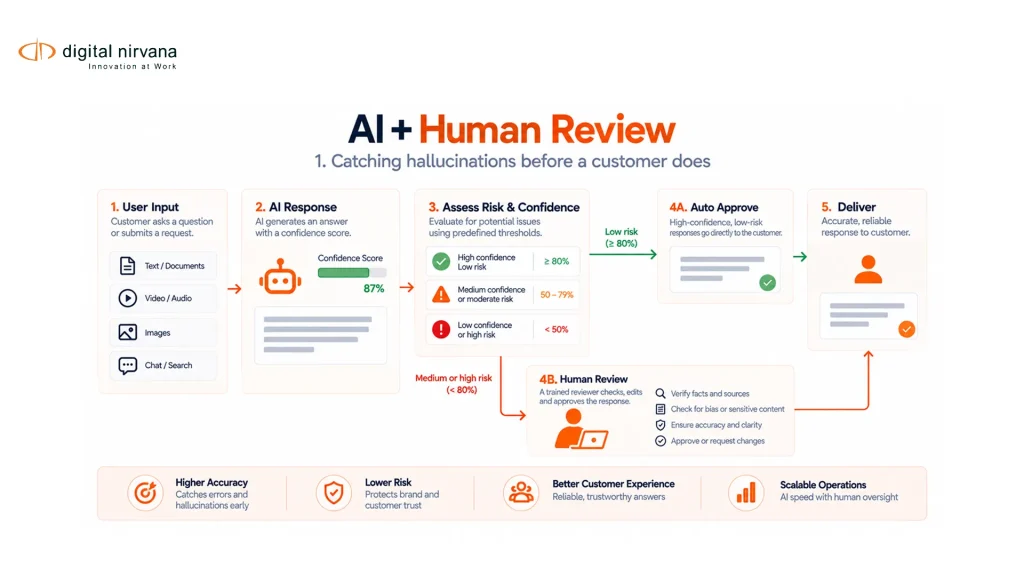
That is why the best captioning workflow is usually neither AI-only nor human-only. For many professional media teams, the best approach is AI-assisted captioning with human review, quality control, and platform-ready delivery.
Table Of Contents
- What Is Automatic Closed Captioning Software?
- Why Auto Captioning Software Is Growing In Media Workflows
- Benefits Of Automatic Closed Captioning Software
- Limits Of Automatic Closed Captioning Software
- Why Human Review Still Matters
- A Practical AI-Plus-Human Captioning Workflow
- What To Look For In Auto Captioning Software Or Services
- How Digital Nirvana’s Subs & Dubs Supports Captioning And Localization
- When To Use Automatic Captions, Human Captions Or A Hybrid Workflow
- FAQs
- Conclusion And Key Takeaway
What Is Automatic Closed Captioning Software?
Automatic closed captioning software uses automatic speech recognition, or ASR, to convert spoken audio into timed text.
In a basic workflow, the software listens to the audio, creates a transcript, splits the transcript into caption lines, adds timing, and exports a caption file. Depending on the tool, it may also support speaker identification, punctuation, caption editing, translation, subtitle formatting, and file exports such as SRT, VTT, SCC, or other timed text formats.
Digital Nirvana’s caption accuracy article explains that the Word Error Rate is commonly used to measure the accuracy of automatic speech recognition, especially when ASR technology is used to generate captions.
For simple content with clean audio, one speaker, and limited background noise, automatic captions can be a useful first pass. Professional media should usually be reviewed before publication.
Why Auto Captioning Software Is Growing In Media Workflows
Auto captioning software is growing as video volume increases.
Broadcasters, streaming platforms, sports networks, universities, creators, enterprises, and corporate media teams are producing more video than manual captioning teams can process on their own. They need speed, consistency, and scalable workflows.
AI captioning helps teams move faster, but buyers are also becoming more aware of quality limits. Amara notes that auto-captions often require human review to ensure accuracy and contextual relevance.
This is why commercial buyers are not only asking, “Can this software generate captions?” They are asking, “Can this workflow create captions that are accurate, readable, accessible, compliant, and ready for distribution?”
Benefits Of Automatic Closed Captioning Software
Automatic captioning can be valuable when it is used in the right workflow. It can reduce repetitive work, speed up first drafts, and make large content libraries easier to process.
Faster Caption Turnaround
The biggest benefit is speed.
Automatic closed captioning software can generate a first draft much faster than a fully manual workflow. For news, sports, OTT clips, learning content, webinars, social video, and large archives, this can reduce the time between production and publishing.
This does not mean captions should always be published without review. It means editors and captioners can start with a draft rather than a blank page.
Lower First-Pass Captioning Costs
Automatic captioning can reduce the cost of creating an initial transcript and caption draft.
This is useful for high-volume teams that need captions for internal content, drafts, archives, social clips, training videos, or lower-risk assets. The cost benefit is strongest when teams use automation for the first pass and reserve human review for priority content.
Easier Scaling Across Large Video Libraries
Manual captioning can become difficult when teams need to caption hundreds or thousands of videos.
Auto captioning software helps teams process large libraries faster. This is useful for OTT catalogs, archive monetization, eLearning libraries, corporate knowledge bases, and media asset management workflows.
Digital Nirvana’s Hollywood captioning success story shows how a technology-aided workflow helped a media processing customer generate captions, apply style guide requirements, perform human review, run automatic QC, and deliver sidecar files at scale.
Better Searchability And Content Reuse
Captions and transcripts make video easier to search.
Once speech becomes text, teams can search for names, topics, phrases, quotes, product mentions, speakers, or segments. This helps editors, producers, learning teams, compliance teams, and archive managers find and reuse video content faster.
Digital Nirvana’s captioning and transcription article also recommends storing captions and transcripts alongside media in a MAM so teams can search and reuse content more effectively.
Support For Multilingual Localization
Auto captioning can also support localization workflows.
A source transcript or caption file can become the starting point for subtitles, translations, dubbing, and multilingual distribution. Digital Nirvana positions Subs & Dubs as a service for AI-driven subtitles, translations, and automated dubbing, refined by experts for cultural and linguistic accuracy.
For global media teams, this matters because captions are often the first step toward subtitles, translated subtitles, and dubbed versions.
Limits Of Automatic Closed Captioning Software
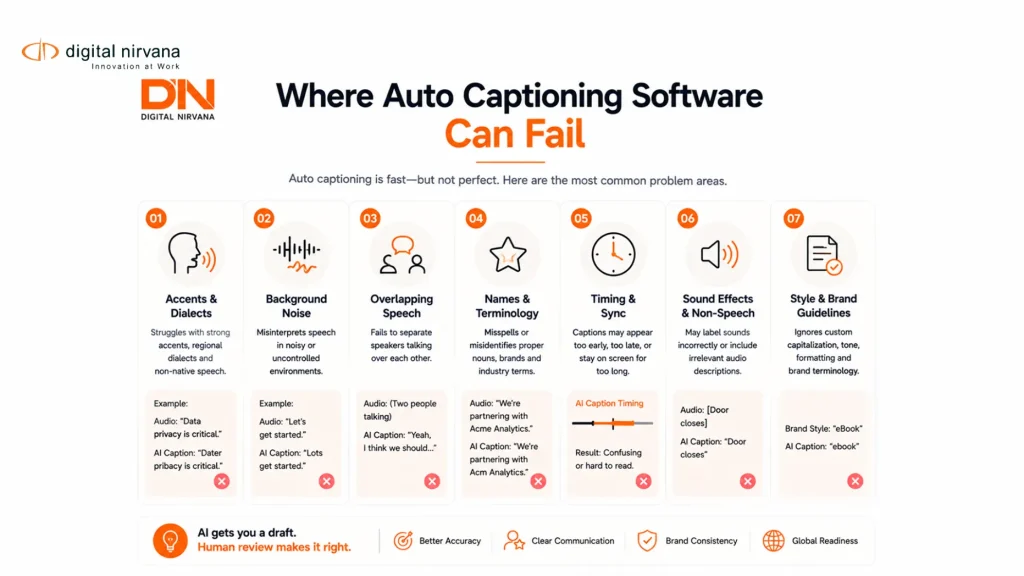
Automatic captioning software is useful, but it is not perfect. Its limits become more visible when content is complex, noisy, regulated, multilingual, or brand-sensitive.
Speech Recognition Errors
ASR can mishear words.
This happens more often with overlapping speech, background noise, music, technical terminology, proper nouns, accents, fast speakers, unclear recordings, and mixed-language content.
A small transcription error can change meaning. A name, medical term, legal phrase, financial figure, player name, or location can become incorrect. That is why automatic captions should be reviewed before they are used for high-value or public-facing content.
Speaker Identification Challenges
Captions often need to identify who is speaking.
Automatic systems may struggle when speakers overlap, talk quickly, interrupt each other, or sound similar. This is common in interviews, panel discussions, news programs, reality content, sports commentary, documentaries, webinars, and classroom recordings.
If speaker labels are wrong or missing, viewers may not understand the conversation clearly.
Missing Sound Effects And Non-Speech Audio
Closed captions are different from basic subtitles.
Captions should include meaningful non-speech audio, such as music, laughter, applause, alarms, doorbells, explosions, tone, or other sounds that affect meaning. W3C explains that captions include both speech and non-speech audio information needed to understand the content.
Automatic captioning tools may miss these details unless the workflow includes human review or additional quality checks.
Timing, Placement And Readability Issues
Good captions must appear at the right time, stay on screen long enough to read, and avoid blocking important visual information.
The FCC says closed captions should be accurate, synchronous, complete, and properly placed. This creates a higher standard than simply generating text from speech.
Auto captioning software may create captions that are too long, too fast, poorly split, awkwardly timed, or placed over important on-screen elements. Human captioners can adjust timing, line breaks, placement, and readability.
Accent, Noise And Domain Vocabulary Problems
ASR performance depends heavily on audio quality and context.
Automatic captions may struggle with regional accents, industry vocabulary, sports terminology, brand names, medical terms, legal terms, speaker names, and noisy environments. This is especially important for professional media, where mistakes can affect credibility.
Digital Nirvana’s caption accuracy article explains that accuracy measurement matters because ASR output can include substitutions, insertions, and deletions that affect caption quality.
Compliance And Style Guide Gaps
Professional media teams often need captions to follow style guides.
These may cover punctuation, capitalization, speaker labels, sound cues, line length, reading speed, file format, profanity handling, caption placement, and client-specific rules.
Automatic closed captioning software may not fully apply these rules without configuration and human QC. Digital Nirvana’s Hollywood success story notes that captioning workflows may require customer-style-guide checks, human transcription review, captioner review, automatic QC, and post-delivery auditing.
Why Human Review Still Matters
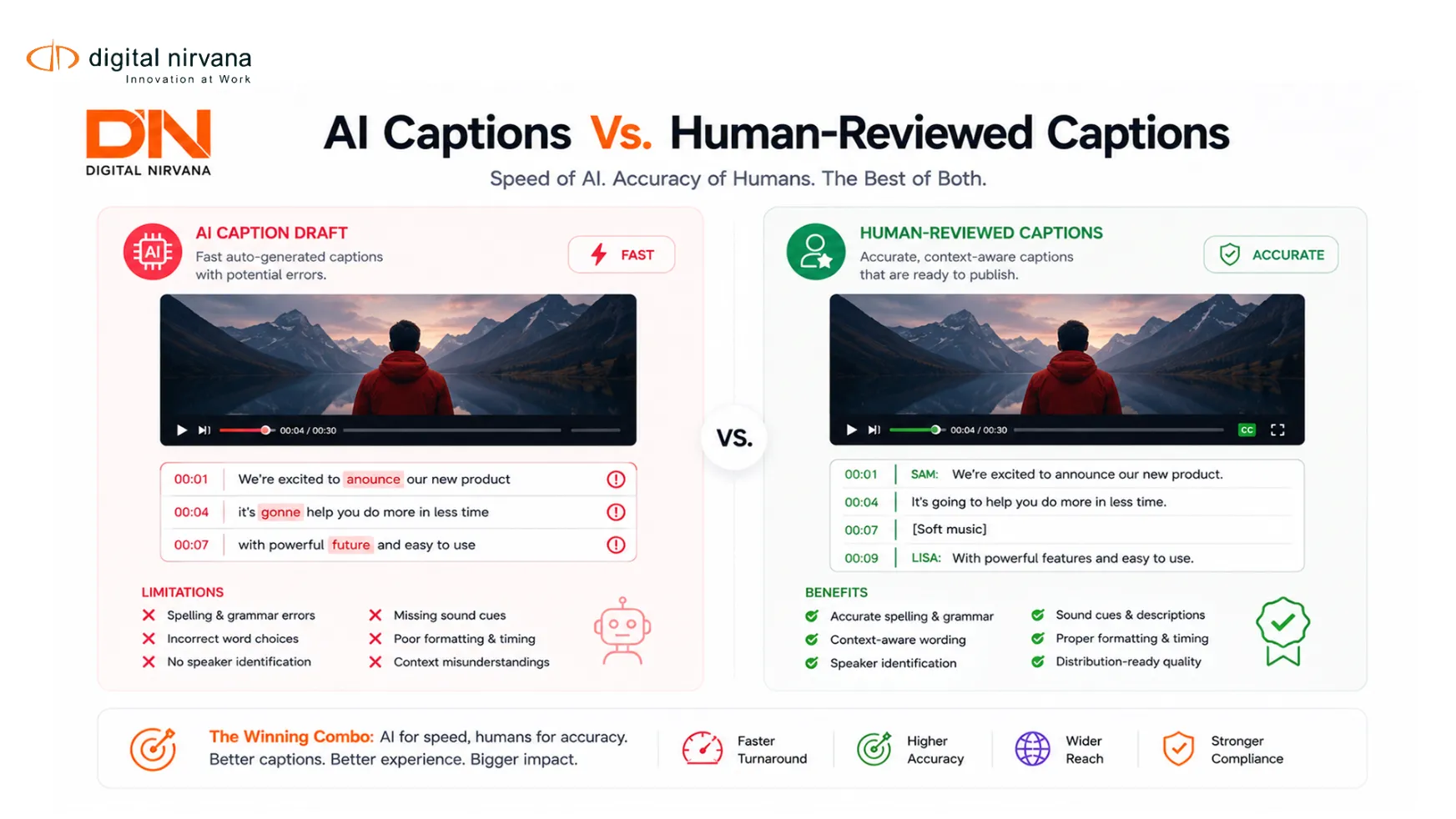
Human review is not a sign that automatic captioning failed. It is what turns a fast draft into a reliable deliverable.
Accessibility Quality
Captions are an accessibility feature.
For viewers who are Deaf or hard of hearing, captions may be the main way to understand the content. That means captions need to include accurate speech, speaker identification, meaningful sound cues, and timing that supports comprehension.
The FCC’s captioning quality standards emphasize accuracy, synchronicity, completeness, and placement. Human review helps ensure these qualities are present before content is published.
Compliance Confidence
Compliance requirements vary by market, platform, and content type, but the principle is consistent. Captions should be reliable.
For broadcast and regulated media teams, human review can reduce the risk of errors that cause complaints, rework, resubmissions, or compliance issues. This is especially important for television programming, live events, legal content, financial content, education, healthcare, and government content.
Brand And Editorial Accuracy
Captions represent the brand.
Misspelled names, wrong terminology, inaccurate quotes, missing punctuation, or awkward line breaks can make content feel careless. This is especially risky for studios, networks, universities, enterprise brands, and media companies with formal editorial standards.
Human reviewers can protect tone, terminology, names, speaker labels, and meaning.
Localization And Cultural Nuance
Automatic captions are often the foundation for subtitles and translations.
If the source captions are wrong, the translated subtitles may also be wrong. If the translation is literal, it may miss humor, tone, idioms, emotion, or cultural context.
Digital Nirvana’s Subs & Dubs positioning is relevant here because it combines AI-driven subtitles, translations, and automated dubbing with expert refinement for cultural and linguistic accuracy.
Final File Readiness
Caption quality is not only about text accuracy.
Final caption files must match platform requirements, frame rates, timing standards, naming conventions, language codes, file formats, and delivery specifications. Human review and automated QC help prevent rejected files and delivery delays.
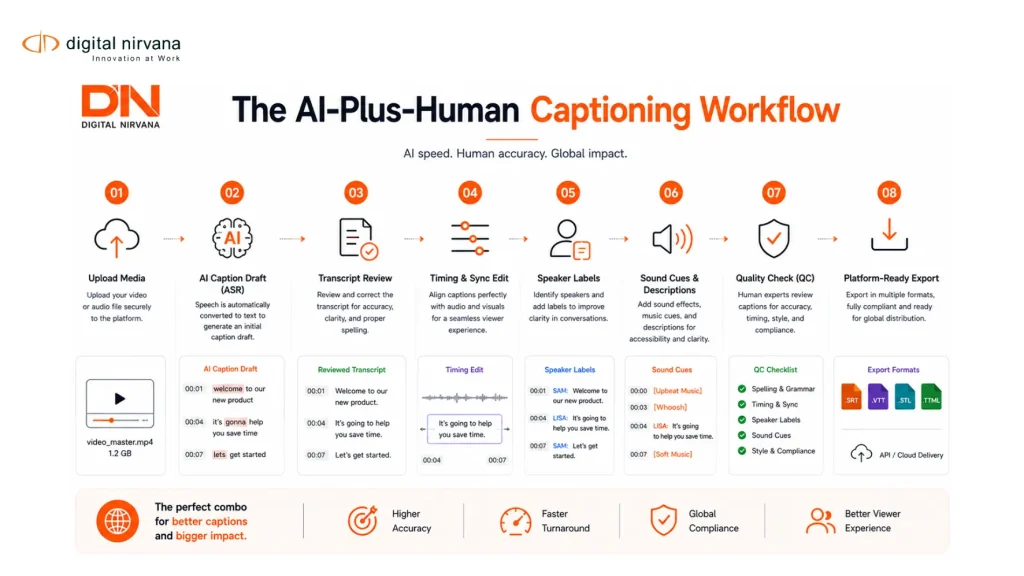
A Practical AI-Plus-Human Captioning Workflow
The strongest workflow combines automation, editing, and QC.
Upload Or Ingest The Media
The workflow begins with the media file, live feed, or recorded asset.
At this stage, teams should confirm the source language, audio quality, content type, platform destination, required caption format, style guide, turnaround time, and whether the content needs subtitles, translation, or dubbing.
Generate Automatic Captions
The software generates an initial transcript and caption draft using ASR.
This first pass should include timing and basic punctuation. Some tools may also support speaker detection or multilingual processing.
Review Transcript Accuracy
A human reviewer checks the transcript for missed words, wrong words, names, numbers, punctuation, speaker changes, and terminology.
This step is critical because every later step depends on the source text.
Edit Timing, Placement And Reading Speed
The captioner adjusts timing so captions align with the audio.
They may split long lines, fix awkward breaks, adjust reading speed, and ensure captions do not block important visual information. This is where automatic captions become viewer-ready captions.
Add Speaker Labels And Sound Cues
Closed captions should include speaker labels and relevant non-speech audio.
This may include music cues, laughter, applause, sound effects, off-screen speech, tone, or other audio information needed to understand the scene. W3C’s caption guidance supports this broader view of captions as speech plus non-speech audio information.
Run Quality Control
The workflow should include language QC and technical QC.
This can include checks for accuracy, spelling, punctuation, timing, duration, reading speed, line length, caption placement, file format, and style guide compliance.
Export Platform-Ready Caption Files
The final step is delivery.
Teams may need SRT, VTT, SCC, TTML, embedded captions, sidecar files, translated subtitles, or other platform-specific formats. Digital Nirvana’s TranceIQ page describes CaptionerIQ as a professional captioning interface that allows users to review automatic captions and output high-quality captions in several formats.
What To Look For In Auto Captioning Software Or Services
Buyers should evaluate automatic closed captioning software by workflow quality, not only by speed.
ASR Quality
Start with ASR performance.
Ask how the software performs with accents, noisy audio, multiple speakers, technical vocabulary, music, live content, and mixed-language content. Also ask how accuracy is measured and whether the provider reports Word Error Rate or another quality metric.
Human Review Options
Human review should be available when accuracy matters.
For public, regulated, premium, or multilingual content, buyers should look for workflows that include professional captioners, transcriptionists, linguists, or quality reviewers.
Verbit’s media accessibility services page describes a workflow that combines automatic speech recognition with human quality review and professional editing for captions, subtitles, and transcripts. (verbit.ai) This reflects a broader market shift toward hybrid workflows.
Caption Editing Interface
A good captioning interface should make review efficient.
Look for timeline editing, waveform support, video preview, keyboard shortcuts, speaker labels, search, spell check, timing adjustment, style guide enforcement, and multi-format export.
Multi-Format Export
Different platforms require different caption files.
Buyers should confirm support for SRT, VTT, SCC, TTML, STL, and other required formats. They should also confirm whether files can be exported as sidecar files or embedded captions when needed.
Style Guide Support
Professional captioning often depends on style guides.
The software or service should support rules for punctuation, line breaks, reading speed, speaker labels, sound effects, capitalization, numbers, profanity, and client-specific terminology.
Digital Nirvana’s Hollywood captioning success story highlights how a workflow can classify files by expected output and customer style guides before moving through human review and automatic QC.
Localization And Dubbing Support
For global media distribution, captions are often only the first step.
If a team also needs subtitles, translations, or dubbing, it should choose a workflow that supports localization. Digital Nirvana’s Subs & Dubs offering is centered on AI-powered subtitles, translations, and automated dubbing, all refined by experts.
Security And Workflow Integration
Media teams often handle unreleased, sensitive, or licensed content.
Ask about secure file transfer, user permissions, review access, audit trails, platform integrations, turnaround workflows, and delivery controls. For enterprise media teams, security and process reliability matter as much as caption generation speed.
How Digital Nirvana’s Subs & Dubs Supports Captioning And Localization
Digital Nirvana’s Subs & Dubs is built for teams that want AI speed with expert refinement.
Its site describes Subs & Dubs as a way to localize content with AI-driven subtitles, translations, and automated dubbing, refined by experts for cultural and linguistic accuracy. It also describes captioning as a workflow that combines ASR technology with expert review to produce accurate, well-timed, and linguistically refined captions.
This positioning is important for buyers evaluating automatic closed captioning software because the real need is often broader than caption generation.
A media team may need:
- Automatic caption drafts.
- Human-reviewed captions.
- Subtitles for global distribution.
- Translations across multiple languages.
- Dubbing for premium or regional content.
- Style guide compliance.
- Technical QC.
- Platform-ready files.
- Faster delivery without sacrificing quality.
Digital Nirvana’s closed captioning success story also shows how a technology-aided workflow can combine speech-to-text generation, professional transcript editing, AI-based caption splitting, frame-by-frame captioner review, automatic QC, and post-delivery auditing.
For buyers, that is the value of a hybrid model. AI accelerates the work. Human review protects the final output.
When To Use Automatic Captions, Human Captions Or A Hybrid Workflow
Not every captioning project needs the same level of review.
Use Automatic Captions When Speed Matters More Than Perfection
Automatic captions may be suitable for internal drafts, rough cuts, searchable archives, meeting recordings, low-risk internal videos, or first-pass caption generation.
Even then, teams should review captions before public release if accuracy, accessibility, or brand quality matters.
Use Human Captions When Accuracy And Risk Matter Most
Human captioning is better for broadcast programming, legal content, medical content, financial content, educational content, public-sector videos, premium entertainment, high-visibility brand content, and anything subject to compliance requirements.
Human review is also important when content includes poor audio, heavy accents, multiple speakers, technical terms, or sensitive topics.
Use A Hybrid Workflow For Most Professional Media
For many teams, the best answer is hybrid.
AI generates the first draft. Human reviewers correct accuracy, timing, speaker labels, sound cues, style guide issues, and final file readiness. This approach supports both speed and quality.
Digital Nirvana’s Subs & Dubs and captioning positioning fit this model because they combine AI-driven outputs with expert refinement for linguistic and cultural accuracy and caption quality.
FAQs
Automatic closed captioning software uses ASR to convert spoken audio into timed caption text. It can create a first draft of captions quickly, often with punctuation, timing, and export options for common caption formats.
Auto captioning software can be useful, but broadcast content usually needs human review. Broadcast captions must be accurate, synchronous, complete, and properly placed according to FCC caption quality standards.
Captions include spoken dialogue and important non-speech audio such as speaker labels, music, sound effects, and other cues. Subtitles usually focus on dialogue, often for viewers who can hear the audio but need language support. W3C explains that captions include speech and non-speech audio information needed to understand the content.
Automatic captions need human review because ASR can make errors with names, accents, background noise, speaker changes, punctuation, timing, and technical vocabulary. Human reviewers also add sound cues, fix line breaks, improve readability, and check final quality.
The main benefits are speed, lower first-pass cost, scalability, searchability, and easier preparation for subtitles or localization. Automatic captions help teams process large volumes of content faster.
Auto captioning software may struggle with noisy audio, overlapping speakers, accents, domain-specific words, proper names, timing, placement, speaker labels, and non-speech audio. It may also fail to meet style guide or compliance requirements without review.
Yes. Automatic captions or transcripts can be used as the starting point for subtitles, translation, and dubbing. Digital Nirvana’s Subs & Dubs offering supports AI-driven subtitles, translations, and automated dubbing refined by experts for cultural and linguistic accuracy.
Digital Nirvana supports AI-assisted captioning through workflows that integrate ASR, expert review, caption editing, QC, subtitle generation, translation, and dubbing. Its TranceIQ page also describes CaptionerIQ as a professional interface for reviewing automatic captions and exporting high-quality captions in several formats.
Conclusion
Automatic closed captioning software is powerful, but it should not be treated as a complete replacement for caption quality control.
AI can create captions quickly, reduce first-pass cost, and help teams scale large content libraries. But professional captions still need accurate text, proper timing, speaker labels, sound cues, readable formatting, platform-ready files, and confidence in compliance.
For most broadcast, OTT, education, enterprise, and global media teams, the strongest workflow is AI plus human review. That model protects speed without sacrificing accessibility, quality, or viewer trust.
Key Takeaway
- Automatic closed captioning software is useful for fast first-pass caption generation.
- Auto captioning software works best with clean audio, clear speakers, and low-complexity content.
- AI captions can struggle with accents, noise, speaker changes, names, timing, and non-speech audio.
- Human review is essential for accessibility, compliance, style guides, localization, and final delivery quality.
- Captions should be accurate, synchronous, complete, and properly placed.
- A hybrid AI-plus-human workflow gives media teams both speed and quality.
- Digital Nirvana’s Subs & Dubs is a strong fit for teams that need AI-driven subtitles, translations, dubbing, and expert-reviewed caption workflows.