Introduction
A broadcast issue does not always begin as a major outage.
It may start as missing captions on one feed. A frozen frame on a regional output. A loud commercial break. A failed SCTE marker. A black screen that lasts only a few seconds. A silent audio channel that nobody notices until a viewer complains.
In traditional monitoring workflows, teams often rely on operators to watch screens, check logs, and react only after a problem is already visible. That approach becomes harder when one team must monitor linear channels, OTT streams, IP feeds, regional outputs, ad breaks, captions, loudness, and return paths simultaneously.
AI broadcast monitoring changes the workflow. It helps systems detect issues earlier, send alerts faster, connect alerts to recorded evidence, and help teams understand whether a problem affects compliance, quality of experience, or both.
For broadcasters, OTT teams, and network operations teams, the goal is simple. Catch the issue before viewers, regulators, advertisers, or internal stakeholders do.
Table Of Contents
- What Is AI Broadcast Monitoring?
- Why Traditional Broadcast Monitoring Is No Longer Enough
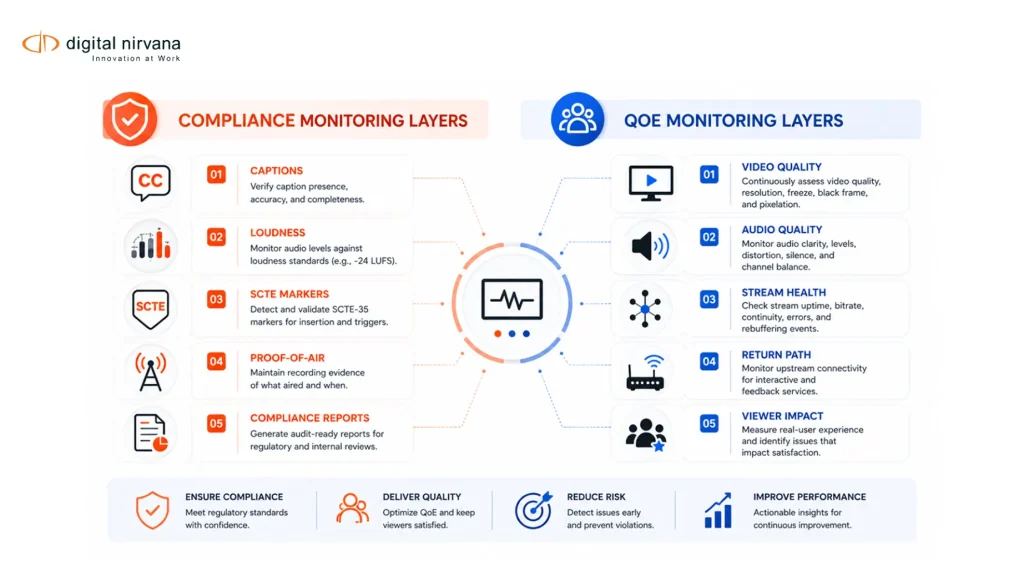
- How AI Alerts Improve Broadcast Compliance
- How AI Alerts Improve QoE
- AI Broadcast Monitoring Workflow
- What To Compare In AI Broadcast Monitoring Tools
- How MonitorIQ Supports AI Broadcast Monitoring
- When Broadcast Teams Should Invest In AI Alerts
- FAQs
- Conclusion And Key Takeaway
What Is AI Broadcast Monitoring?
AI broadcast monitoring is the use of artificial intelligence, automation, signal analysis, metadata, and rules-based alerts to monitor broadcast and streaming content in real time or near real time.
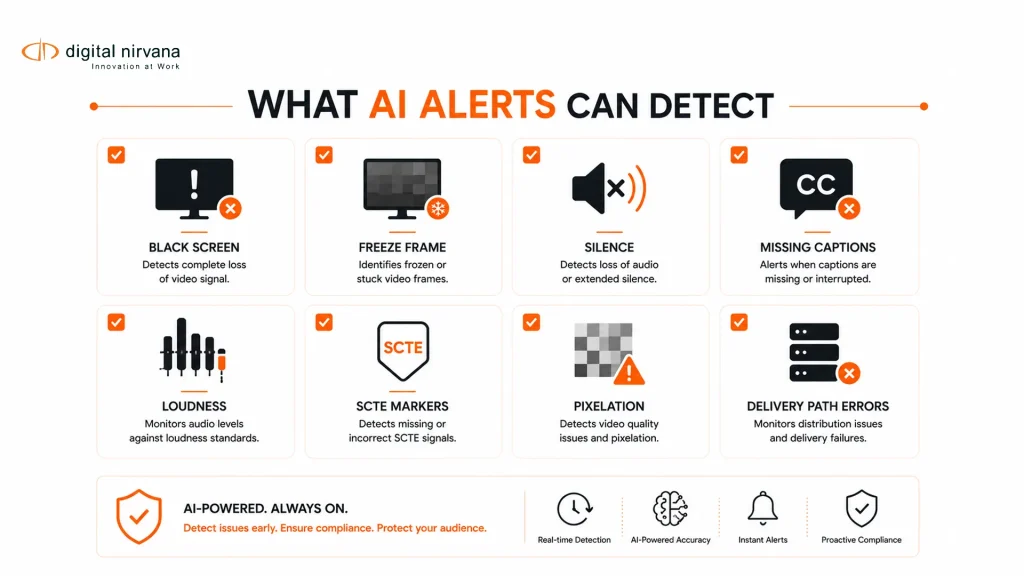
In a broadcast environment, this can include monitoring for black screen, freeze frame, audio silence, audio loudness, missing captions, subtitle issues, SCTE markers, ad verification, transport stream errors, QoE problems, and content events that may require review.
This is different from general media monitoring. General media monitoring often tracks brand mentions, sentiment, competitors, or reputation across TV, radio, podcasts, and online channels. Onclusive, for example, describes broadcast media monitoring as the tracking, recording, and analysis of brand or industry mentions across television and radio, often using speech-to-text and sentiment analysis.
AI broadcast monitoring is more operational. It is built for teams responsible for signal quality, compliance logging, proof-of-air, service reliability, caption availability, loudness compliance, ad verification, and viewer experience.
Digital Nirvana’s MonitorIQ fits this operational category. It is positioned as a content monitoring, compliance logging, and verification solution that helps teams monitor ad performance issues, service quality, compliance gaps, and content-monitoring challenges on a single platform.
Why Traditional Broadcast Monitoring Is No Longer Enough?
Traditional monitoring workflows were designed for a simpler delivery environment.
A team could watch a set of screens, check a few channels, review logs, and respond when something looked or sounded wrong. That model becomes less reliable when content is distributed across linear broadcast, cable, satellite, OTT, FAST, social clips, regional variants, and return-path feeds.
Modern teams need to monitor more signals, more formats, and more failure points. They also need to prove what happened after the fact.
A viewer complaint may require a clip. A regulator may require evidence. An advertiser may ask whether a spot aired correctly. A legal team may need the exact timestamp of a segment. A distribution team may need to know whether the issue happened at the source, encoder, CDN, platform, or device return path.
This is why AI alerts matter. They do not replace operators. They help operators focus on the feeds, moments, and incidents that need attention.
How AI Alerts Improve Broadcast Compliance?
Compliance depends on more than recording what aired. Teams need to know when something went wrong, where it happened, and whether there is enough evidence to review or report it.
AI alerts improve compliance by turning passive logs into active review workflows.
Caption And Subtitle Alerts
Caption and subtitle issues can affect accessibility, viewer trust, and regulatory risk.
In the United States, the FCC requires that closed captions be accurate, synchronous, complete, and properly placed. That makes caption monitoring important for broadcasters, cable networks, and other video programming distributors.
AI broadcast monitoring can help detect missing captions, caption timing issues, subtitle presence, Teletext issues, and feed-specific caption problems. MonitorIQ supports closed-caption monitoring for CC608, CC708, subtitles, and Teletext, along with real-time alerting for caption standards compliance.
For compliance teams, the value is not only the alert. The value is the ability to connect the alert to a recording, timestamp, metadata, and exportable proof.
Loudness Alerts
Loudness remains one of the most visible viewer experience and compliance issues.
The FCC’s CALM Act rules require commercials to have the same average volume as the programs they accompany. MonitorIQ offers loudness monitoring for the CALM Act/A/85 and EBU R128, enabling teams to track and report on loudness compliance.
AI alerts can help teams respond faster when loudness moves outside expected thresholds. Instead of waiting for viewer complaints or reviewing logs later, operators can see loudness exceptions as they happen and tie them to the affected feed, ad break, or program segment.
SCTE And Ad Verification Alerts
Ad insertion is a technical, revenue, and compliance workflow.
SCTE-35 signals can identify advertising breaks, advertising content, and programming content such as programs and chapters. When those markers fail, fire late, or do not align with the intended break, teams may face revenue leakage, incorrect ad delivery, or proof-of-performance disputes.
MonitorIQ supports ad verification across SCTE-35, SCTE-104, and SCTE-224. AI broadcast monitoring can help teams identify marker issues, investigate the affected window, and export proof for traffic, ad operations, engineering, or sales.
Proof-Of-Air And Compliance Logging Alerts
Compliance logging is most useful when recordings, alerts, and metadata work together.
A recording alone may prove what aired, but teams still need to find the right time, verify the issue, and share the evidence. Digital Nirvana’s content monitoring article describes modern content monitoring as a single source of truth for what left the facility or OTT stack, with timecoded proof for regulators, advertisers, and executives.
AI alerts make that evidence easier to retrieve. When an alert is tied to timecoded recording, metadata, and reporting, teams can move from “something happened” to “here is what happened, when it happened, and what evidence supports it.”
Content And Policy Alerts
Some compliance risks are not purely technical.
Teams may need to identify prohibited words, sensitive visuals, missing disclaimers, incorrect ad placements, political content, regional restrictions, or internal policy concerns. AI can help surface likely issues for human review.
The key is to keep humans in the decision loop. AI can flag potential issues, but compliance teams should confirm context before final action. This is especially important for legal, political, accessibility, and regulated content.
How AI Alerts Improve QoE?
Quality of experience, or QoE, is about what the viewer actually experiences.
A signal may technically exist, but the viewer may still see pixelation, freezing, black frames, audio drops, missing subtitles, or loud ad breaks. Broadcast Bridge notes that QoE measurement has become critical for monetization, especially in targeted advertising and direct content consumption.
AI alerts improve QoE by helping teams detect viewer-impacting issues faster.
Black Screen And Freeze Detection
Black screen and freeze frame alerts help teams identify visual failures that may only affect one feed, region, platform, or output.
In a manual workflow, an operator must notice the issue on a screen. In an AI-assisted workflow, the system can flag the issue based on thresholds and patterns. This is especially useful when teams monitor multiple channels or regional variants simultaneously.
MonitorIQ supports proactive alarms for visual impairments that affect service quality.
Audio Loss And Silence Detection
Audio issues can be harder to notice than video issues, especially when operators are monitoring many feeds visually.
AI alerts can identify silence, loss of audio, incorrect audio levels, loudness problems, or channel-specific audio failures. Actus Digital’s QoE monitoring page also highlights real-time alerts for loss of audio, loss of video, loudness issues, missing subtitles, and missing closed captions, which reflects how common these alert types are in the category.
For broadcast teams, audio alerts are valuable because silence, incorrect loudness, or missing channels can affect both compliance and viewer experience.
Pixelation And Visual Quality Alerts
Pixelation and visual artifacts may indicate encoding problems, delivery issues, bandwidth constraints, or downstream platform problems.
AI monitoring can help identify when video quality drops below expected standards. This is especially important for OTT and IP workflows, where issues may vary by delivery path, device, bitrate ladder, CDN, or regional endpoint.
Transport Stream And Delivery Path Alerts
Many broadcast issues are not visible as simple black screen or silence.
They may involve transport stream errors, missing services, metadata problems, timing issues, or delivery chain problems. MonitorIQ lists TS analysis and TS/IP/OTT input support, which is relevant for teams monitoring transport streams, IP delivery, and OTT outputs.
The goal is to understand where the problem appears in the chain. Did it happen at ingest, master control, encoder output, distribution, OTT packaging, or return-path monitoring?
Return Path And OTT Monitoring
Return path monitoring helps teams see what viewers or downstream endpoints may actually receive.
This matters because a clean source feed does not always mean a clean viewer experience. Issues can appear after encoding, packaging, distribution, localization, or platform delivery.
MonitorIQ supports return path and remote monitoring across geographic areas, helping teams monitor distributed outputs as well as internal feeds.
AI Broadcast Monitoring Workflow
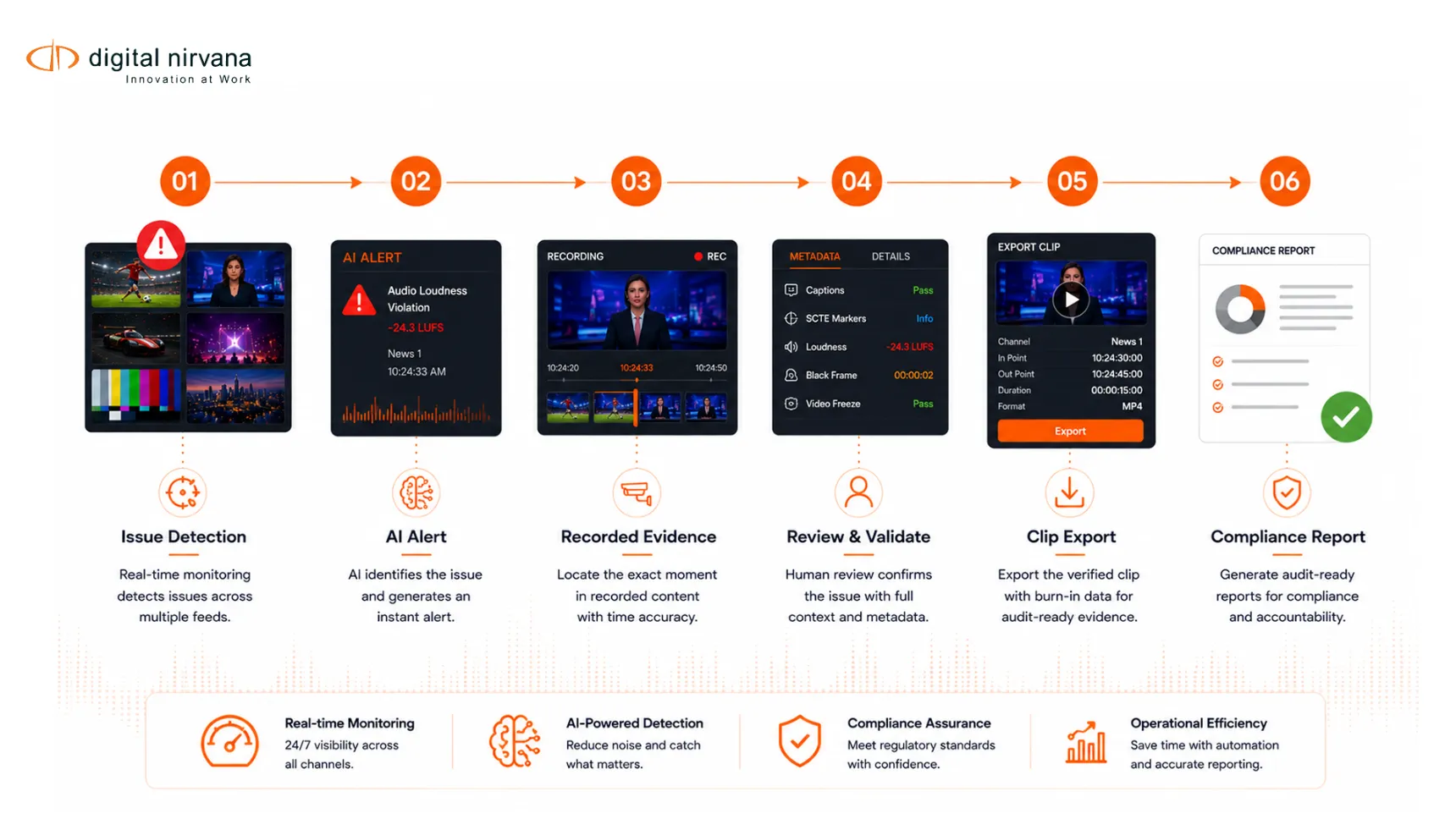
AI broadcast monitoring works best when alerts are connected to action. A useful alert should help a team detect, prioritize, investigate, document, and prevent future issues.
Detect The Issue
The first step is detection.
The monitoring system identifies a problem such as black screen, freeze, silence, loudness deviation, missing captions, SCTE mismatch, or transport stream issue.
Prioritize The Alert
Not every alert has the same impact.
A short caption dropout on a test feed is not the same as a long outage on a primary channel. AI alerts should help teams prioritize by severity, channel, duration, audience impact, compliance risk, and business importance.
Connect The Alert To Recorded Evidence
An alert becomes much more useful when it is connected to the recorded content.
Teams should be able to open the exact time window, review the feed, inspect related metadata, and compare the incident against other channels or delivery points.
MonitorIQ gives users browser-based access to live or historical recordings across one to hundreds of channels, with access to content and metadata.
Review The Incident
Human review remains important.
AI can identify that something may be wrong, but engineering, compliance, or operations teams still need to confirm the issue, understand context, and decide what to do next.
For example, a silence alert may be a real outage, or it may be expected silence during a specific segment. A caption alert may indicate a missing caption file, or it may be tied to an exception. A loudness alert may need to be reviewed against the program and ad window.
Export Proof And Reports
Teams often need to share evidence with stakeholders who do not use engineering tools.
That may include legal, traffic, ad sales, station management, regulators, distributors, or advertisers. A strong workflow should allow users to export clips, reports, logs, timestamps, and metadata.
MonitorIQ’s positioning around compliance logging and verification supports this type of proof workflow.
Use Trends To Prevent Repeat Issues
AI alerts should not only solve individual incidents. They should help teams identify patterns.
If captions fail on the same regional feed every week, that points to a repeat workflow issue. If loudness alerts appear around specific ad sources, the ad workflow needs review. If OTT quality drops during peak hours, the distribution path may need attention.
Over time, alert history becomes operational intelligence.
What To Compare In AI Broadcast Monitoring Tools?
Choosing an AI broadcast monitoring platform is not only about alert count. More alerts do not always mean better monitoring. The right system should generate useful alerts, reduce noise, connect alerts to evidence, and support both compliance and QoE workflows.
Real-Time Alert Coverage
Compare which events the platform can detect in real time.
Look for alerts around black screen, freeze frame, silence, loss of audio, loudness, missing captions, subtitle issues, SCTE events, ad verification, transport stream errors, visual impairments, and QoE problems.
Compliance Logging And Retention
A monitoring tool should help teams prove what aired.
Compare recording quality, retention options, channel count, search functions, clip export, report export, and audit access. Compliance workflows need evidence that is easy to retrieve and share.
Caption, Loudness, And SCTE Support
These are high-priority comparison points for commercial broadcast buyers.
MonitorIQ supports closed-caption standards, loudness monitoring for the CALM Act/A/85 and EBU R128, and ad verification across SCTE-35, SCTE-104, and SCTE-224.
QoE And Signal Analysis
QoE monitoring should reflect what viewers experience, not only whether a signal exists.
Compare whether the platform can detect visual impairments, audio loss, missing subtitles, pixelation, freeze, black screen, and delivery path issues. Also check whether it can monitor across linear, IP, OTT, and return-path workflows.
Historical Search And Clip Export
A good alert is only useful if the team can investigate it quickly.
Users should be able to jump from an alert to the exact recording, review the moment, compare channels, inspect metadata, create a clip, and export evidence.
Browser-Based Access
Modern broadcast teams are distributed.
Engineering, compliance, traffic, sales, legal, and station management may all need different levels of access. Browser-based access helps non-engineering users review recordings and evidence without sitting in master control.
MonitorIQ provides browser-based access to live or historical recordings across many channels.
Reporting And Audit Trails
Compliance teams need reports that are defensible and easy to review.
Compare whether the system can export alert reports, loudness reports, caption evidence, SCTE logs, proof-of-performance reports, and incident records.
Deployment Flexibility
Broadcast infrastructure is often mixed.
A team may have SDI, IP, transport stream, OTT, satellite, cable, terrestrial, and radio workflows. MonitorIQ lists support across transport stream, TS/IP/OTT, baseband, terrestrial, satellite, cable, and radio sources.
The best tool should fit the team’s current infrastructure and the architecture it is moving toward.
How MonitorIQ Supports AI Broadcast Monitoring
MonitorIQ is built for teams that need content monitoring, compliance logging, and verification in one workflow.
Digital Nirvana positions MonitorIQ as a solution for ad performance issues, inconsistent service quality, compliance gaps, and content monitoring challenges. For AI broadcast monitoring, the most relevant capabilities include real-time alerts, QoE monitoring, loudness monitoring, closed caption monitoring, ad verification, SCTE support, TS analysis, return path monitoring, and browser-based access to live and historical recordings.
MonitorIQ is especially relevant when teams need to:
- Monitor many feeds, channels, or outputs.
- Detect quality issues faster.
- Track caption and subtitle problems.
- Monitor loudness compliance.
- Verify ad markers and SCTE events.
- Review historical recordings.
- Export proof-of-air clips and reports.
- Support engineering, compliance, traffic, legal, and operations teams.
- Connect alerts to evidence instead of isolated notifications.
Digital Nirvana’s content monitoring guide also positions MonitorIQ as an AI-powered broadcast compliance logging and content monitoring platform that records from any point in the delivery chain and integrates video, captions, loudness, and metadata on a single page.
That combination matters because AI broadcast monitoring is not just about detecting a problem. It is about helping teams prove what happened and resolve it faster.
When Broadcast Teams Should Invest In AI Alerts
Broadcast teams should consider AI alerts when manual monitoring is no longer enough to protect compliance, service quality, or viewer experience.
Common buying triggers include:
- The team monitors too many feeds for operators to watch manually.
- Viewer complaints are the first sign of quality issues.
- Caption problems are discovered after publishing or airing.
- Loudness issues create complaints or compliance risk.
- Ad markers and SCTE events need stronger verification.
- OTT outputs need return-path monitoring.
- Compliance teams spend too much time searching recordings.
- Engineering teams need faster root-cause investigation.
- Legal, traffic, or sales teams need proof-of-air evidence.
- Historical logs and alerts are hard to search.
The organization wants one monitoring layer for live review, compliance evidence, QoE, and reporting.
The commercial value is clear. AI alerts help teams move from reactive review to proactive monitoring, with fewer missed issues and stronger evidence when something goes wrong.
FAQs
What Is AI Broadcast Monitoring?
AI broadcast monitoring uses automation, AI, signal analysis, metadata, and rules-based alerts to monitor broadcast and streaming content. It helps detect issues such as black screen, freeze frame, audio loss, loudness problems, missing captions, SCTE errors, and QoE issues.
What Is The Difference Between AI Broadcast Monitoring And Media Monitoring?
AI broadcast monitoring focuses on signal quality, compliance logging, proof-of-air, loudness, captions, SCTE, ad verification, and QoE. General media monitoring often focuses on brand mentions, sentiment, reputation, and competitive tracking across TV, radio, podcasts, and online media.
How Do AI Alerts Improve Broadcast Compliance?
AI alerts improve compliance by flagging issues such as missing captions, loudness problems, SCTE marker errors, ad verification issues, and policy-sensitive content. When connected to recordings and metadata, alerts help teams review incidents and export proof.
How Do AI Alerts Improve QoE?
AI alerts improve QoE by detecting viewer-impacting issues such as black screen, freeze frame, silence, audio loss, pixelation, missing subtitles, and delivery path problems. This helps teams respond before issues reach more viewers.
Why Are Caption Alerts Important?
Caption alerts are important because captions affect accessibility and compliance. The FCC says closed captions should be accurate, synchronous, complete, and properly placed.
Why Are Loudness Alerts Important?
Loudness alerts help teams identify commercials or segments that may be louder than surrounding programming. The FCC’s CALM Act rules require commercials to have the same average volume as the programs they accompany.
Can AI Broadcast Monitoring Help With Ad Verification?
Yes. AI broadcast monitoring can support ad verification by monitoring SCTE markers, ad breaks, proof-of-performance, and related recordings. MonitorIQ supports ad verification across SCTE-35, SCTE-104, and SCTE-224.
Does MonitorIQ Support AI Broadcast Monitoring Workflows?
Yes. MonitorIQ supports content monitoring, compliance logging, real-time alerts, QoE monitoring, loudness monitoring, closed caption monitoring, ad verification, TS analysis, return path monitoring, and browser-based access to live and historical recordings.
Conclusion
AI broadcast monitoring gives teams a faster way to detect, investigate, and prove what happened across live, linear, OTT, and return-path workflows.
The biggest value is not simply more alerts. It is better alerts that connect to recordings, metadata, reports, and review workflows. For broadcast engineering, master control, NOC, compliance, and distribution teams, this creates a more reliable way to protect service quality and viewer experience.
MonitorIQ fits this need when teams want broadcast monitoring, compliance logging, QoE alerts, caption and loudness checks, SCTE verification, and historical evidence in one platform.
Key Takeaway
- AI broadcast monitoring helps teams detect compliance and QoE issues faster.
- AI alerts can flag black screen, freeze, silence, audio loss, missing captions, loudness issues, SCTE problems, and delivery path issues.
- Compliance improves when alerts connect to recordings, timestamps, metadata, clips, and reports.
- QoE improves when teams monitor what viewers experience, not only whether a signal exists.
- Human review remains important for confirming context, severity, and compliance decisions.
- MonitorIQ is a strong fit for teams that need content monitoring, compliance logging, verification, QoE alerts, caption monitoring, loudness monitoring, SCTE support, and browser-based access to live or historical recordings.