Introduction
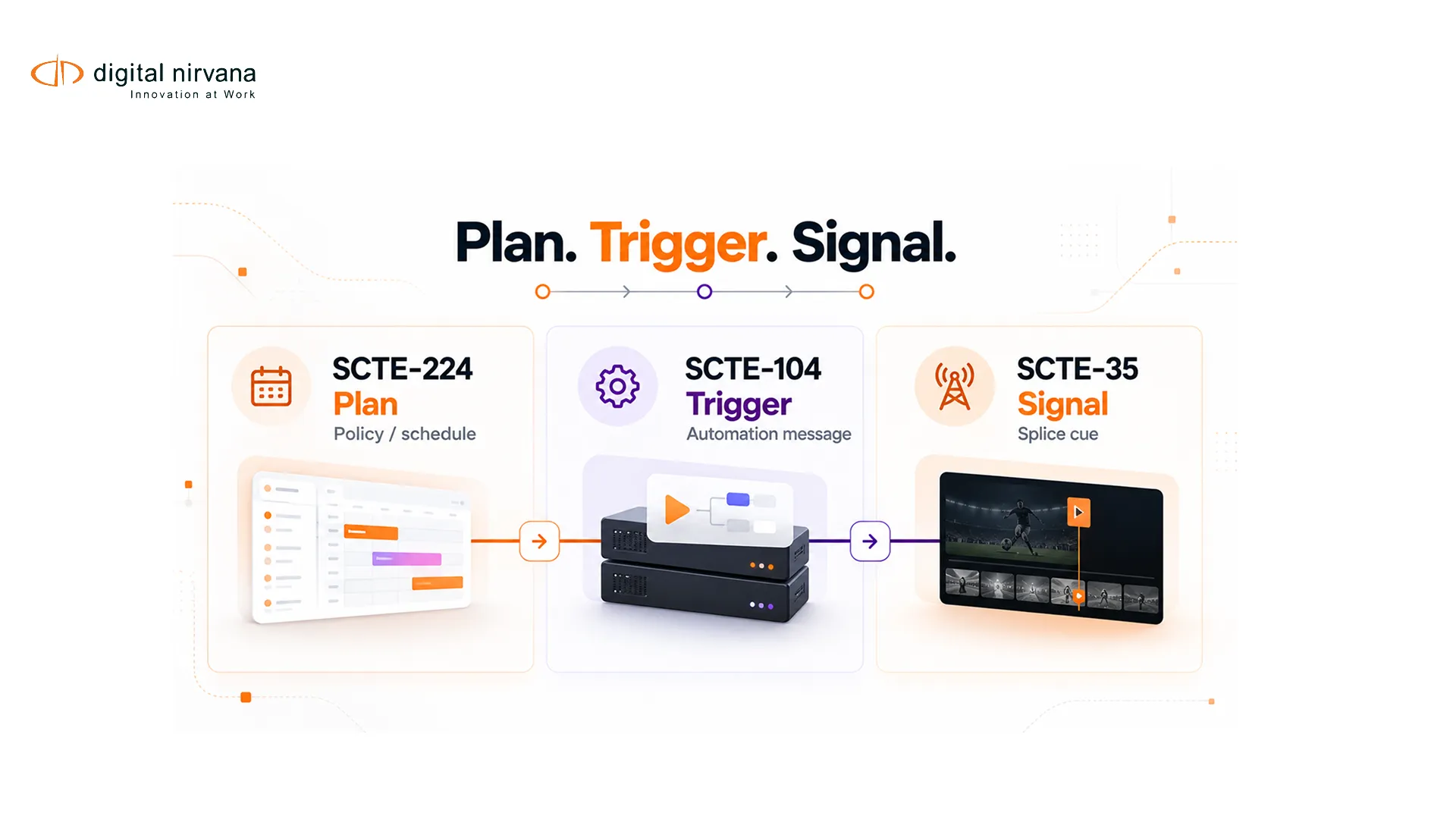
SCTE-224 is an event scheduling and notification interface used to exchange information about media events and policies outside the program stream. It can provide context that distribution systems use when applying regional, availability or other event-based rules. SCTE-35 and SCTE-104 serve different positions in the signaling chain, so the three standards should not be treated as competing versions of the same message.
The operational challenge is correlation. Teams need to connect what was scheduled or authorized, what automation requested, what the compressed stream carried and what downstream systems acted on.
Key Takeaways
- SCTE-224 communicates event and policy information out of band.
- SCTE-104 commonly carries automation messages before compression.
- SCTE-35 carries timed cue messages in compressed distribution workflows.
- Schedule, stream and manifest evidence must be correlated by identifiers and time.
- Monitoring should expose missing, late, malformed, duplicated and mismatched events.
Table Of Contents
- What SCTE-224 is
- SCTE-224, SCTE-104 and SCTE-35 compared
- End-to-end signaling flow
- Monitoring and troubleshooting
- Implementation questions
- FAQs
What Is SCTE-224?
The SCTE catalog names the standard the Event Scheduling and Notification Interface. It defines a way for systems to exchange information associated with media events and policies. The current SCTE-224 catalog entry is the authoritative place to confirm the published revision and scope.
SCTE also publishes SCTE-224 schema resources for implementers. A production team should validate its payloads against the revision agreed by participating systems and should not assume that every optional element is supported by every product.
SCTE-224 is not the frame-level command that a decoder executes to splice content. It provides out-of-band event and policy context. A distribution system can use that context with timed in-band signals and its own business rules.
SCTE-224 vs SCTE-104 vs SCTE-35
| Standard | Typical Location | Main Role | Evidence To Retain |
| SCTE-224 | Out-of-band system interface | Exchange event schedule and policy information | Request, response, version, identifiers, timestamps |
| SCTE-104 | Automation or baseband-to-compression path | Convey splice information before encoding | Source command, port or route, event ID, timing |
| SCTE-35 | Compressed stream and derived distribution signals | Carry timed cue messages for downstream processing | Raw cue, parsed fields, PTS context, stream location |
The word “typical” matters. Architectures and vendor implementations differ. Teams should document where each message is created, transformed and consumed in their own chain.
Digital Nirvana’s existing guide to SCTE-35 monitoring focuses on verification of stream cues and downstream behavior.
An End-To-End Event-Signaling Flow
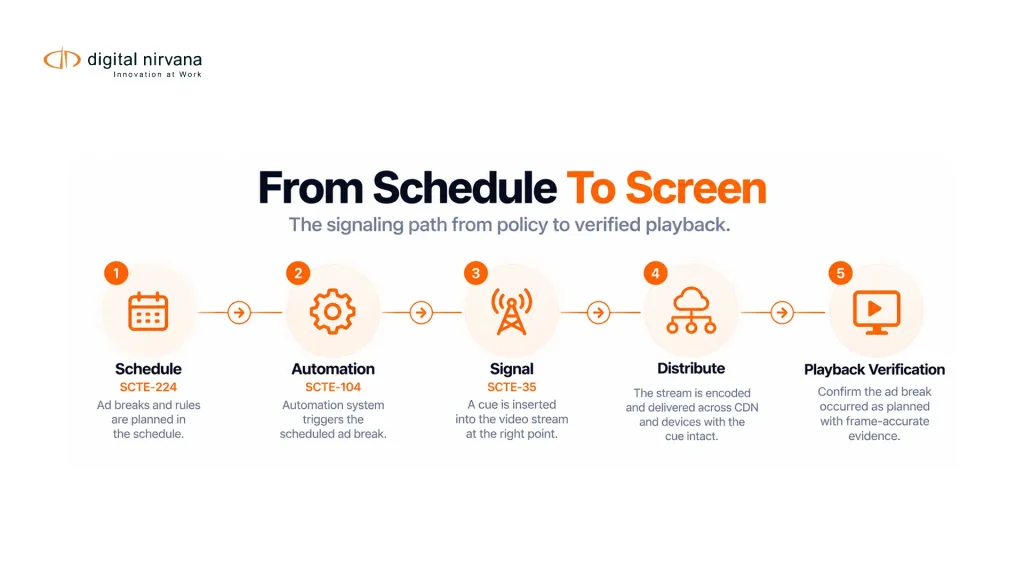
A scheduling or policy system creates the planned event and communicates applicable metadata through an SCTE-224 interface. Broadcast automation can trigger a splice request in the playout chain, often using SCTE-104 before compression. The encoder translates the relevant instruction into SCTE-35 cueing in the compressed stream.
A packager can expose the cue in HLS or DASH according to its configuration. A downstream ad-insertion or distribution system interprets the signal alongside business rules, availability decisions and platform-specific policies. The final viewer experience depends on every handoff, not only the presence of one SCTE-35 message.
This sequence should be modeled as correlated evidence:
- Planned event and policy record
- Automation or origin trigger
- Encoded SCTE-35 cue
- Packaged manifest marker
- Downstream decision and response
- Playback or output verification
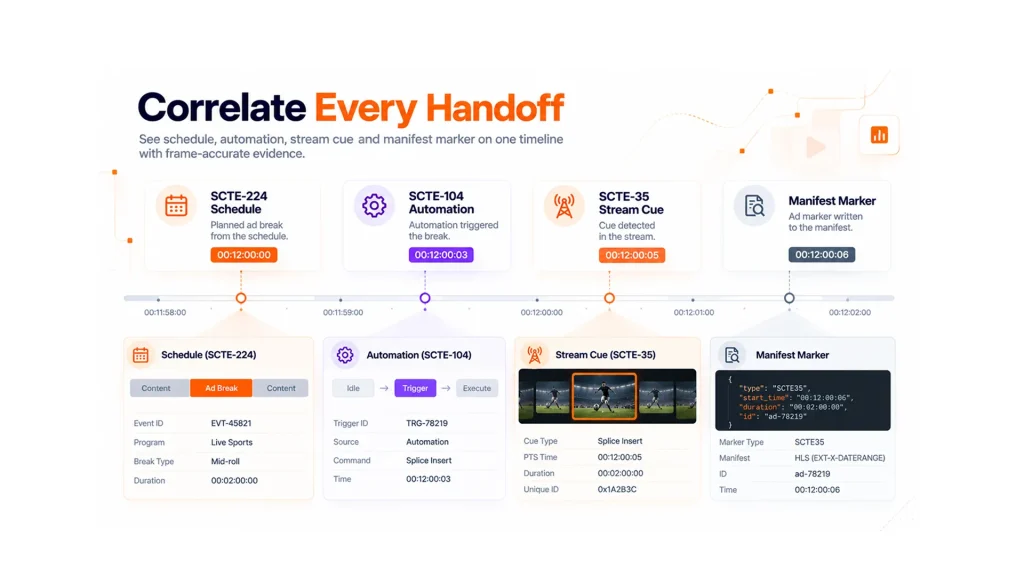
Identifiers may change across systems, so the correlation design should record explicit mappings. Time comparisons must also account for clock source, program delays and the distinction between wall-clock schedules and presentation timestamps.
How To Monitor And Troubleshoot The Workflow
| Symptom | Compare | Likely Investigation |
| Scheduled event has no cue | SCTE-224 record, automation trigger, encoder input | Policy selection, automation route, SCTE-104 handoff |
| Cue exists but no manifest marker | Parsed SCTE-35 and packager output | Message type, descriptor, packager configuration |
| Wrong regional behavior | Event policy, audience or region fields, downstream rule | Policy mapping and system interpretation |
| Event occurs at wrong time | Schedule time, automation time, PTS and output | Clock alignment, delay, cue translation |
| Duplicate action | Event IDs, repeated triggers and downstream logs | Retry behavior, deduplication and state handling |
| Start has no end | Paired messages, duration and downstream timeout | Cue construction, missed message or rule behavior |
Monitoring should preserve the raw record and the parsed interpretation. A dashboard that shows only “cue detected” cannot explain which command arrived, whether the descriptor matched the plan or how the packager represented it.
MonitorIQ is Digital Nirvana’s product family for broadcast signal monitoring, compliance logging, ad verification and proof-of-performance workflows. Its role is operational observation and evidence, distinct from content-indexing products.
The AWS MediaTailor guide to SCTE-35 ad-break messages is one implementation reference showing how a downstream service recognizes selected cue messages. It should be read as product-specific behavior, not as the universal behavior of every distribution system.
Questions To Resolve Before Implementation
- Which system is authoritative for event schedule and policy?
- Which SCTE-224 revision and schema profile do all parties support?
- How are event, content, region and policy identifiers mapped?
- What creates SCTE-104 or equivalent automation instructions?
- Which SCTE-35 commands and descriptors does each downstream system act on?
- How are schedule time, wall clock and presentation time correlated?
- What retries are allowed, and how are duplicate events suppressed?
- Which logs and media evidence are retained for incident review?
The answers should become a test matrix. Include normal events, cancellations, schedule changes, missing cues, duplicated triggers and late updates.
FAQs
It is used to exchange media-event scheduling and policy information between systems outside the program stream.
No. SCTE-224 provides out-of-band event and policy context. SCTE-35 carries timed cue messages in compressed media workflows.
SCTE-104 commonly carries splice-related automation information before encoding, where an encoder can translate the instruction into SCTE-35.
No. It communicates event and policy information. Ad selection, cue interpretation, packaging and playback are handled by other systems in the distribution chain.
Use mapped event identifiers, timestamps, service context and retained source messages. Document any identifier or time transformation at each handoff.
Retain raw and parsed messages, event identifiers, timestamps, stream and service context, manifest evidence, downstream responses and operator actions.
Conclusion
SCTE-224 adds scheduled event and policy context to a signaling workflow. SCTE-104, SCTE-35, packaging and downstream decisions complete different parts of the path. Correlated monitoring across those layers gives operations teams the evidence needed to find where a planned event changed or failed.
To discuss monitoring and evidence for an SCTE signaling chain, contact Digital Nirvana.