Meet FCC caption standards without vendor chaos. Learn the 4 key compliance standards, file formats, and how AI-assisted workflows cut turnaround time.
The compliance wake-up call
Your station manager just handed you a viewer complaint letter. The FCC marked three recent broadcasts as non-compliant: captions were out of sync, a speaker wasn’t identified, and sound effects went missing. Now compliance is asking for a plan.
You’re not alone. Broadcast teams across the country balance tight production schedules with regulatory expectations, and one missed step can trigger audits, fines, or reputational damage. The good news: caption compliance isn’t mysterious. It’s a workflow problem with a clear solution.
This guide walks you through the four FCC standards, platform-specific requirements, and how modern workflows deliver captions without vendor overhead.
Why FCC caption compliance matters
Closed captions serve viewers who are deaf or hard of hearing, and they’re required by law on most new TV programming. The FCC doesn’t just demand captions exist. It demands they’re accurate, synchronized, complete, and properly placed on screen. Every breach puts your station at risk.
Beyond regulation, captions expand your audience. Research shows captions increase watch time, improve comprehension, and reach viewers in sound-off environments (gyms, transit, social media). When you treat captions as a production essential, not an afterthought, the business case builds itself.
The four FCC standards that define compliance
The FCC’s closed captioning rule rests on four pillars. Miss one, and your program is technically non-compliant.
Accuracy. Every word, spelling, and punctuation mark must match the audio. If a character says “analyze,” your caption says “analyze,” not “analyze.” Slang, accents, and product names need to be correct. Punctuation matters because commas and question marks shape meaning for readers who can’t hear tone.
Synchronicity. Captions must align with audio in real time. A caption appears when the speaker starts, ends when they stop. In fast dialogue or overlapping speech, timing gets tricky, but delay or lag loses viewers. Live broadcasts need trained captioners or backup systems. Pre-recorded content allows polish during QC.
Completeness. Every word of dialogue must be captioned. Critical sound effects (sirens, gunshots, door slams) must be described in brackets. Music lyrics that advance plot need to appear. Sponsor tags and promos inside the program get captions too. Skipping “incidental” audio is a common compliance trap.
Placement. Captions can’t block faces, on-screen text, or graphics. They need safe margins on all sides. During lower thirds or crawls, captions must reposition or hide. Proper placement sounds simple but trips up teams that haven’t mapped safe areas.
File formats: what each platform expects
Your master caption file should be format-agnostic. Create once, export to multiple formats for different delivery paths.
SRT (SubRip Text) is the lightweight standard for YouTube, social media, and streaming. It’s human-readable and platform-agnostic. Use SRT when simplicity and broad compatibility matter most.
WebVTT (Web Video Text Tracks) powers HTML5 players and interactive video platforms. It supports styling, positioning, and cue settings that SRT can’t handle. Use WebVTT when you need design control in the player.
SCC/MCC (Scenarist Closed Caption) is the broadcast standard. It uses frame-accurate timecodes and supports EIA-608/708 caption data. Use SCC for TV transmission where frame-level precision is non-negotiable.
TTML (Timed Text Markup Language) is the interchange format for global libraries. It carries metadata, styling, and multi-region layouts. Use TTML when multiple services will ingest your captions.
Create your master in one format that suits your workflow, then generate platform-specific exports. This prevents format multiplication errors and keeps one source of truth.
Real-world workflow: from production to playout
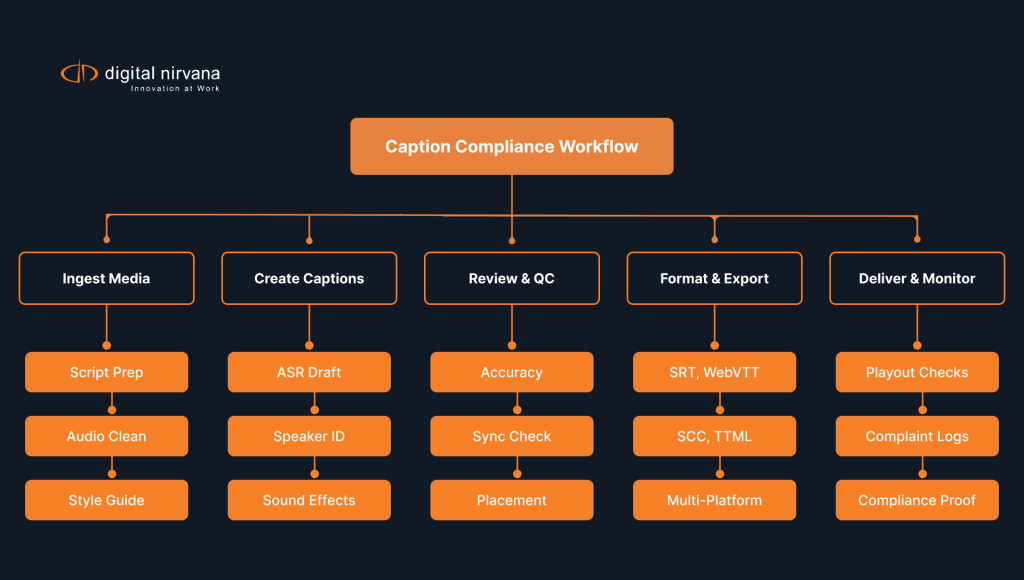
Here’s how a broadcast team runs captions end-to-end without chaos:
1. Ingest & Prep. Audio is cleaned, scripts are pulled, glossaries are prepared (show names, character names, brand terms). A style guide confirms the speaker identification format and the sound-effect language.
2. Draft Captions. AI tools auto-generate an SRT or WebVTT draft from audio. Modern systems handle speaker diarization (who speaks when) and domain terms. Turnaround: 30 minutes for a 60-minute show.
3. Edit & QC. Humans review the draft for accuracy, sync, and placement. An editor corrects homophones, fixes punctuation, and adjusts line breaks for readability. A compliance specialist confirms all four FCC standards are met.
4. Format & Export. The master file is exported to SCC for transmission, WebVTT for streaming, and SRT for social platforms. Validation tools confirm no frame loss and no platform-specific errors.
5. Deliver & Monitor. Files are loaded into your content management system. On air, monitoring tools track caption delivery and flag dropout. Post-broadcast, logs show proof of compliance.
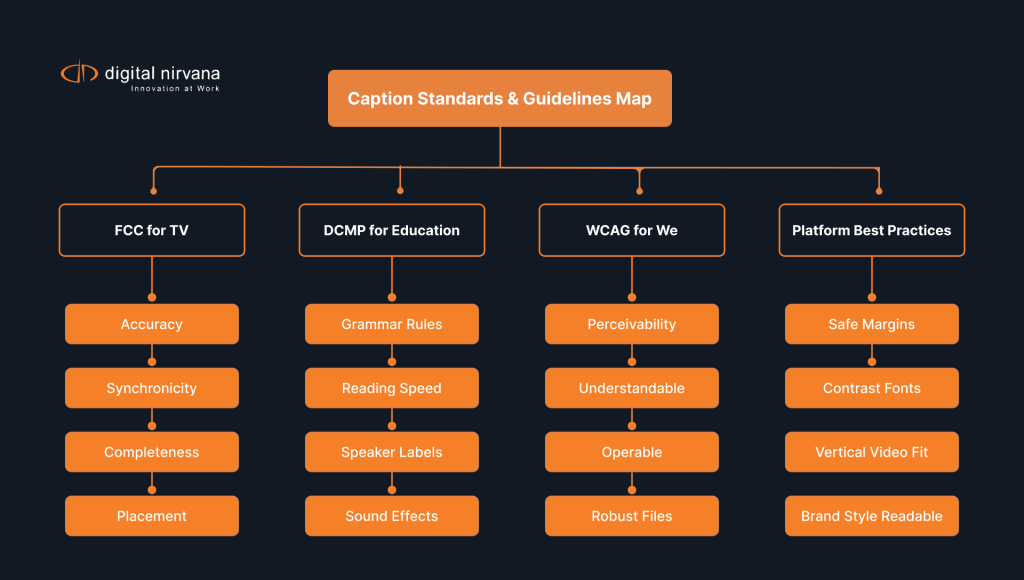
FCC, DCMP, and WCAG: standards by audience
Depending on where your content lives, different rules apply.
For TV broadcasters (FCC Rule). If you own linear channels or simulcast to apps, FCC rules apply. Accuracy, sync, completeness, and placement. Document your process and respond to complaints within 30 days. Keep proof of compliance for audits.
For educational content (DCMP Guidelines). Schools and universities follow DCMP standards, which go deeper into grammar, reading speed, and speaker labels. Education audiences include early readers and English learners, so clarity is more important than brevity. DCMP also expects descriptions of sound effects to carry pedagogical meaning.
For web & apps (WCAG 2.1 AA). If your content lives on a website or streams through a web app, WCAG accessibility standards apply. WCAG expects captions for prerecorded video and, where feasible, live captions for live streams. Player controls must support caption on/off with keyboard and screen readers. Ensure high contrast between text and background so captions remain readable at any resolution.
For platforms (Platform Rules). YouTube, Netflix, Amazon, and Hulu each have caption conformance specs. Netflix wants specific font choices and safe margins. Amazon enforces character limits per line. YouTube auto-corrects SRT timing but flags obvious errors. Check platform specs before you export.
Measurable impact: what compliance unlocks
Meeting caption standards doesn’t just avoid fines. It delivers:
Risk Reduction. One compliance violation can cost $10,000–$100,000 in FCC fines, depending on severity. A documented workflow prevents repeat violations.
Speed. Teams using AI-assisted captioning cut turnaround from 2–3 days to 4–6 hours. That speed lets you publish breaking news or live events with captions, not hours after.
Audience Growth. Closed captions increase watch time by 13–25% and reach viewers on muted autoplay (social media, transit). You’re expanding audience without extra production cost.
Vendor Control. Managing multiple captioning vendors creates inconsistency and cost sprawl. A single integrated workflow reduces vendor dependency and keeps spend predictable.
How AI streamlines caption workflows
Automatic speech recognition has improved dramatically. Modern AI systems handle accents, technical terms, and domain-specific vocabulary. They also perform speaker diarization so you know who speaks when.
But AI alone isn’t compliance-ready. Homophones confuse AI (a “marshal” vs. “martial” law). Sarcasm and cultural references miss AI. Live speech with crosstalk stumps most engines.
Hybrid workflows solve this: AI drafts in hours, humans refine to compliance in minutes. An editor spends 30% of the time reviewing AI output versus 100% typing from scratch. A compliance specialist confirms the four FCC standards are met. The result is broadcast-ready captions at speed.

Common objections: what teams ask
“Doesn’t AI accuracy risk compliance?” AI drafts in minutes; human review ensures compliance. This hybrid approach is safer than manual captioning where fatigue drives errors. Every file is checked against FCC standards before delivery.
“We’ve done manual captions for years. It works fine.” Manual works at low volume. When you scale to multiple channels, daily news, or long-form content, manual becomes a bottleneck. One 60-minute episode takes 8–12 hours to caption manually. AI plus human review cuts that to 2–3 hours.
“Can’t we just use YouTube’s auto-captions?” YouTube’s captions are free and adequate for some use cases, but they’re not FCC-compliant for broadcast. Auto-captions miss proper nouns, struggle with crosstalk, and lack human judgment. For TV, YouTube captions are a starting point, not a finish line.
“What if our vendor goes down?” Diversified workflows reduce single-vendor risk. If you have caption files in open formats (SRT, WebVTT, SCC), you can port them to another vendor. Avoid proprietary formats that lock you in.
Success metrics to track
Set these KPIs to measure caption quality and compliance:
- Caption Error Rate: Aim for <1% (accuracy, sync, completeness issues per 100 minutes)
- On-Time Delivery: 95%+ of files delivered before air date
- Compliance Audit Pass Rate: 100% when tested
- Viewer Complaints: Track and close within 30 days with corrective action
- Turnaround Time: Aim for <6 hours post-production for pre-recorded content
Review these metrics monthly. When error rates drift, audit your QC process. When turnaround stretches, you may need workflow adjustments or additional vendor support.

Get your caption workflow compliance-ready
Caption compliance is a continuous workflow where accuracy, sync, completeness, and placement are baked in. Start by auditing your current process, defining a style guide, and testing your delivery chain.
Ready to move forward? Choose your path.
Frequently asked questions
Closed captions are for viewers who need dialogue plus sound effects described for full comprehension. Subtitles present translated dialogue for viewers who hear the audio but prefer another language. Subtitles usually skip non-speech audio. Use closed captions on TV and streaming when you must meet captioning laws. Use subtitles for global content distribution.
Platforms like YouTube and TikTok support optional captions. But your audience often watches with sound off, so captions improve engagement even when not required. Many platforms accept SRT or WebVTT files. For best reach, use both closed captions (player toggle) and open captions (burned into video) on key assets.
Live broadcasts need captions that appear with minimal delay so viewers can follow in real time. Broadcasters hire trained captioners, re-speakers, or qualified vendors and set service levels for latency and accuracy. Engineering teams route clean audio and provide glossaries so captioners keep names and terms consistent. Producers plan correction windows during breaks and issue post-event fixes for VOD versions.
Compliant captions hit four goals at once: accuracy, synchronicity, completeness, and proper placement that avoids covering important visuals. Stations document their processes, respond to complaints promptly, and audit vendor performance. Editors time captions to match fast dialogue, check spelling, and fix punctuation. Engineers confirm files travel cleanly through transcode and playout so frame timing stays intact. When every team member owns a slice of these steps, the operation meets captioning laws.