Live content is where transcription gets tested the hardest. The speaker turns fast, the audio is messy, names are unusual, and the moments you need are often the moments with the worst signal.
If your team depends on automatic audio transcription for highlights, compliance checks, or rapid clip creation, “good enough” accuracy is not a stable target. You need a system that gets better every week, with a workflow that connects audio capture, vocabulary training, and QC into one repeatable loop.
This guide breaks down what actually moves transcription accuracy in noisy live environments, and how to operationalize it with timecoded outputs that production teams can use immediately.
Why Noisy Live Audio Breaks Transcription Accuracy
Noisy live audio is rarely one problem. It is usually several at the same time:
- Background noise and crowd beds mask consonants
- Reverberation in large venues
- Mixed sources, like program audio plus comms, plus field mics
- Cross-talk, interruptions, and people speaking off mic
- Distortion and clipping from hot levels
Speech-to-text best practice guidance consistently points to the same fundamentals: keep the microphone close, avoid clipping, and avoid processing that changes the signal in unpredictable ways.
The takeaway is simple. Accuracy is not only a model problem. It is a capture, configuration, and QC problem, too.
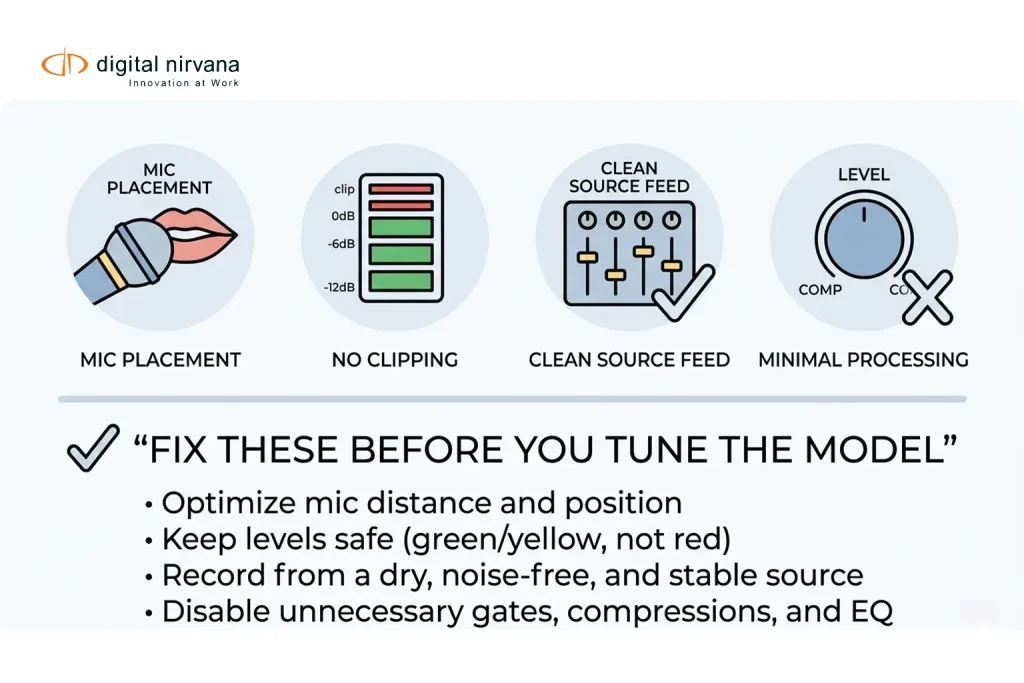
Audio Strategy That Improves Transcription Before Any AI Touches It
You will get the biggest lift from changes you can control upstream.
Capture Checklist For Live And Near-Live
- Prioritize the cleanest source
If you can take a dedicated commentator mic feed, do it. A clean channel beats any downstream “fix.” - Keep microphones close and consistent
Mic distance matters more when background noise is present. - Avoid clipping and distortion
Once audio clips are gone, the words are gone. Test levels before the show, and monitor peaks. - Be careful with aggressive processing
Some technical guides caution that heavy compression and hard noise gates can reduce transcription accuracy, especially when they chop word onsets or pump the noise floor.
If you do process, keep it minimal and consistent. - Choose stable audio specs and avoid last-minute conversions
Consistency helps both measurement and troubleshooting. If your workflow forces transcodes, document where it happens and validate the output on a few known segments.
Use Separate Channels When You Can
If you have separate microphones on separate channels, avoid mixing them into one track before transcription. Multi-channel transcription can preserve channel separation, allowing speech to be recognized more cleanly.
This is one of the most overlooked wins in noisy live workflows, especially for sports, panels, and multi-host shows.
Vocab Training: How To Make Names, Acronyms, And Local Terms Stick
“Vocab training” usually means biasing the speech engine toward the words that matter most in your content.
Three Practical Approaches
- Custom Vocabulary Lists
Add domain terms like talent names, venues, sponsors, team names, acronyms, and product names. Many speech engines support custom vocabularies specifically for these cases. - Language Or Model Adaptation
Model adaptation lets you boost recognition of specific phrases and is explicitly positioned as helpful when audio is noisy or unclear. - Domain Text For Context
Some platforms also support building or tuning language models from domain text, which helps when the same jargon appears repeatedly over many hours.
A Broadcast-Friendly Vocab Training Loop
Use a simple operating rhythm:
- Start with a baseline vocab pack
Roster, talent list, sponsor list, recurring locations, common show segments, and internal abbreviations. - Add a “weekly deltas” process
Every week, pull the top transcription misses from QC review, then decide: add to vocab, add as a phrase, or ignore. - Assign ownership
Accuracy improves faster when one person owns vocab updates and versioning, even if multiple teams contribute suggestions. - Keep it tight
Overstuffed vocab lists can create confusing collisions. Trim terms that no longer appear, and separate lookalike entries carefully.
Digital Nirvana also emphasizes the value of domain vocabularies to keep transcripts cleaner at the start, before downstream enrichment.
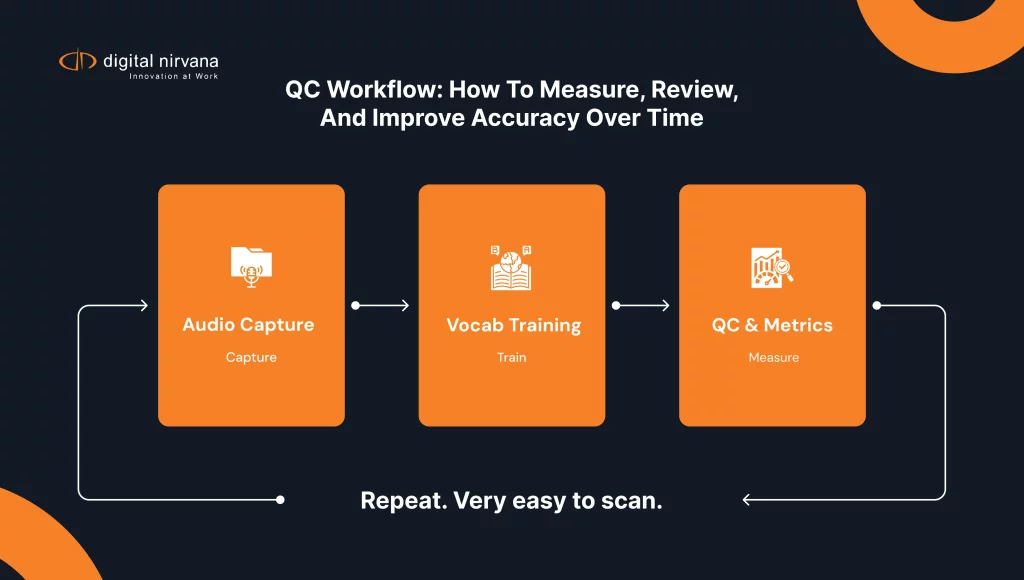
Configuration Choices That Matter: Channels, Diarization, And Timecodes
Channel Strategy
If your capture gives you clean channels, transcribe per channel. If you only have a mixed program feed, expect more crosstalk errors.
Reference approaches for multi-channel handling exist across major STT providers, including channel identification to separate speakers by channel.
Speaker Diarization Strategy
Diarization is useful when the content is conversational, and you need attribution, but it can struggle in loud environments with overlapping speech. Treat diarization as a layer you validate, not a guarantee.
Timecoding Strategy
For media operations, timecoded transcripts are far more useful than plain text because they let teams jump to the exact moment, validate context quickly, and turn text into markers and searchable moments.
If your goal is fast highlight creation or compliance response, insist on time alignment as part of “accuracy.”
QC Workflow: How To Measure, Review, And Improve Accuracy Over Time
If you do not measure, your accuracy will drift, and nobody will notice until a deadline breaks.
The Minimum QC Stack
- Gold Set Sampling
Build a small set of representative clips: studio, field, loud crowd, phone insert, and the hardest show segment. - Measure Word Error Rate
WER is widely used to evaluate accuracy by comparing transcripts to a human reference. - Add Timestamp Hit Rate
For workflows that depend on timecode search, measure whether the transcript hits the right moment inside an acceptable tolerance. Digital Nirvana’s bake-off guidance calls out timestamp hit rate and timestamp error as separate measures for time-sensitive workflows. - Track Errors By Severity
Not all errors matter equally. A missed sponsor name, person name, or compliance phrase is more expensive than a filler word.
A Simple QC Table You Can Reuse
| QC Layer | What You Check | How Often |
| Daily Spot Checks | Worst segments, loudest moments, speaker overlap | Every show day |
| Weekly Gold Set Run | WER, timestamp hit rate, key term accuracy | Weekly |
| Vocab Update Review | New names, acronyms, sponsor terms, recurring misses | Weekly |
| Quarterly Regression Check | Same gold set, same metrics, compare trend | Quarterly |
What “Good” Looks Like In Live Workflows
Instead of chasing a single accuracy number, define acceptance thresholds by use case:
- Search and discovery
- Highlight clipping
- Compliance review and audit response
- Captioning readiness, if you have downstream caption requirements
Digital Nirvana’s approach to evaluating metadata tooling emphasizes building a gold set that matches your real content mix, including noisy audio and live sports, then scoring precision, recall, and time alignment where required.
Common Failure Modes And How To Prevent Them
Names And Acronyms Keep Getting Mangled
Fix: Build a show-specific vocabulary pack, then refresh it weekly with a lightweight process. Use phrase boosting for repeated multi-word names.
Live Crowd Noise Causes “Word Soup”
Fix: Capture a cleaner channel when possible, and avoid over-processing that can introduce pumping artifacts.
Overlapping Speech Breaks Speaker Attribution
Fix: Use channel separation where available, and treat diarization as an assist. In the worst cases, prioritize clean transcript text and timecodes over perfect attribution.
Teams Do Not Trust The Transcript
Fix: Make QC visible. Publish a simple weekly accuracy scorecard, list the top fixed issues, and show that vocab updates are continuous.
How MetadataIQ Fits Into Noisy Live Transcription Workflows
MetadataIQ is designed to operationalize timecoded transcripts and metadata in real media environments, including PAM/MAM systems and Avid workflows, so teams can search content by moment, not by file.
In noisy live workflows, that typically means:
- Timecoded transcripts that support jump-to-moment review and faster clip creation
- Domain vocabulary tuning so the first transcript is cleaner, especially for names, sponsors, and recurring terminology
- A measurable improvement loop, using gold sets and timestamp hit rate to validate what changed and why
- Writing results back into systems where producers and editors work, so transcription becomes usable metadata, not a detached text file
Meet Digital Nirvana At NAB Show 2026
If you’re attending NAB Show 2026, stop by to see how Digital Nirvana helps teams turn live and recorded media into structured, timecoded intelligence that is easy to search, review, and operationalize. At the booth, you can explore MetadataIQ workflows for time-aligned markers, live feed segmentation, frame-accurate alignment, and faster review and discovery.
You can meet the team at Booth N1555 in Las Vegas, April 19–22, 2026, or book a dedicated demo slot through the NAB landing page.
FAQs
Automatic audio transcription is a speech-to-text technology that converts spoken audio into written text. In media workflows, the most useful outputs are timecoded so teams can jump directly to the right moment in a recording.
Start with audio capture fundamentals: keep the mic close, avoid clipping, and avoid aggressive processing that can distort speech. Then add domain vocabulary and a weekly QC loop so the system improves with your real content.
It usually means providing custom vocabularies or phrase boosting so the model recognizes your domain terms more consistently, like names, acronyms, and sponsor brands.
A common approach is Word Error Rate (WER), which compares the transcript to a human reference. For media operations, also measure time alignment with a timestamp hit rate if teams depend on jump-to-moment search.
Yes. If speakers are recorded on separate channels, multi-channel transcription or channel identification can reduce cross-talk errors and improve readability.
Conclusion
Noisy live content will always be unpredictable, but your transcription results do not have to be. When you treat transcription accuracy as a system, not a single setting, you can stabilize outcomes and improve week over week.
That system is three parts: a capture strategy that protects speech, a vocabulary training loop that reflects your domain, and a QC workflow that measures both text accuracy and time alignment.
Key Takeaways:
- Fix upstream audio first: mic proximity, no clipping, and avoid aggressive processing that harms intelligibility.
- Use vocab training, custom vocab lists, and phrase boosting to lock in names, acronyms, and sponsor terms.
- Separate channels when possible to reduce cross-talk and improve live multi-speaker transcription.
- Measure accuracy with WER, and measure usability with timestamp hit rate for timecode-driven workflows.
- MetadataIQ helps operationalize timecoded transcripts and markers within PAM/MAM and Avid-style workflows, making transcription usable metadata at scale.