Introduction
Most long-form video libraries are full of valuable moments that teams cannot find fast enough.
A producer may remember a quote from an interview, but not the exact file. A sports editor may need one replay from a three-hour match. A compliance team may need to review every brand mention, disclaimer, or sensitive scene before publishing. An archive manager may know the footage exists, but still spend hours searching through folders, filenames, and old logs.
That is the real challenge with searchable content in media workflows. The video may exist, but the moments inside it are invisible unless the right metadata has been captured.
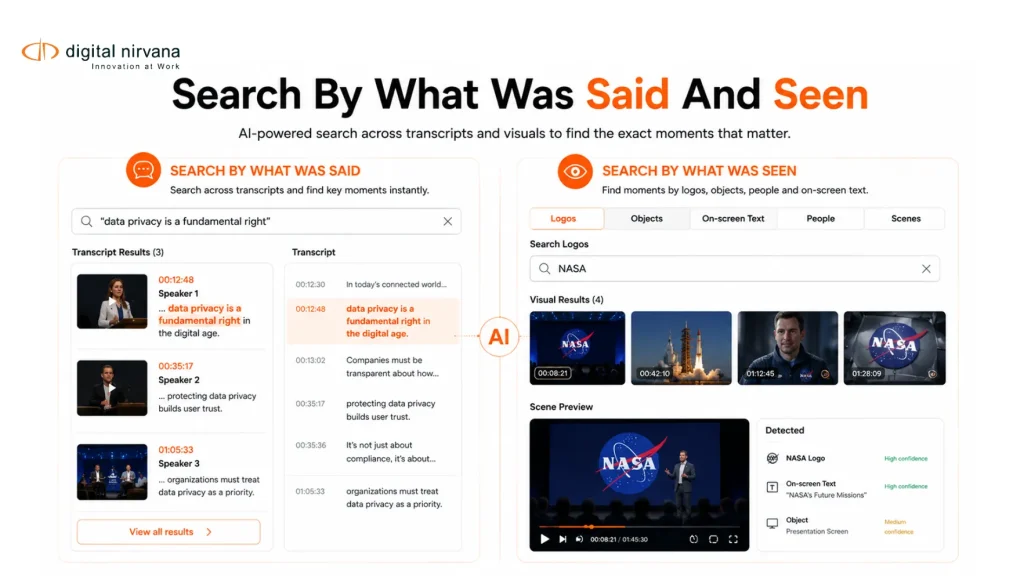
AI metadata changes that. It helps long-form video behave more like searchable text, where teams can find speakers, topics, phrases, scenes, objects, logos, captions, and time-coded moments without manually watching the full file. Google Cloud describes video intelligence as a way to extract metadata that can index, organize, and search video content, including metadata at the video, shot, or frame level.
For broadcast, OTT, sports, news, and archive teams, this is not just a convenience. It is a faster way to edit, validate, distribute, reuse, and monetize video content.
Table Of Contents
- What Searchable Content Means For Long-Form Video
- Why Long-Form Video Is Hard To Search Manually
- How AI Metadata Makes Video Searchable
- The Metadata Layers That Make Long-Form Video Searchable
- Step-By-Step Workflow To Make Video Searchable
- What Broadcast And Media Teams Should Search For
- When You Need AI Metadata Software
- How MetadataIQ Supports Searchable Video Workflows
- Best Practices For Searchable Content At Scale
- FAQs
- Conclusion And Key Takeaway
What Searchable Content Means For Long-Form Video?
Searchable content is content that can be found, filtered, and retrieved based on the information inside it.
For written content, that may mean searching a document for a phrase. For long-form video, it means something more advanced. A team should be able to search for a word spoken in an interview, a person shown on screen, a logo in the background, a scene type, a sports play, a compliance flag, a location, a topic, or a time-coded chapter.
In a broadcast or media environment, searchable content should answer questions like these:
- Where did this speaker appear?
- Which clips mention this topic?
- Where is the exact quote from the interview?
- Which segment includes a sponsor logo?
- Which scenes may need compliance review?
- Which archived footage can be reused for a new story?
- Which long-form files contain highlights worth clipping?
This is why searchable video cannot depend only on filenames and folder structures. Long-form video needs metadata that describes what happens inside the asset.
Adobe’s AI-powered media intelligence guidance clearly shows this shift. It allows users to search footage by visual descriptions, spoken words, and embedded metadata such as shoot date, location, and camera type.
Why Is Long-Form Video Hard To Search Manually?
Long-form video is difficult to search because most of its value lies within the timeline.
A one-hour interview may contain ten useful quotes. A full sports match may include dozens of key moments. A live broadcast may include breaking news, guest appearances, sponsor mentions, disclaimers, lower-thirds, captions, crowd shots, and sensitive visuals. A documentary archive may contain people, places, and events that are not mentioned in the filename.
Manual search breaks down for five common reasons.
- First, file names rarely describe the full content. A name like final_episode_master_v4.mov may identify the asset, but it does not describe speakers, scenes, topics, or rights.
- Second, manual logging is slow and inconsistent. One person may tag “climate policy,” another may tag “environment,” and another may not tag the segment at all.
- Third, transcripts are often disconnected from video systems. A transcript may exist, but if it is not time-coded and connected to the asset, it does not help teams jump to the exact moment.
- Fourth, visual information is often missed. Spoken transcripts cannot identify logos, objects, locations, jerseys, signage, lower-thirds, or on-screen text.
- Fifth, rights and compliance data may live outside the media system. This makes it harder to know which footage can be reused, where it can be published, or whether it needs review.
These issues create a real operational cost. Teams spend more time searching, reviewing, duplicating work, and rebuilding existing content.
How AI Metadata Makes Video Searchable?
AI metadata makes long-form video searchable by converting audio, visual, and contextual signals into structured information.
Instead of asking teams to watch a full video and tag everything manually, AI can analyze the asset and generate searchable metadata around what is said, shown, detected, and segmented.
- The most useful AI metadata capabilities include:
- Speech-to-text transcription, which turns spoken dialogue into searchable text.
- Speaker identification, which helps teams locate who said what.
- Topic segmentation, which breaks long videos into meaningful sections.
- Scene detection, which identifies visual changes or content shifts.
- Object recognition, which detects people, places, actions, products, and visual elements.
- Logo recognition, which helps identify brands, sponsors, or restricted content.
- OCR, which captures on-screen text from slides, signs, graphics, and lower-thirds.
- Summarization, which gives users a quick view of what a long video contains.
- Compliance tagging, which helps flag profanity, nudity, violence, sensitive content, political ads, or legal disclaimers.
- Time-coded metadata, which connects every tag or transcript point to an exact moment in the video.
The key is not just creating more metadata. The key is creating useful metadata that is structured, searchable, editable, and connected to the systems teams already use.
MetadataIQ, for example, supports automated metadata tagging, transcription, translation, topic segmentation, summarization, scene description, logo recognition, object recognition, sports analysis, and virality scoring inside broadcast workflows.
The Metadata Layers That Make Long-Form Video Searchable
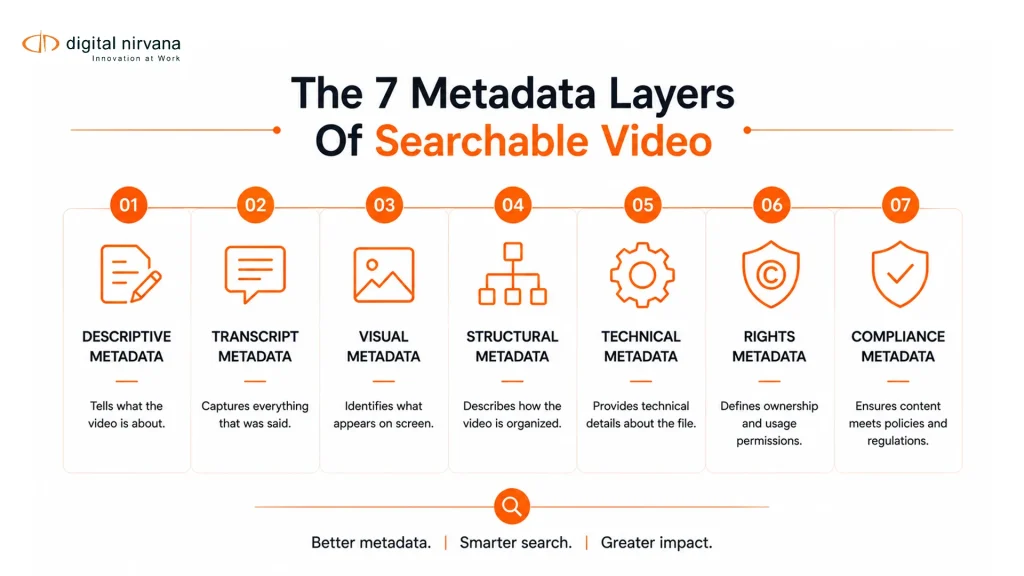
Long-form video becomes searchable when teams capture multiple layers of metadata. Each layer helps a different team find, validate, or reuse the asset.
Descriptive Metadata
Descriptive metadata explains what the video is about. It includes title, summary, show name, episode name, topic, guest names, speaker names, locations, people, organizations, and keywords.
This is the first layer most users search. It helps producers, editors, and archive teams understand the asset without opening the full file.
Transcript Metadata
Transcript metadata captures spoken dialogue and aligns it with timecodes.
This is one of the strongest layers for long-form video search. A producer can search for a quote, topic, person, product, disclaimer, or phrase and jump directly to the right moment.
Contently notes that accurate transcripts and SRT files help AI systems understand topics, identify takeaways, and match videos to more specific queries.
Visual Metadata
Visual metadata describes what appears on screen. It can include scenes, objects, logos, faces, locations, products, graphics, signage, lower-thirds, actions, and on-screen text.
This matters because long-form video is not only audio. A silent shot, a logo in the background, a lower-third, or a product placement may be important for editing, compliance, sponsorship, or reuse.
Structural Metadata
Structural metadata explains how the video is organized. It includes chapters, segments, scene boundaries, ad breaks, intro and outro points, highlight moments, and time-coded markers.
This layer helps users navigate the video quickly. Instead of opening a full asset and scrubbing through the timeline, they can search, filter, and jump to a relevant segment.
Technical Metadata
Technical metadata describes the file format and delivery readiness. It includes duration, frame rate, resolution, codec, aspect ratio, audio channels, language tracks, caption status, and file format.
This helps operations and engineering teams confirm whether the asset is ready for editing, publishing, distribution, or archive.
Rights And Usage Metadata
Rights metadata explains where and how a video can be used. It includes rights owner, usage window, approved platforms, restricted regions, third-party footage, music rights, talent releases, sports rights, and syndication permissions.
This is essential for archive reuse. A searchable archive is only useful if teams can also understand whether the footage is cleared for use.
Compliance Metadata
Compliance metadata flags content that may require review. It can include profanity, violence, nudity, sensitive material, political content, product placement, legal disclaimers, brand mentions, and regulatory notes.
MetadataIQ includes a compliance tagging and rules engine that can detect and tag regulatory content such as political ads, profanity, product placement, and legal disclaimers.
Operational Metadata
Operational metadata helps teams manage workflows. It includes project ID, owner, editor, approval status, review notes, source system, ingest date, publish date, archive status, and metadata quality score.
This layer supports governance. It helps teams know who approved the asset, what stage it is in, and whether metadata is complete enough for use.
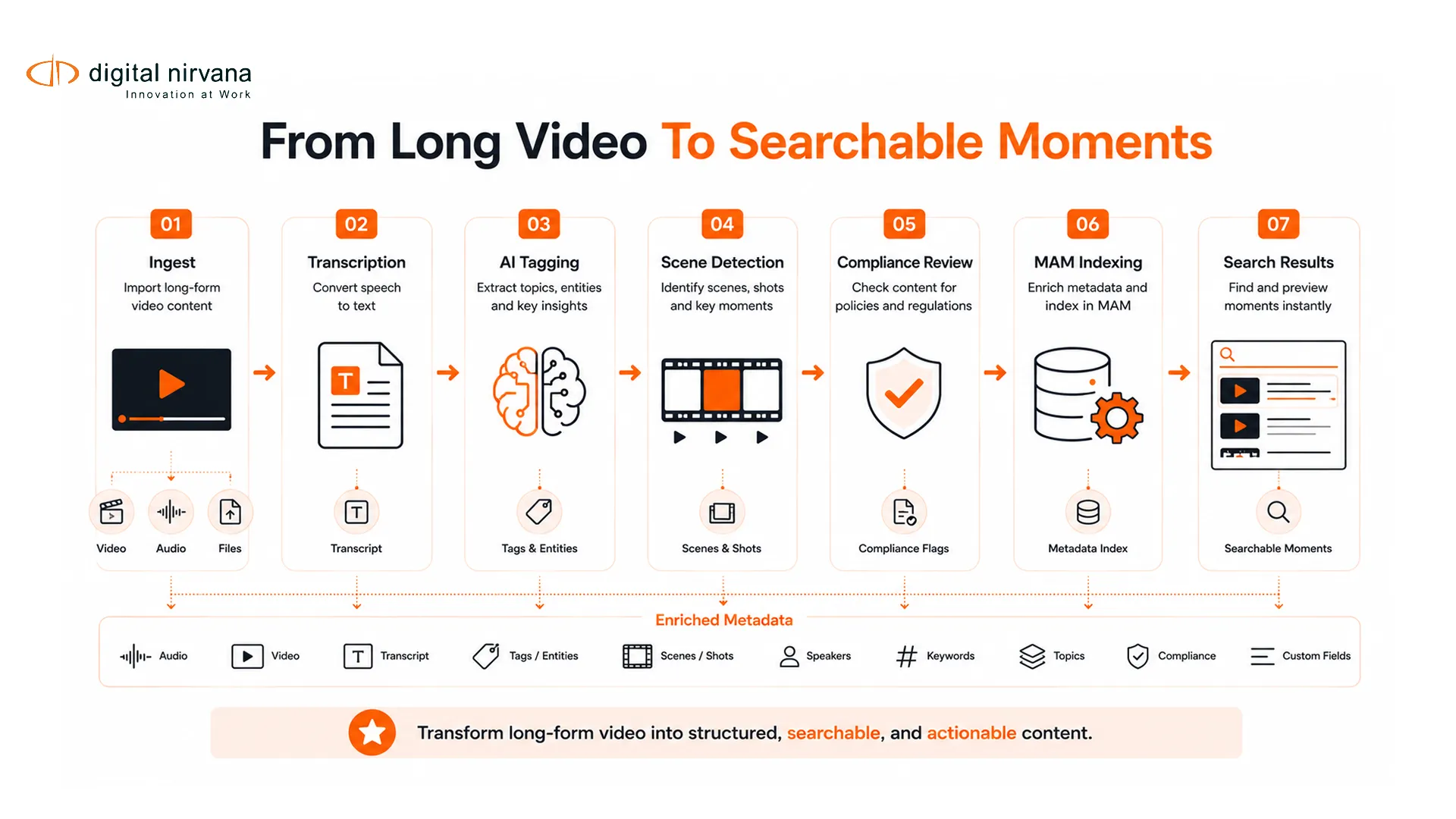
Step-By-Step Workflow To Make Video Searchable
A searchable long-form video strategy needs a clear workflow. AI can automate much of the process, but the system still needs structure, rules, and review.
Step 1: Start At Ingest
Searchability should begin when the asset enters the workflow.
At ingest, capture the basic metadata that identifies the file, such as title, source, format, show, episode, content ID, project ID, capture date, and owner. This creates the foundation for every later search and review step.
Step 2: Generate A Time-Coded Transcript
The next step is to create a transcript that is aligned with the video timeline.
A plain text transcript is useful, but a time-coded transcript is much more powerful. It lets editors, producers, and reviewers search for a phrase and jump to the exact moment where it appears.
This is especially useful for interviews, speeches, panel discussions, news packages, documentaries, webinars, town halls, and live event recordings.
Step 3: Add AI Tags For Topics, People, And Scenes
Once the transcript exists, AI can classify the content into topics, themes, speakers, scenes, and segments.
For example, a news program might be tagged by election coverage, weather update, market report, interview, public safety, and sports recap. A sports broadcast might be tagged by team, player, play type, goal, replay, foul, injury, celebration, and post-game interview.
These tags help users find content based on meaning, not just exact words.
Step 4: Detect Visual Elements
Searchable video should include what appears on screen, not only what is spoken.
AI can help identify objects, logos, signage, on-screen text, locations, people, and scene types. This is useful for brand safety, sponsor tracking, compliance review, editorial search, and archive discovery.
Pics.io describes AI video intelligence as a way to search across words, scenes, people, brands, on-screen text, transcripts, OCR, entities, and AI tags.
Step 5: Apply Compliance And Rights Rules
After AI detects transcript and visual signals, teams should apply compliance and rights rules.
This may include flagging profanity, political ads, legal disclaimers, sponsor mentions, competitor logos, age-sensitive content, restricted regions, or third-party material.
For commercial teams, this step matters because content should not only be searchable. It should be safe to use, publish, clip, sell, or redistribute.
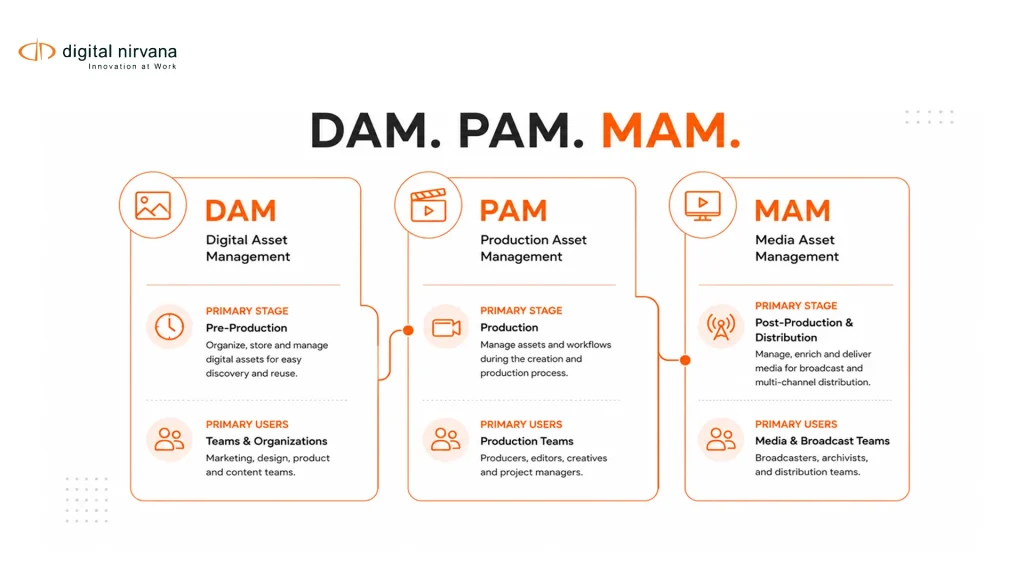
Step 6: Write Metadata Back Into The MAM Or DAM
Metadata should not live in a separate spreadsheet or one-off AI tool.
The best workflow writes metadata back into the systems teams already use, such as PAM, MAM, DAM, NLE, archive, or newsroom systems. This keeps search close to the production workflow and reduces tool switching.
Digital Nirvana positions MetadataIQ as an intelligence layer for Avid, Grass Valley, and custom MAM systems, with metadata automation inside existing workflows.
Step 7: Create A Search Experience For Teams
The final step is to make the metadata usable.
Users should be able to search by keyword, speaker, topic, scene, object, date, rights status, compliance flag, show, team, location, or timecode. Advanced users should also be able to filter results by metadata fields, approval status, language, platform, region, and archive category.
Iconik describes media asset search as the ability to find video, audio, and image files using structured metadata, indexed transcripts, and advanced filters, rather than relying on folder navigation.
What Broadcast And Media Teams Should Search For
Different teams need searchable content for different reasons.
News Teams
News teams need to quickly find quotes, speakers, public figures, locations, events, b-roll, interviews, and live segments. Searchable metadata helps them clip moments from long broadcasts and reuse verified footage in new packages.
Sports Teams
Sports teams need to find highlights, players, teams, plays, goals, fouls, penalties, celebrations, interviews, and sponsor moments. AI metadata can help turn full matches into searchable, clip-ready libraries.
OTT Teams
OTT teams need searchable metadata for packaging, recommendations, content discovery, localization, and library operations. Better metadata can support better categorization and faster reuse across platforms.
Post-Production Teams
Post-production teams need to search across raw footage, interviews, b-roll, scenes, transcripts, and visual elements. This reduces manual review and helps editors build stories faster.
Archive Teams
Archive teams need to make older content discoverable, reusable, and monetizable. AI metadata can help enrich legacy assets that were never fully logged at the time of creation.
MetadataIQ is also positioned for archived content, with use cases around retroactively processing and enriching archives so older footage can become searchable and more useful for monetization.
Compliance Teams
Compliance teams need to find and review profanity, sensitive content, political ads, disclaimers, product placement, brand mentions, and restricted material. Searchable metadata gives them a faster way to locate issues before content moves downstream.
When You Need AI Metadata Software?
Not every team needs enterprise AI metadata software on day one. But there are clear signs that manual processes are no longer enough.
- You should consider AI metadata software when:
- Your team manages hundreds or thousands of long-form video assets.
- Editors spend too much time searching through footage.
- Archives are underused because content is hard to find.
- Compliance review depends on manual viewing.
- Rights information is disconnected from video assets.
- Transcripts exist but are not searchable inside your media system.
- Your team needs to clip live or long-form content quickly.
- You use Avid, Grass Valley, MAM, DAM, or custom media infrastructure.
- Your metadata quality varies by team, person, or project.
- You need to process large backlogs or live streams at scale.
For commercial buyers, the main question is not whether AI can create metadata. The stronger question is whether the metadata can be trusted, governed, integrated, searched, and used in daily media workflows.
How MetadataIQ Supports Searchable Video Workflows?
MetadataIQ helps broadcast and media teams turn long-form video into searchable, actionable content.
It is built for broadcast metadata workflows, with automated tagging, quality tracking, support for broadcast standards, real-time dashboards, and integrations with existing media infrastructure.
- For teams working in high-volume environments, MetadataIQ supports:
- Automated time-coded metadata across video and audio.
- AI-powered content discoverability for instant access to scenes.
- Topic-based segmentation and summarization.
- Transcription and translation.
- Scene description and contextual explanation.
- Logo and object recognition.
- Sports analysis, including play-by-play use cases.
- Compliance tagging for sensitive or regulated content.
- Governance dashboards and quality scoring.
- Batch scheduling and pipeline automation.
- Real-time live stream processing.
- Native integrations with Avid MediaCentral, Grass Valley, and MAM or DAM systems.
The biggest value is workflow fit. MetadataIQ is not positioned as a generic tagging layer that sits outside the production process. It is designed to fit into existing media infrastructure, so teams can keep working in the systems they already use while making their content easier to search, review, clip, and reuse.
Best Practices For Searchable Content At Scale
AI metadata works best when it is supported by strong operational rules.
Build A Controlled Metadata Taxonomy
Create approved terms for shows, topics, people, locations, teams, events, leagues, sponsors, content types, and compliance categories.
This prevents duplicate or conflicting tags. For example, one team should not use “football,” another “soccer,” and another “EPL” unless the taxonomy clearly defines how those terms relate.
Use Timecodes Wherever Possible
For long-form video, asset-level metadata is not enough.
Teams need to know where a topic, speaker, logo, or scene appears. Time-coded metadata makes search useful because it connects the result to the exact moment.
Combine AI Tags With Human Review
AI can handle the first pass, but people should review sensitive metadata.
This is especially important for compliance, rights, legal disclaimers, editorial context, speaker names, and regional restrictions. AI can accelerate the workflow, but governance keeps the workflow reliable.
Keep Metadata Inside The Workflow
Metadata should be available where teams already work.
If metadata sits in a separate spreadsheet, teams will not trust it or use it consistently. The better approach is to connect metadata with PAM, MAM, DAM, NLE, archive, and publishing workflows.
Measure Metadata Quality
Searchable content should be measured.
Track missing fields, inconsistent tags, failed rules, incomplete transcripts, uncategorized files, and assets without rights status. MetadataIQ includes governance dashboards and quality scoring to help teams track metadata health in real time.
Protect Permissions And Access
Search should respect user permissions.
A team member should only discover, open, or export assets they are allowed to access. This is especially important for unreleased footage, licensed content, legal material, internal recordings, and restricted regional content.
Plan For Both Live And Archive Workflows
Searchable content is not only an archive problem.
Live news, sports, events, and broadcasts also need fast metadata capture. MetadataIQ supports real-time live stream processing, which helps teams ingest, tag, and prepare live content while it airs.
FAQs
What Is Searchable Content In Video Workflows?
Searchable content in video workflows means video assets can be found by the information inside them. This can include spoken words, speakers, topics, scenes, objects, logos, on-screen text, captions, rights, compliance flags, and time-coded metadata.
How Does AI Metadata Make Long-Form Video Searchable?
AI metadata makes long-form video searchable by analyzing the audio, visuals, text, and structure of the video. It can generate transcripts, chapters, summaries, tags, object labels, logo detections, OCR text, compliance flags, and time-coded markers.
Why Is Long-Form Video Hard To Search Without AI?
Long-form video is hard to search manually because important moments are hidden inside the timeline. File names and folders rarely describe every quote, scene, speaker, logo, or compliance issue. Teams often have to watch, scrub, or manually log footage to find what they need.
What Metadata Should Be Captured For Searchable Video?
Teams should capture descriptive metadata, transcript metadata, visual metadata, structural metadata, technical metadata, rights metadata, compliance metadata, and operational metadata. For long-form video, timecodes are especially important.
Can AI Metadata Help With Compliance Review?
Yes. AI metadata can help identify and tag content such as profanity, political ads, product placement, legal disclaimers, sensitive visuals, and brand mentions. MetadataIQ includes compliance tagging and rules that support these types of broadcast and media workflows.
Can Searchable Video Metadata Help Archive Monetization?
Yes. When archived footage is searchable by topic, speaker, rights, scene, and timecode, teams can find and reuse valuable footage more easily. This can support licensing, repackaging, clipping, syndication, and OTT library use.
Does MetadataIQ Work With Existing MAM Or DAM Systems?
MetadataIQ is built to integrate with existing media infrastructure, including Avid MediaCentral, Grass Valley, and MAM or DAM systems. It is designed for high-volume environments where teams need metadata inside their existing workflows.
Conclusion
Long-form video becomes more valuable when teams can search what is inside it.
A video library should not depend only on filenames, folders, or manual notes. With AI metadata, teams can search by transcript, speaker, topic, scene, object, logo, on-screen text, compliance flag, rights status, and exact timecode.
For broadcast, OTT, sports, news, archive, and post-production teams, this turns long-form video into searchable content that can be found, reviewed, clipped, reused, and monetized faster.
Key Takeaway
- Searchable content means teams can find moments inside long-form video, not only the file itself.
- AI metadata helps convert spoken words, visuals, scenes, and timecodes into structured search signals.
- Long-form video search should include transcripts, topics, chapters, objects, logos, OCR, rights, and compliance metadata.
- The best workflows write metadata back into PAM, MAM, DAM, archive, and production systems.
- Human review is still important for compliance, rights, editorial context, and sensitive metadata.
- Metadata governance, taxonomy, permissions, and quality scoring make searchable content reliable at scale.
- MetadataIQ is a strong fit for broadcast and media teams that need AI-powered metadata inside existing high-volume workflows.