When captions appear late, teams often blame the captioner or speech-recognition engine. The actual delay may be introduced by audio routing, look-ahead processing, caption encoding, playout, packaging, CDN buffering, the player, or the viewer device. Live caption latency should be measured end-to-end at the audience output, then broken into timestamped stages so operators can locate the added delay without sacrificing accuracy or completeness.
This guide provides a vendor-neutral measurement method. It does not define a universal acceptable delay or claim that Digital Nirvana supports a specific latency metric without product verification.
Key Takeaways
- Measure from an identifiable audio event to the first correct display of its caption at the same viewer endpoint.
- Capture median, high-percentile, maximum, and variability, not only one average.
- Separate caption-generation delay from video-path delay and caption-versus-video synchronization.
- Instrument audio ingest, caption creation, encoding, playout, packaging, distribution, and player display where possible.
- Lower latency can reduce accuracy if the system commits text before enough speech context is available.
- Monitor delay with accuracy, completeness, placement, availability, and correction behavior.
Table Of Contents
- What Live Caption Latency Means
- How To Measure Caption Delay End To End
- Which Timestamps To Capture
- Where Caption Latency Accumulates
- How To Diagnose Common Delay Patterns
- How To Set A Practical Service Level
- How To Monitor Latency In Production
- FAQs
What Is Live Caption Latency?
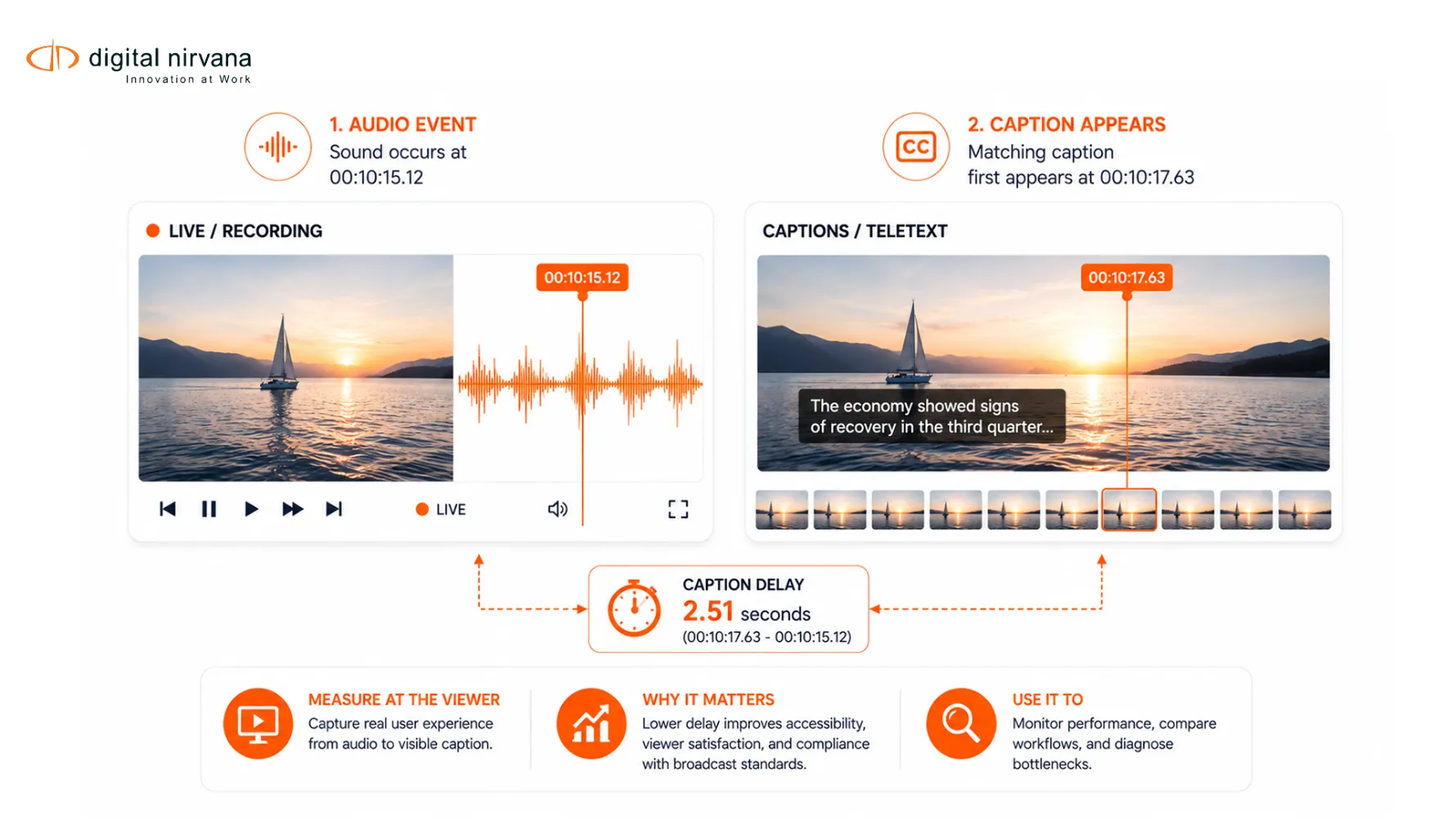
Live caption latency is the elapsed time between a spoken audio event and the viewer seeing the corresponding caption. It is an audience-experience measure, not merely an internal API processing time.
Several related measures can be confused:
- Generation latency: audio reaches the captioning process to caption output.
- Insertion latency: caption output reaches the encoder or playout system.
- Distribution latency: encoded media reaches the player or receiver.
- Relative synchronization: caption display time compared with the associated audio or video at one endpoint.
- Glass-to-glass latency: real-world capture to viewer display for the whole program.
If both video and captions are delayed equally by a streaming buffer, the program may have high glass-to-glass latency but acceptable caption synchronization. If captions take a different path and arrive later than video, viewers experience a caption delay even when the video itself is fast.
W3C’s Synchronization Accessibility User Requirements notes that live captions inherently involve processing delay and that acceptable timing depends on the live-media context and accuracy needs. This supports measuring the actual workflow rather than applying one unqualified number.
How Do You Measure Caption Delay End-to-End?
Create an observable audio event, record the audience output, and compare the event time with the first correct caption display.
A controlled test can use:
- A visible and audible slate with synchronized time reference
- A spoken sequence of unique test phrases
- The normal production audio and caption route
- A recording of the final broadcast, OTT, FAST, or player output
- Frame-by-frame or timestamp-based comparison
For each phrase:
- Mark the onset of the meaningful spoken word at the measured endpoint.
- Mark the first frame where the corresponding readable caption appears.
- Subtract the audio-event time from caption-display time.
- Record whether the caption was partial, revised, wrong, or complete.
- Repeat across program types and network conditions.
Measure the same phrase at multiple points only when clocks are synchronized. Otherwise, use one captured output containing both audio and displayed captions. That avoids creating false latency from clock drift.
Digital Nirvana’s live captioning services guide identifies synchronization, completeness, placement, and accuracy as related quality dimensions. Latency testing should keep those dimensions visible.
Which Timestamps Should You Capture?
Capture timestamps at every handoff that can add or hide delay. A useful trace may include:
- Audio available at production output
- Audio received by captioner or ASR
- First token generated
- Caption committed
- Caption delivered to encoder
- Caption inserted into the media stream
- Segment or package produced
- Origin response sent
- CDN edge response
- Player receives caption data
- Caption rendered on screen
- Corresponding audio rendered
Each event should include a shared clock reference, asset or channel, caption sequence, region, rendition, device, player version, and test identifier. If systems cannot expose timestamps, capture network events or use synchronized monitoring probes around the missing stage.
Do not rely only on caption cue timestamps. A cue may contain the intended presentation time, while delivery or player buffering determines when it actually appears.
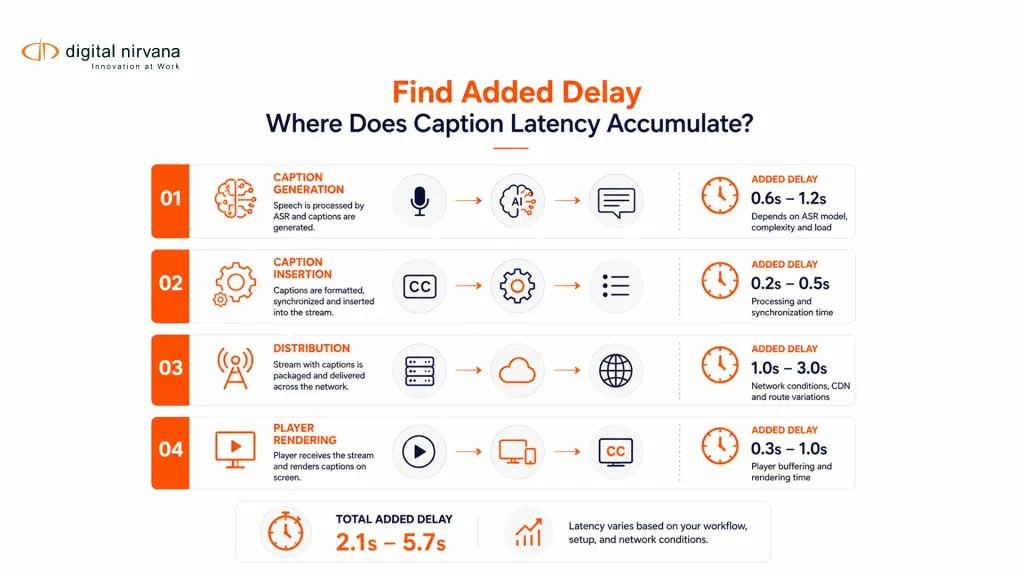
Where Does Caption Latency Accumulate?
Delay usually accumulates across several small buffers and decisions rather than one obvious failure.
Audio And Caption Generation
Remote contribution codecs, audio processing, noise reduction, and routing can delay the signal before captioning begins. Human captioners and ASR systems also need enough speech context to create accurate text. Endpointing, punctuation, speaker changes, translation, profanity control, and correction policies can add hold time.
Encoding And Playout
Caption gateways may batch updates or wait for frames. Encoders, multiplexers, and playout systems can queue caption data, convert formats, or align it with delayed video.
Streaming Packaging And Distribution
Segment duration, packaging windows, manifest updates, origin behavior, CDN caching, rendition switching, and missing caption segments can affect timing. Caption and video tracks that use different segment boundaries may drift or update unevenly.
Player And Device
The player may buffer captions separately, wait for the next cue, apply a timestamp offset, or render only after a video-state change. Device performance, app lifecycle, and accessibility settings can also affect display.
The viewer endpoint is therefore essential. A caption feed can look timely at the encoder while appearing late in the app.
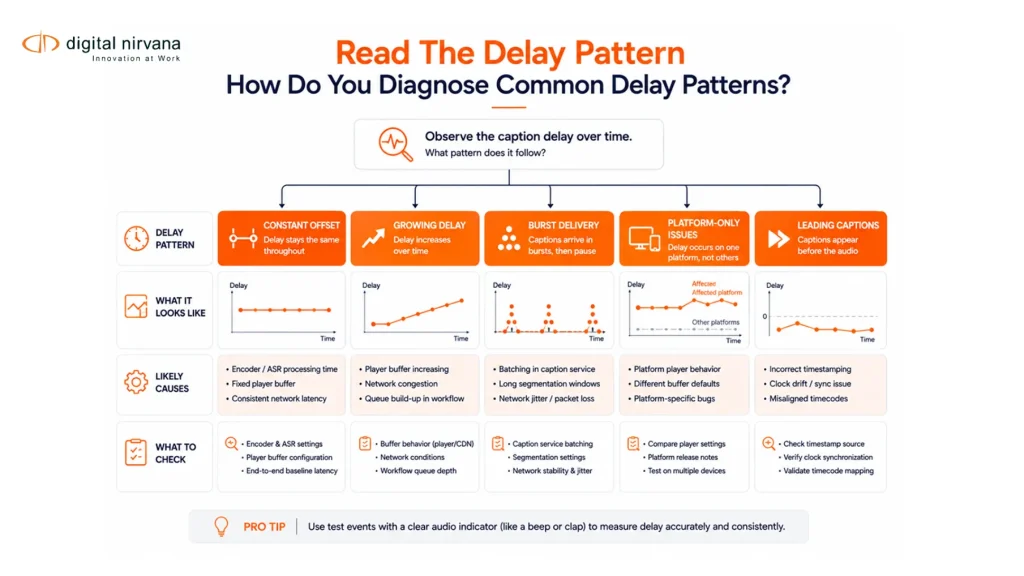
How Do You Diagnose Common Delay Patterns?
Use the shape and location of the delay to narrow the cause.
- Constant offset on every cue: check timestamp mapping, intentional video delay, encoder configuration, or player offset.
- Delay grows during the program: look for clock drift, queue buildup, slow processing, or segment-timeline mismatch.
- Delay spikes on rapid speech: inspect ASR endpointing, human correction behavior, batching, and caption commit rules.
- Only one platform is affected: compare packager, CDN, player, and device paths.
- Captions arrive in bursts: inspect network jitter, gateway batching, segment boundaries, and retry behavior.
- Captions lead the audio: verify video delay compensation and clock references.
- Delay follows speaker changes: inspect diarization, captioner handoff, or segmentation rules.
- Translated captions are slower: isolate transcription, translation, review, and rendering stages.
Change one variable at a time. Start with a reproducible source, bypass optional components, and compare before-and-after traces. Preserve the final viewer recording with the timestamp log so another engineer can reproduce the conclusion.
How Do You Set A Practical Caption-Latency Service Level?
Set the target from audience needs, program risk, workflow capability, and applicable requirements, then pair it with quality guardrails.
The service level should define:
- Measured start and end events
- Output points and platforms covered
- Test and monitoring method
- Median and high-percentile targets
- Maximum allowed excursions
- Measurement window and minimum sample size
- Accuracy and completeness floor
- Availability and dropout rules
- Alert threshold, owner, and response time
- Exclusions and planned-maintenance handling
Do not optimize latency in isolation. A system can display unstable partial words quickly and revise them repeatedly. Another may wait longer for more accurate phrases. Evaluate which behavior gives the audience understandable, synchronized access.
The FCC’s best practices for live captioning vendors call for metrics covering accuracy, synchronicity, completeness, and placement. W3C’s live-caption guidance emphasizes synchronized text for live audio content. Neither source supports treating speed as the only quality measure.
How Do You Monitor Caption Latency In Production?
Measure continuously or sample on a defined schedule at representative audience endpoints.
A production dashboard can track:
- Median, 95th percentile, and maximum caption delay
- Caption availability and dropout duration
- Cue rate and burst behavior
- Caption-to-audio lead or lag
- Revisions and unstable partial captions
- Accuracy or error samples
- Channel, region, platform, rendition, and device
- Incident start, acknowledgment, recovery, and owner
Correlate latency with audio quality, network state, encoder events, packager health, and player telemetry. Keep recordings and traces long enough to investigate under the approved retention policy.
Digital Nirvana’s MonitorIQ overview addresses broadcast signal monitoring. Product specialists should confirm whether and how the intended deployment detects caption presence, synchronization, delay, or other caption conditions before publication.
FAQs
Live caption latency is the time between a spoken audio event and the corresponding caption appearing to the viewer.
Record audio and displayed captions at one endpoint, mark the spoken event and first correct caption frame, then subtract their timestamps.
No. Stream latency covers the whole program path, while caption latency describes caption timing relative to speech at the measured endpoint.
Delay can come from audio transport, transcription, caption commitment, encoding, packaging, distribution, buffering, and player rendering.
Yes. Committing text before enough speech context is available can increase errors or visible revisions.
Common causes include batching, network jitter, retries, gateway queues, and streaming segment boundaries.
Test every material delivery path because broadcast, OTT, FAST, web, mobile, and device players can introduce different delays.
Use a set that includes typical delay, high-percentile delay, maximum excursions, variability, and related accuracy and completeness measures.
Conclusion
Measure live caption latency where the audience experiences it, then instrument each handoff to locate the added delay. Diagnose patterns, test every delivery path, and balance speed with stable, accurate, complete captions.
Professional support is useful when caption generation, encoding, playout, streaming, monitoring, and players cross several teams or vendors. Begin with one channel, one endpoint, and a repeatable test phrase set.