Introduction
Every broadcast team has experienced this problem.
Someone remembers the quote. Someone remembers the guest. Someone remembers the story, the show, or the segment. But nobody knows the exact file, timestamp, version, or clip location.
That is where search starts to break down.
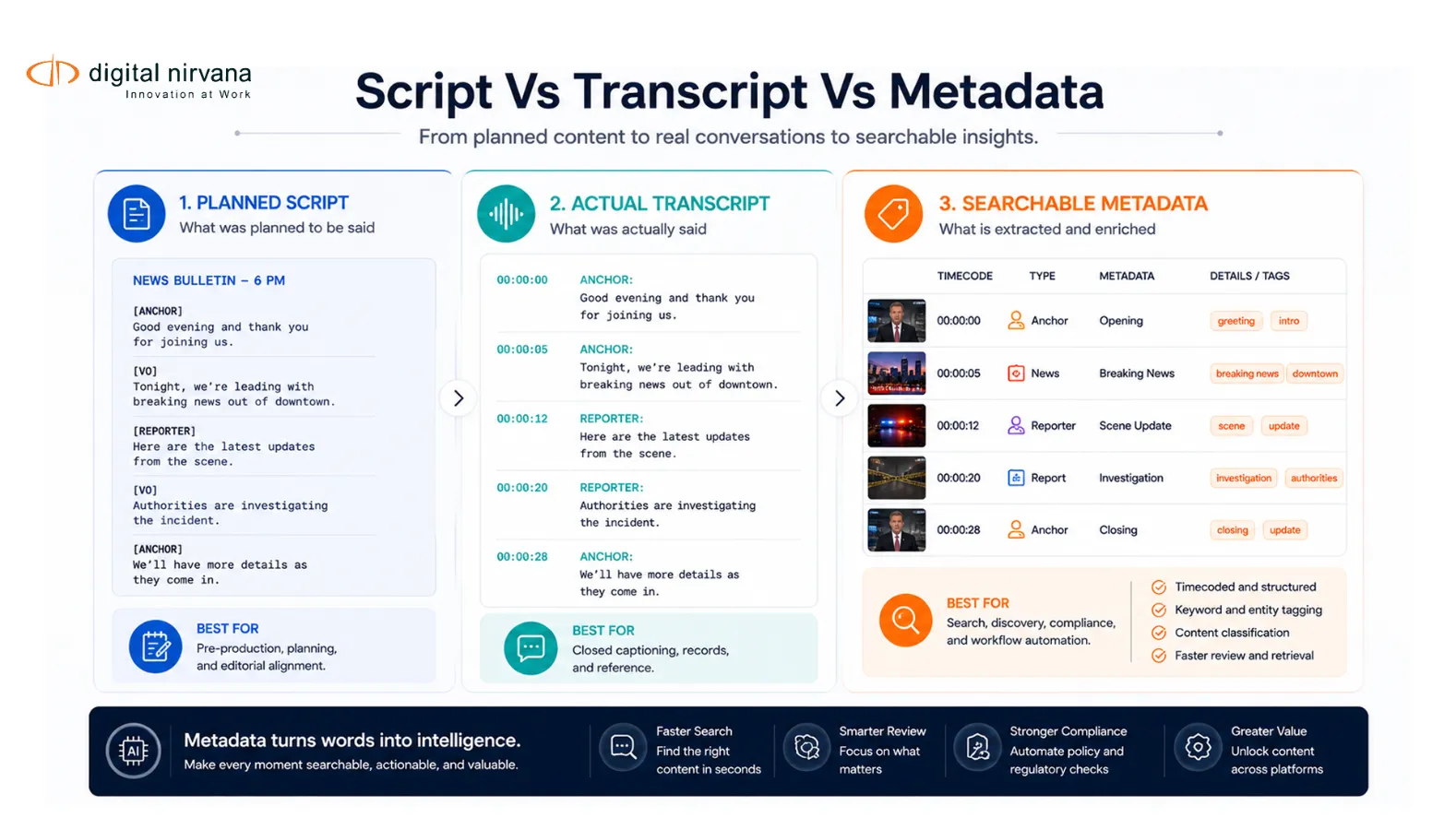
Broadcast scripts help teams plan what should happen on air. Broadcast transcripts show what actually happened. Timecoded metadata connects both to the exact moment in the video or audio file. When these three layers work together, producers, editors, compliance teams, and archive teams can search media with far more precision.
For a modern broadcast team, the goal is not only to write better broadcast scripts. The goal is to make scripts, transcripts, and media assets searchable across the entire workflow.
Table Of Contents
- What Are Broadcast Scripts?
- Broadcast Scripts Vs Broadcast Transcripts
- Why Scripts Alone Are Not Enough For Search
- What Timecoded Metadata Adds To Broadcast Search
- A Smarter Search Workflow For Broadcast Teams
- Search Use Cases By Team
- When Broadcast Teams Need AI Metadata Software
- How MetadataIQ Supports Script And Transcript Search Workflows
- Best Practices For Searchable Broadcast Scripts And Transcripts
- FAQs
- Conclusion And Key Takeaway
What Are Broadcast Scripts?
Broadcast scripts are written documents used to guide what presenters, reporters, producers, directors, and technical teams say or do during a television, radio, streaming, or live broadcast.
In a newsroom, a script may include anchor copy, reporter narration, voice-over cues, sound-on-tape references, graphics instructions, camera cues, lower-third notes, and timing details. In many TV news workflows, scripts use a two-column format, with one column containing video or technical instructions and the other containing the words spoken by the anchor or reporter.
Broadcast scripts also connect closely with rundowns and teleprompters. Rundown Creator, for example, shows how script formatting can support roll cues, production notes, objects, printed scripts, and teleprompter output.
For production teams, scripts help answer questions like:
- What should the anchor say?
- Which clip should roll?
- Where does the soundbite start?
- What graphic should appear?
- Which guest speaks next?
- What is the timing of the segment?
- Which story comes before or after?
That makes scripts essential for planning and execution. But for search, scripts are only one part of the story.
Broadcast Scripts Vs Broadcast Transcripts
Broadcast scripts and broadcast transcripts are related but not the same.
A broadcast script is written before or during production. It represents the planned version of the show, package, segment, or live event.
A broadcast transcript is created from the actual audio after, during, or near the time of broadcast. It represents what was actually spoken. Digital Nirvana defines a broadcast transcript as the complete text version of a program, usually with timecodes, speaker labels, and timestamps aligned to the video or audio timeline.
This difference matters because live and near-live content rarely follows the script perfectly.
An anchor may ad-lib during breaking news. A guest may go off-topic. A reporter may change wording in the field. A producer may reorder segments. A sports commentator may react to an unexpected play. A panel discussion may include interruptions, corrections, jokes, or unscripted remarks.
The script tells the team what was supposed to happen. The transcript tells the team what actually happened.
For search, compliance, clipping, and archive reuse, the actual transcript is often more useful than the original script. But when the two are connected, the search workflow becomes much stronger.
Why Scripts Alone Are Not Enough For Search?
Broadcast scripts are valuable, but they have limits.
They are often stored in newsroom systems, rundown tools, documents, or production folders. They may not be connected to the final media file. They may not include the exact words that aired. They may not show what appeared on screen. They may not include post-production edits, last-minute changes, or audience-facing captions.
That creates several search problems.
Scripts May Not Match The Final Broadcast
A script may say one thing, but the aired content may include a different phrase, an additional quote, or a corrected statement. This is common in live news, sports, interviews, talk shows, and panel formats.
If a team searches only the script, they may miss what actually aired.
Scripts Often Lack Timecode Precision
A script may include a general story order or segment duration, but it may not include frame-level or phrase-level timecodes. Without timecodes, users still have to scrub through video to find the exact line, shot, or soundbite.
Scripts Do Not Capture Visual Events
A script may mention a graphic, VO, or SOT, but it may not capture every logo, object, face, lower-third, sign, jersey, scoreboard, or scene that appears on screen.
This matters for compliance, brand safety, sponsorship, rights, and archive search.
Scripts May Stay Separate From PAM/MAM Systems
If scripts live in one system and media assets live in another, search becomes fragmented. A producer may find the script but not the clip. An editor may find the clip but not the script context. An archive manager may find the asset but not know which lines, speakers, or story elements are inside it.
A smarter search workflow needs scripts, transcripts, and metadata connected to the media asset itself.
What Timecoded Metadata Adds To Broadcast Search?
Timecoded metadata connects information to exact moments in a video or audio timeline.
Instead of saying “this program includes a mayor interview,” timecoded metadata can show that the mayor appears at 00:08:14, mentions a specific policy at 00:09:03, and appears again in a reaction shot at 00:12:41.
This changes how teams search.
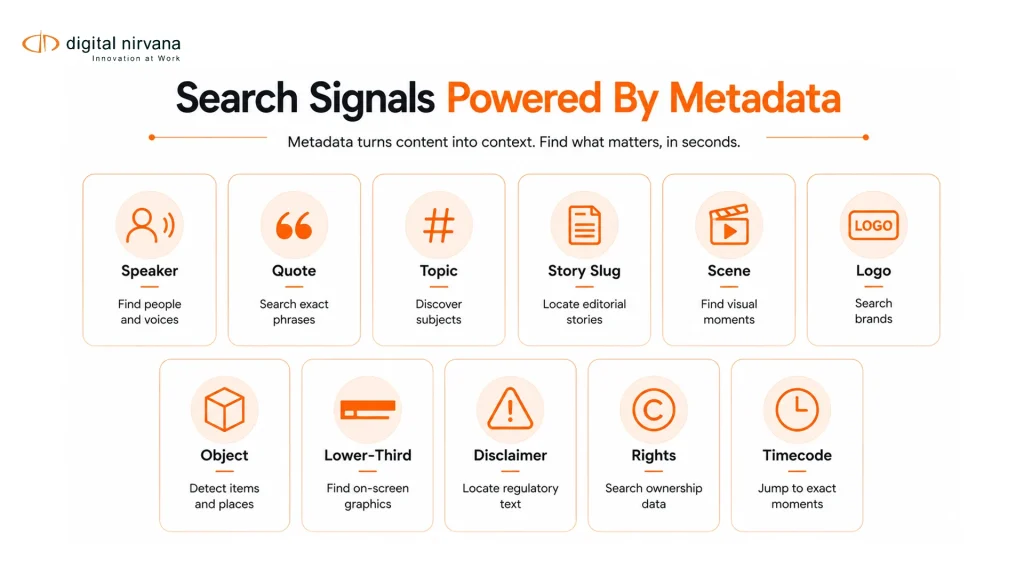
With timecoded metadata, users can search for a word, speaker, topic, logo, object, scene, or compliance flag and jump directly to the relevant point in the asset. Metadata Guru describes this value clearly: with time-locked transcripts, teams can search for words in the text and go directly to the matching time in the video.
PhotoShelter’s guidance on time-based video metadata also highlights the operational value of metadata associated with specific timecodes. It allows users to navigate video using tags, transcript text, and events instead of manually scrubbing through long files.
For broadcast teams, timecoded metadata can include:
- Speaker names.
- Spoken words.
- Story topics.
- Segment boundaries.
- Scene changes.
- Shot changes.
- Logos and brands.
- Objects and locations.
- On-screen text.
- Lower-thirds.
- Ad markers.
- Captions and subtitles.
- Compliance flags.
- Rights restrictions.
- Archive categories.
This is where a broadcast transcript becomes more than a text file. It becomes a search layer for the media itself.
A Smarter Search Workflow For Broadcast Teams
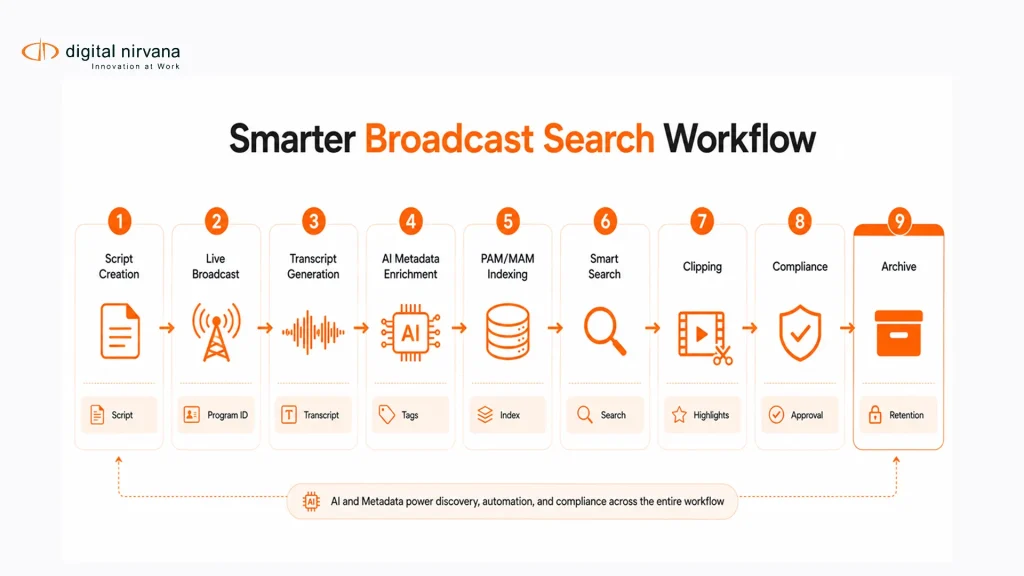
A smarter search workflow connects scripts, transcripts, and metadata from the start.
The goal is not to replace existing newsroom or editing tools. The goal is to make the content inside those tools easier to find, verify, clip, and reuse.
Step 1: Start With The Broadcast Script
The workflow begins with the script.
At this stage, teams should capture structured information such as show name, story slug, segment title, anchor, reporter, guest names, planned topics, VO cues, SOT references, graphics cues, and planned timing.
This script metadata gives the asset a planned structure before it goes on air.
Step 2: Capture What Actually Aired
After the content airs or while it is airing, speech-to-text can generate a broadcast transcript.
The broadcast transcript should include spoken words, speaker labels, timecodes, and clean formatting. Digital Nirvana’s broadcast transcript guidance notes that production-ready transcripts should include accuracy, speaker identification, timecoded lines, machine-readable formatting, and the ability to move into PAM/MAM workflows.
This creates the actual spoken record.
Step 3: Compare Scripted And Unscripted Content
Once the script and transcript exist, teams can compare what was planned with what actually happened.
This is useful for:
- Finding ad-libs.
- Checking whether required disclaimers were read.
- Confirming guest quotes.
- Reviewing corrections.
- Tracking unscripted comments.
- Identifying missing segments.
- Auditing live changes.
This is especially valuable for news, politics, sports, finance, legal, and regulated content where wording and timing matter.
Step 4: Add AI Metadata Beyond The Transcript
A transcript captures speech, but video contains more than words.
AI metadata can enrich the asset with faces, logos, objects, on-screen text, scene changes, topics, summaries, and compliance-sensitive markers. Digital Nirvana’s MetadataIQ states that the platform uses speech-to-text, video recognition, and rules-based engines to auto-tag content across media types.
This adds a second layer of intelligence to the transcript.
For example, a search for a sponsor should not only return the moment the sponsor is mentioned. It should also return moments where the sponsor logo appears on screen.
Step 5: Write Markers Into PAM/MAM And Editorial Systems
The workflow becomes much stronger when metadata is available inside systems where teams already work.
Digital Nirvana’s broadcast transcript article explains that MetadataIQ can generate or ingest timecoded transcripts, enrich them with video intelligence, and write markers back into Avid and PAM/MAM systems so editors can search and jump to exact frames.
This is important because search should not require teams to copy text from one system, search video in another, and manually match timecodes in a third.
Step 6: Search By Script, Transcript, Or Metadata
Once scripts, transcripts, and metadata are connected, teams can search in several ways.
- They can search by planned story slug from the broadcast script.
- They can search by exact words from the broadcast transcript.
- They can search by speaker, topic, location, object, logo, or compliance flag.
- They can search by timecode.
- They can search by rights, version, platform, or publish status.
- This creates a search workflow that supports both editorial speed and operational control.
Search Use Cases By Team
Newsroom Teams
Newsroom teams need to quickly find quotes, SOTs, live remarks, breaking updates, packages, and previous coverage.
With connected scripts and transcripts, producers can search for a story slug, anchor line, interview phrase, guest name, or breaking news keyword and jump to the right moment. This helps teams build follow-up packages, social clips, recaps, and corrections faster.
Editors And Post-Production Teams
Editors need to find exact moments without scrubbing through long recordings.
A timecoded broadcast transcript lets editors search dialogue. AI metadata lets them search visual content. Together, they make it easier to build packages, promos, highlight reels, alternate cuts, and platform-specific versions.
Compliance And Standards Teams
Compliance teams need proof.
They may need to know whether a disclaimer was read, when a political ad aired, whether profanity appeared, or whether a sensitive segment needs review. MetadataIQ includes compliance tagging that can detect and tag content such as political ads, profanity, product placement, and legal disclaimers.
The value is not only faster review. It is also better audit readiness.
Archive And Research Teams
Archive teams need to make old content findable.
Scripts can provide planned context. Transcripts provide the spoken record. Metadata provides people, places, objects, topics, rights, and timecoded markers. When combined, archives become searchable by meaning, not only by title or date.
MetadataIQ is also positioned for retroactive archive enrichment, making stored footage searchable, reusable, monetizable, and more compliant with current requirements.
Sports Production Teams
Sports teams need to search by player, team, play, sponsor, commentator phrase, replay, injury, penalty, score moment, or post-game quote.
Scripts may structure the show, but live sports depend heavily on unscripted commentary and visual events. Timecoded transcripts and AI metadata help teams create highlights faster and locate moments that would be hard to find from the script alone.
MetadataIQ’s page lists sports production as a use case for generating precise metadata for live games, faster clip creation, highlight reels, and fan engagement.
OTT And Streaming Teams
OTT teams need scripts, transcripts, and metadata for content discovery, localization, packaging, compliance, and archive reuse.
A well-structured broadcast transcript can support subtitles, summaries, content descriptions, translation workflows, and search. Verbit’s media transcription page also notes that media transcription supports broadcast deliverables, accessibility, and production edits.
For OTT teams, metadata also helps content move across platforms with fewer manual checks.
When Broadcast Teams Need AI Metadata Software
AI metadata software becomes important when scripts and transcripts are no longer enough on their own.
Broadcast teams should consider a platform like MetadataIQ when:
- Teams spend too much time searching scripts, rundowns, and video separately.
- Editors still sift through long shows to find a single quote.
- Transcripts exist but are not connected to PAM/MAM or editing systems.
- Compliance teams manually review entire programs rather than flagged moments.
- Archived content is hard to reuse because search metadata is incomplete.
- Live content needs to be clipped while the event is still unfolding.
- Sports, news, or entertainment teams need speaker, topic, object, logo, and scene search.
- Rights, disclaimers, and sensitive content need audit-ready metadata.
- Metadata quality varies by show, team, or region.
- The organization uses Avid MediaCentral, Grass Valley, MAM, DAM, or custom broadcast workflows.
The buying need is clear: teams are looking for more than just transcription. They are looking for searchable media intelligence that fits production workflows.
How MetadataIQ Supports Script And Transcript Search Workflows
MetadataIQ helps broadcast teams turn scripts, transcripts, and media files into searchable, timecoded intelligence.
Digital Nirvana positions MetadataIQ as an automated metadata tagging engine that generates accurate, timecoded metadata across video and audio, helping teams reduce manual tagging and focus on delivery. It also works with Avid MediaCentral and existing MAM/DAM systems.
For a script and transcript search workflow, the most relevant MetadataIQ capabilities include:
- Speech-to-text transcription.
- Timecoded metadata generation.
- Speaker and topic tagging.
- Scene and shot detection.
- Logo and object recognition.
- On-screen text detection.
- Compliance tagging.
- Governance dashboards and metadata quality scoring.
- Batch scheduling for large libraries.
- Real-time live stream processing.
- PAM/MAM and Avid workflow integration.
Digital Nirvana also states that MetadataIQ can ingest, tag, and prepare live content as it airs, helping teams clip, index, and validate footage before it is fully off the feed.
That live capability matters for news and sports teams. When a story is developing or a game is still in progress, search speed can directly affect publishing speed.
Best Practices For Searchable Broadcast Scripts And Transcripts
Use Consistent Script Fields
Broadcast scripts should use consistent fields for show name, story slug, segment title, anchor, reporter, guest, VO, SOT, graphics, planned duration, and production notes.
Consistent script fields make it easier to connect planned content with transcripts and metadata later.
Keep Scripts And Transcripts Linked To The Media Asset
A script should not live as an isolated document. A transcript should not live as a separate text file.
Both should connect to the media asset through IDs, timecodes, markers, or PAM/MAM metadata. This helps teams search from the asset, not across disconnected systems.
Capture Timecodes At The Phrase Or Segment Level
For search, timecodes need to be specific enough to help users jump to the right point.
A full-program timestamp is not enough. Teams need timecodes for lines, phrases, sound bites, scenes, ad breaks, disclaimers, lower thirds, and sensitive moments.
Use AI For The First Pass And Human Review For Sensitive Content
AI can generate transcripts and metadata quickly, but humans should review high-stakes outputs.
This is especially important for speaker names, legal disclaimers, political content, sensitive topics, regulated claims, rights restrictions, and premium programming.
Digital Nirvana’s transcript article also describes a hybrid model in which AI handles scale and speed, while human review supports critical or high-visibility content.
Build A Shared Metadata Taxonomy
Teams should agree on approved terms for shows, story categories, guests, anchors, regions, sponsors, sports leagues, teams, compliance categories, and platform destinations.
Without a shared taxonomy, the same person or topic may appear under multiple labels, which weakens search.
Track Metadata Quality
Metadata needs governance.
MetadataIQ includes governance dashboards and quality scoring that track missing tags, inconsistencies, failed rule checks, and audit health.
For broadcast teams, this helps prevent search problems from becoming production, compliance, or archive problems.
FAQs
What Are Broadcast Scripts?
Broadcast scripts are written documents used to guide what is said and done during a TV, radio, streaming, or live broadcast. They may include anchor copy, reporter narration, voice-over cues, soundbite references, graphics notes, timing, camera instructions, and teleprompter text.
What Is A Broadcast Transcript?
A broadcast transcript is the text version of what was actually spoken during a broadcast. It often includes speaker labels and timecodes that align the words to the exact point in the video or audio file.
How Are Broadcast Scripts Different From Broadcast Transcripts?
Broadcast scripts are planned before or during production. Broadcast transcripts are generated from the actual aired or recorded audio. Scripts show what was intended. Transcripts show what was said.
Why Do Broadcast Teams Need Timecoded Metadata?
Broadcast teams need timecoded metadata because it connects words, speakers, topics, scenes, objects, logos, and compliance flags to exact moments in the video. This helps teams search, review, clip, verify, and reuse content faster.
How Do Broadcast Scripts Help Search Workflows?
Broadcast scripts help search workflows by providing planned structure, story slugs, segment titles, speaker names, cues, and production context. When scripts are connected to transcripts and timecoded metadata, they become more useful for media discovery.
Can AI Metadata Improve Broadcast Transcript Search?
Yes. AI metadata can enrich transcripts with speaker labels, topics, scenes, logos, objects, on-screen text, summaries, and compliance flags. This gives teams more ways to search beyond spoken words.
How Does MetadataIQ Support Broadcast Scripts And Transcripts?
MetadataIQ can generate timecoded metadata, process speech-to-text, apply AI video intelligence, tag compliance-sensitive content, and integrate with Avid MediaCentral, MAM, and DAM systems. It helps teams make scripts, transcripts, and media assets searchable inside existing workflows.
Is This Workflow Useful For Live Broadcasts?
Yes. Live broadcasts often change from the planned script. A workflow that captures transcripts and timecoded metadata in real time can help teams clip, index, validate, and search content while it is still airing. MetadataIQ supports real-time live stream processing for this type of use case.
Conclusion
Broadcast scripts are essential for planning. Broadcast transcripts are essential for knowing what actually happened. Timecoded metadata is what makes both layers searchable inside real production, compliance, and archive workflows.
When these pieces stay disconnected, teams lose time searching documents, scrubbing footage, checking versions, and manually matching words to moments. When they work together, the workflow becomes faster, more accurate, and easier to govern.
Key Takeaways
- Broadcast scripts show what was planned, while broadcast transcripts show what was actually spoken.
- Scripts alone are not enough for search because live content changes, ad-libs happen, and visual events are often missing.
- Timecoded metadata connects words, speakers, topics, scenes, logos, and compliance flags to exact video moments.
- A smarter workflow links scripts, transcripts, and metadata inside PAM/MAM and editorial systems.
- AI metadata helps teams move from manual search to searchable, timecoded media intelligence.
- Human review is still important for sensitive, legal, compliance, and high-visibility content.
- MetadataIQ is a strong fit for broadcast teams that need transcript-driven search, compliance tagging, live processing, and Avid or MAM integration.