Introduction
Manual review is one of the quietest bottlenecks in media operations.
A file arrives. Someone checks the title. Someone watches the footage. Someone confirms the caption file. Someone looks for profanity, brand mentions, disclaimers, black frames, wrong versions, rights restrictions, or missing tags. Then another person searches for the same asset later because the metadata was incomplete the first time.
That pattern works when content volume is low. It breaks when teams are managing live feeds, long-form programs, social clips, OTT packages, multilingual versions, archives, and tight delivery windows.
A modern multimedia workflow should not depend on people manually reviewing every second of every asset. It should use metadata to tell teams what the asset contains, what stage it is in, what needs attention, and what can move forward.
That is where AI metadata becomes valuable. It does not remove human judgment. It helps teams focus human review where it matters most.
Table Of Contents
- What Is A Multimedia Workflow?
- Why Manual Review Slows Multimedia Workflows
- How Metadata Reduces Manual Review
- The Metadata Types That Support Workflow Automation
- Where Metadata Automation Fits In The Workflow
- From Manual Review To Exception-Based Review
- How MetadataIQ Supports Multimedia Workflow Automation
- Best Practices For Reducing Manual Review With Metadata
- FAQs
- Conclusion And Key Takeaway
What Is A Multimedia Workflow?
A multimedia workflow is the process for moving video, audio, images, graphics, captions, transcripts, and related files from creation to delivery.
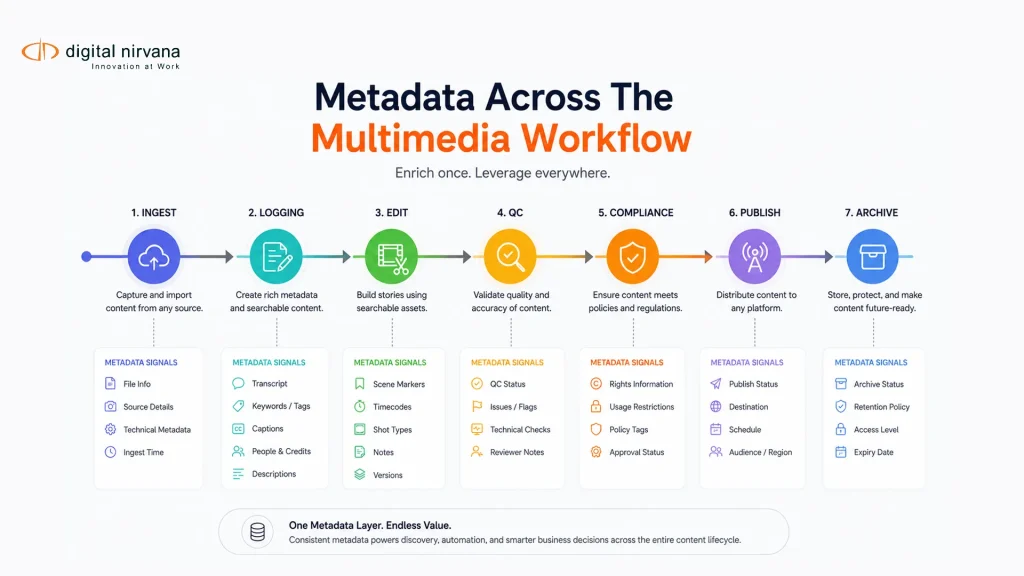
In a broadcast, OTT, post-production, or media archive environment, that workflow may include ingest, technical checks, logging, transcription, metadata enrichment, editing, compliance review, caption validation, rights review, versioning, publishing, distribution, archive, and reuse.
AWS describes media asset management as the process of organizing media files, such as images, audio, and video, for efficient discovery, retrieval, and use. A MAM system centralizes media content and gives teams tools to edit, process, tag, and distribute files.
That definition matters because multimedia workflow automation is not only about moving files from one folder to another. It is about helping teams understand what each file is, what is inside it, and what should happen next.
For media teams, metadata is the layer that makes this possible.
Why Manual Review Slows Multimedia Workflows?
Manual review slows multimedia workflows because humans are often asked to solve problems that metadata should already answer.
A producer should not have to scrub through a 90-minute program just to find one quote. A compliance reviewer should not have to watch an entire episode to locate a legal disclaimer. An archive manager should not have to open multiple versions of the same file to understand which one has reuse rights. An editor should not have to ask another department whether the captions, language track, or final delivery format is approved.
Manual review usually appears in five common places.
Asset Identification
Teams manually check whether a file is the correct version, belongs to the right project, and has the correct filename.
Content Logging
Producers, assistants, or loggers watch footage and manually write down speakers, topics, scenes, quotes, visual markers, and highlights.
Compliance Review
Standards teams manually review content for profanity, sensitive visuals, brand mentions, product placement, political ads, regional restrictions, disclaimers, or internal policy issues.
Rights And Usage Review
Teams manually confirm whether footage can be reused, clipped, published internationally, distributed on OTT, syndicated, or monetized.
Archive Search And Reuse
Teams manually search through old folders, review footage, check notes, and rebuild context because historical assets were not properly indexed.
Traditional video workflows relied heavily on manual quality control before delivery or broadcast, with human operators inspecting content for visible or audible issues. Automated QC improved this by enabling systems to check content faster and more consistently, including invisible errors such as metadata issues.
Metadata applies the same logic to broader media operations. It gives teams a structured way to reduce repetitive review work and focus on exceptions.
How Does Metadata Reduce Manual Review?
Metadata reduces manual review by turning media files into searchable, structured, and workflow-ready assets.
Without metadata, a video file is just a file. With metadata, it becomes an asset that can answer questions.
- What is this file?
- Who appears in it?
- What topics are discussed?
- Where are the key moments?
- Does it contain restricted content?
- Which regions can use it?
- Are captions attached?
- Is the technical format ready?
- Has compliance reviewed it?
- Can this asset move to publishing?
When metadata is accurate and connected to workflow systems, teams do not have to inspect every file manually. They can search, filter, route, approve, flag, and retrieve content based on structured signals.
For example, metadata can help a workflow system route a file to compliance only if sensitive content is detected. It can send an asset to caption review only if captions are missing or not approved. It can route a sports clip to editors if a goal, penalty, replay, or player interview is detected. It can prevent an asset from being published if the rights metadata indicates a region or platform restriction.
This is the shift from manual review to metadata-driven automation.
The Metadata Types That Support Workflow
Automation
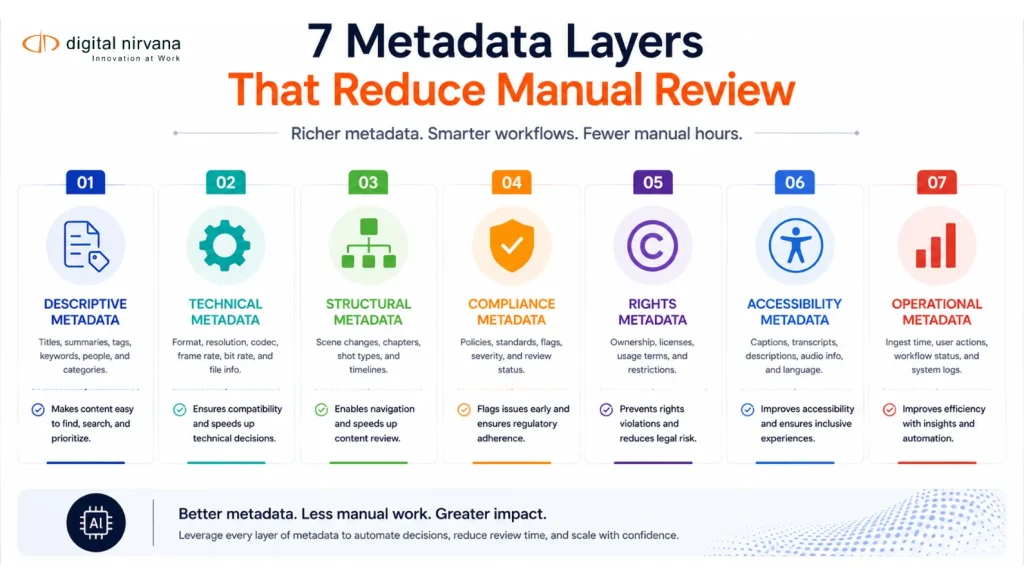
A multimedia workflow needs more than one type of metadata. Different metadata layers support different review decisions.
Descriptive Metadata
Descriptive metadata explains what the asset is about.
It includes title, summary, show name, episode name, speakers, guests, locations, teams, players, topics, events, keywords, and organizations.
This reduces manual search because teams can find assets by meaning, not only by filename.
Technical Metadata
Technical metadata explains the file’s format and delivery readiness.
It includes codec, frame rate, resolution, aspect ratio, duration, audio channels, loudness status, file format, caption file status, and language tracks.
This helps operations teams identify whether an asset is ready for editing, publishing, playout, or platform delivery.
Structural Metadata
Structural metadata explains how the asset is organized.
It includes timecodes, chapters, scenes, segments, markers, ad breaks, intro and outro points, transcript alignment, and clip boundaries.
This is especially important for long-form video because most review work happens at the moment level, not the file level.
Digital Nirvana’s production workflow metadata guidance notes that time-based metadata helps teams jump to the right quote, goal, reaction shot, or product mention instead of scrubbing through full files.
Compliance Metadata
Compliance metadata flags content that may require review.
It can include profanity, violence, nudity, sensitive topics, legal disclaimers, brand mentions, product placement, political advertising, restricted categories, and regional policy notes.
MetadataIQ includes a compliance tagging and rules engine that can detect and tag content such as political ads, profanity, product placement, and legal disclaimers.
Rights Metadata
Rights metadata explains how and where content can be used.
It includes copyright owner, license window, approved platforms, restricted platforms, approved regions, blocked regions, sports rights, music rights, third-party footage, syndication rules, and talent releases.
This reduces manual review by helping teams know whether content can be published, clipped, monetized, localized, or reused.
Accessibility Metadata
Accessibility metadata covers captions, subtitles, transcripts, language versions, audio descriptions, speaker labels, caption approval status, and translation status.
This reduces publishing delays because teams can see whether required accessibility assets are complete before content moves downstream.
Operational Metadata
Operational metadata tracks workflow status.
It includes owner, project ID, source system, approval status, review history, ingest date, publish date, archive status, metadata quality score, and audit logs.
This helps teams understand what has already been reviewed, what still needs attention, and who approved the asset.
Where Metadata Automation Fits In The Workflow?
Metadata automation works best when it is built into the workflow from the beginning. If metadata is added only after publishing, teams lose many of the operational benefits.
Ingest
At ingest, metadata automation can capture the source, file type, show, project, channel, event, owner, date, and technical properties.
AI can also begin transcript generation, baseline tagging, and live stream indexing as content enters the system.
Digital Nirvana positions MetadataIQ as a tool that can ingest, tag, and prepare live content as it airs, which is especially useful for news, sports, and live events.
Logging And Editorial Prep
During logging, AI metadata can identify speakers, topics, quotes, visual moments, scene changes, on-screen text, logos, objects, and highlights.
This reduces the amount of manual shot logging required from assistants, producers, and editors. Instead of building a log from scratch, teams review and refine AI-generated metadata.
Edit And Post-Production
In post-production, metadata helps editors search by topic, speaker, scene, timecode, keyword, or visual marker.
This is where metadata can directly reduce creative friction. Editors spend less time looking for material and more time building the story.
Quality Control
Technical QC can detect file-level issues, but metadata adds operational context.
For example, metadata can show whether the wrong version was submitted, whether captions are missing, whether a delivery format is incomplete, or whether an asset has not passed review.
Compliance Review
Metadata can route only flagged segments to compliance teams.
Instead of watching a full program, reviewers can inspect time-coded moments where AI detected profanity, sensitive content, legal disclaimers, political content, or brand mentions.
Digital Nirvana’s broadcast workflow guidance describes how AI metadata can flag problematic segments, tag political content and disclosures, and maintain an audit trail of what was detected, tagged, and reviewed.
Publishing And Distribution
Metadata helps determine whether content is ready for each destination.
A workflow can check rights, region, captions, language, format, publish date, embargo status, and approval status before sending content to linear broadcast, OTT, FAST, VOD, social, or syndication channels.
Archive And Reuse
Metadata automation can enrich older assets, making them easier to search and reuse.
This is important because many archives contain valuable footage that teams cannot easily find. MetadataIQ is positioned for media archiving use cases, including large-scale cataloging and the searchability and retrievability of historical assets.
From Manual Review To Exception-Based Review
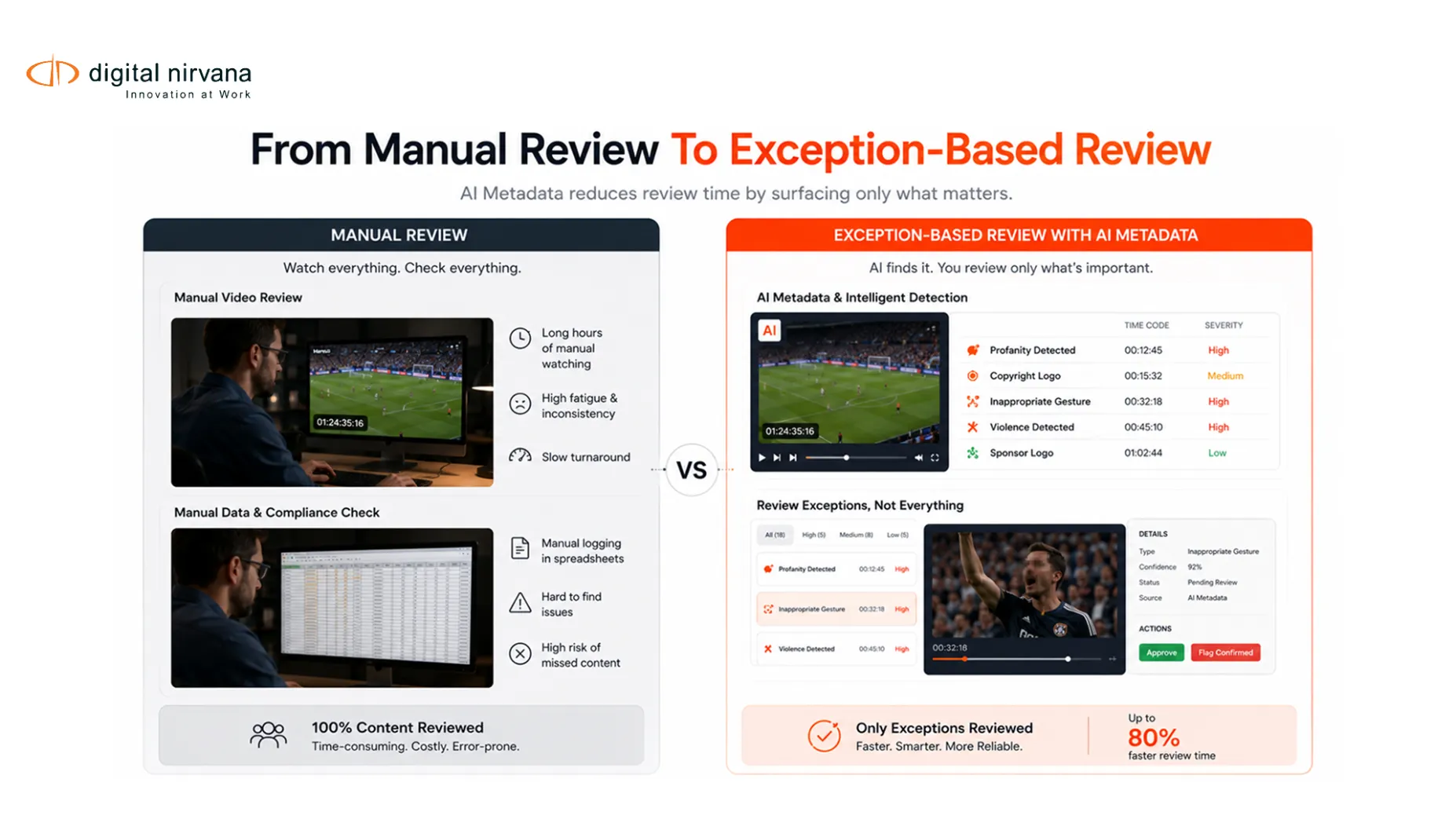
The goal of multimedia workflow automation is not to remove people from the process. The goal is to stop using people as the first line of repetitive review.
Manual review asks people to inspect everything.
Exception-based review asks people to inspect what needs attention.
That difference matters.
In a manual workflow, a reviewer may need to watch an entire asset to confirm whether there is profanity, missing captions, a restricted logo, or a rights issue.
In a metadata-driven workflow, AI and rules can first identify likely issues. The reviewer then checks flagged timecodes, confirms the context, and approves or corrects the result.
This gives teams a better balance between automation and control.
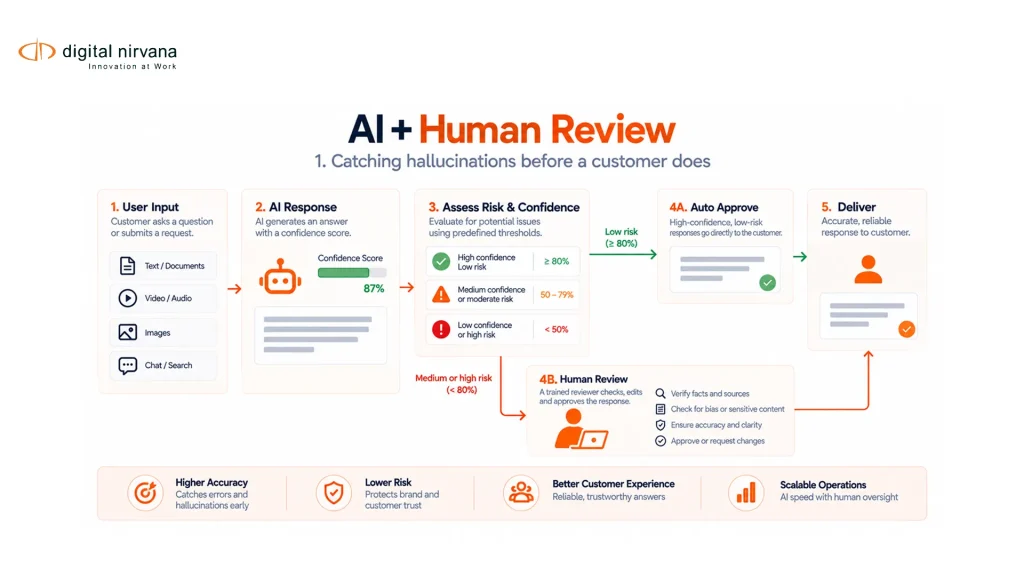
AI metadata can handle first-pass detection, search indexing, tagging, and routing. Human reviewers still make decisions on editorial meaning, legal risk, cultural context, rights interpretation, and final approval.
For commercial buyers, this is one of the clearest value cases. The promise is not “no review.” The promise is “less unnecessary review.”
How MetadataIQ Supports Multimedia Workflow Automation?
MetadataIQ supports multimedia workflow automation by acting as an AI metadata layer for broadcast, OTT, post-production, sports, news, and archive workflows.
It is designed to automate metadata tagging for video and audio, enabling teams to reduce manual tagging and focus on delivery. It also supports content discoverability, scene access, segmentation, clipping, and metadata-driven monetization through better ad placement and asset reuse.
For workflow automation, the most relevant MetadataIQ capabilities include:
- Automated time-coded metadata across video and audio.
- Transcription and translation.
- Topic-based segmentation.
- Summarization and scene description.
- Logo recognition and object recognition.
- Sports analysis and play-by-play tagging.
- Compliance tagging for profanity, violence, nudity, sensitive content, political ads, product placement, and disclaimers.
- Broadcast-grade integrations with Avid MediaCentral, Grass Valley, and MAM or DAM systems.
- Governance dashboards and metadata quality scoring.
- Batch scheduling and pipeline automation.
- Real-time live stream processing.
The integration point is important. Metadata should not sit in a separate AI tool that creates another silo. MetadataIQ is designed to work natively with Avid MediaCentral and existing MAM or DAM systems, enabling teams to use enriched metadata within the workflows they already rely on.
Best Practices For Reducing Manual Review With Metadata
Start With The Review Bottlenecks
Do not begin with every possible metadata field. Start with the manual review points that slow the team down most.
That may be compliance review, caption validation, archive search, content logging, technical readiness, rights approval, or live clipping.
Once the bottleneck is clear, define the metadata needed to reduce that review step.
Use Required Metadata Fields
Some fields should be mandatory before content can move forward.
For example, a publish-ready asset may require title, content ID, owner, rights status, caption status, approval status, format, language, publish destination, and compliance status.
Required fields help prevent incomplete assets from moving downstream.
Use Time-Coded Metadata
For long-form video and live content, file-level metadata is not enough.
Teams need time-coded markers that show where a quote, speaker, object, logo, disclaimer, ad break, or compliance issue appears.
This turns review from full-file watching into targeted moment review.
Build A Controlled Taxonomy
A controlled taxonomy keeps metadata consistent.
Define approved terms for shows, content types, teams, leagues, topics, sponsors, people, regions, platforms, and compliance categories.
Without taxonomy, automation can create more noise because the same concept may appear under multiple labels.
Set Confidence Thresholds
AI metadata should not trigger every action the same way.
High-confidence tags can support search and routing. Lower-confidence tags may need human review before they affect compliance, rights, or publishing decisions.
This helps teams avoid over-automation and false confidence.
Keep Humans In The Loop
Human review is still important for context-sensitive decisions.
AI can flag a brand logo. A human may need to decide whether it is acceptable, sponsored, restricted, blurred, or irrelevant. AI can detect a sensitive phrase. A human may need to decide whether it violates policy.
The best workflow uses AI to narrow the review surface, not remove accountability.
Write Metadata Back Into Core Systems
Metadata should be available inside PAM, MAM, DAM, NLE, compliance, archive, and publishing systems.
If metadata only exists in a separate tool, teams will still depend on manual checking, screenshots, exports, and spreadsheets.
Track Metadata Health
Metadata quality should be measured.
Track missing fields, inconsistent tags, failed rules, low-confidence outputs, unreviewed flags, and assets that cannot be published because metadata is incomplete.
MetadataIQ includes governance dashboards and quality scoring to track missing tags, inconsistencies, failed rule checks, and audit health in real time.
FAQs
What Is A Multimedia Workflow?
A multimedia workflow is the process used to manage video, audio, images, graphics, captions, transcripts, and related files from ingest to editing, review, publishing, distribution, archive, and reuse.
How Does Metadata Improve A Multimedia Workflow?
Metadata improves a multimedia workflow by making assets searchable, trackable, and easier to route. It helps teams identify what an asset contains, whether it is approved, where it can be used, and what needs review.
How Does Metadata Reduce Manual Review?
Metadata reduces manual review by giving teams structured information before they open the file. AI metadata can flag speakers, topics, scenes, captions, rights, compliance issues, technical details, and time-coded moments so reviewers focus only on what needs attention.
Does AI Metadata Replace Human Review?
No. AI metadata should reduce repetitive review, not replace human judgment. The strongest workflow uses AI for first-pass tagging and detection, then uses human review for compliance, rights, editorial context, and final approval.
What Metadata Is Most Useful For Workflow Automation?
The most useful metadata includes descriptive metadata, technical metadata, time-coded structural metadata, compliance metadata, rights metadata, accessibility metadata, and operational metadata.
Where Should Metadata Automation Start?
Metadata automation should start at ingest or logging. The earlier metadata is captured, the more useful it becomes for editing, compliance, publishing, archive, and reuse.
Can MetadataIQ Integrate With Existing Broadcast Systems?
Yes. MetadataIQ is built to work with Avid MediaCentral, Grass Valley, and existing MAM or DAM systems. It is designed for high-volume media workflows where teams need automation without disrupting their current infrastructure.
Is MetadataIQ Suitable For Live Content?
Yes. MetadataIQ can process and tag live content in real time, which makes it useful for news, sports, and live event workflows where teams need to clip, index, and validate content quickly.
Conclusion
Multimedia workflow automation works best when metadata becomes part of the workflow, not an afterthought.
When teams rely only on manual review, every file creates friction. People have to watch, search, check, route, and approve content by hand. When metadata is captured early and connected to workflow systems, teams can automate first-pass tagging, reduce search time, route assets intelligently, and focus human review on exceptions.
For broadcast, OTT, sports, news, post-production, and archive teams, this creates a faster and more scalable operating model.
Key Takeaway
- Metadata turns multimedia files into searchable, structured, workflow-ready assets.
- Manual review should shift from full-file inspection to exception-based review.
- Time-coded metadata helps teams review exact moments instead of watching entire videos.
- Compliance, rights, caption, technical, and operational metadata can all reduce publishing delays.
- AI metadata works best when paired with human review for sensitive decisions.
- Metadata should write back into PAM, MAM, DAM, NLE, and publishing systems.
- MetadataIQ supports this workflow with automated tagging, compliance rules, governance dashboards, batch automation, live stream processing, and broadcast-grade integrations.